
Click here to go to the PocketGPSWorld Speed Camera Database

This guide applies to all Garmin devices that use POILoader to install POI data. This includes all nüvi and zümo devices. If you are also installing sound files, please see this page for the differences between Garmin units that support .mp3 files and those that use .wav files. If your Garmin device is a .wav enabled version then you will also need the SOX.EXE file, a link is provided on that page along with instructions.
First steps
- If you do not already have Garmin's POI Loader Installation Utility installed you must download and install it.
Where to get POI Loader?
- Download POI Loader from Garmin's web site here.
Downloading the Speed Camera Database
- Download from the PocketGPSWorld Speed Camera Database page by selecting Garmin POILoader.
- Press 'Continue'.
- Choose the database files you require (country and database type) e.g. UK - Consolidated by Type.
- Click 'Download Database'.
Extracting the Database on the PC
- Extract the ZIP file contents to a directory on your PC.
- In Windows XP/Vista right-click the .zip file and select "Extract Files Here..." or use a program such as WinZip or WinRar to extract the files - if you do not extract the files POI Loader will not be able to use them and will report that there are no csv files available.
- Mac Users - the process is the same but we advise you to use the free Unarchiver app. The built-in unzipping app is notoriously unreliable.
Installing PocketGPSWorld Speed Camera Database
- Connect your Garmin to the PC via the USB cable or if your device supports it, connect a mciroSD card to your computer using a card reader (see Note below).
- If POI Loader does not automatically start, launch it now.
- Select your device or microSD card from the drop-down selection.
- Browse for your POI folder (on your computer) and follow the on screen instructions.
- NB: You MUST ensure you select Feet and mph if you are using UK/Northern Ireland files or Meters and km/h for all other countries (see below). If you do not ensure this selection is correct for your territory then the alerts will sound at incorrect speeds. This is the most commonly asked question, please check you have configured this correctly first!
- Use 'auto' mode to quickly transfer the database to your unit.
- Note that any other POIs you wish to load must be uploaded at the same time as the Speed Camera.
- If you used a microSD card, eject it from your computer, insert into your Garmin and answer Yes to the 'copy data to device' question. If you installed direct to your device skip to the next step.
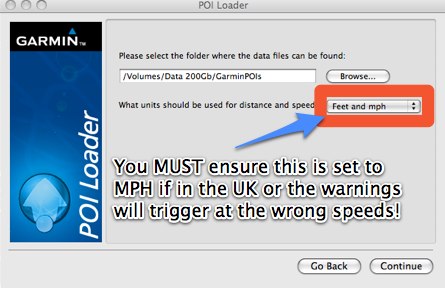
POILoader (Mac version shown, PC Version similar)
Displaying Speed Cameras on Garmin units
-
Ensure that you have Proximity Alerts turned on in the units settings.
- If you have a newer unit with the Garmin / Cyclops camera database installed then you may want to turn off alerts for this database to avoid duplicate warnings.
- Note that camera alerts may not display/sound until you reach a certain speed. E.g. if you a camera site slowly then you may not get an alert but if you approach nearer the triger speed then you will
PLEASE NOTE: Garmin have changed the software in recent releases such that Custom POIs have been relocated from 'Where To / Points of Interest / Custom POIs' to 'Where To / Extras / Custom POIs' or, more recently, 'Where To / Categories / Custom POIs'.
Why they did this we do not know. We can only assume that this has been done to make life a little more difficult for those who choose to use a non-Garmin database.
However, we have become aware more recently of a bug that seems to affect Windows POILoader users only.
When you install POIs using Garmin's POILoader software, the task completes without error and tells you that it has successfully installed xx,000 POIs. However, when you go to 'Where To / Extras / Custom POIs' it tells you there are none installed.
The solution is to install the POIs to a micro-SD card rather than directly to the device. Then insert the microSD card into the device.
We have notified Garmin if this bug but it is still present two releases of POILoader later. Anyone would think they didn't like users choosing someone elses speed camera data!
IMPORTANT: PLEASE BOOKMARK THIS PAGE NOW FOR FUTURE REFERENCE
Add this page to your list of favourites/bookmarks. Please right click here.
NEED HELP? - > |
Please note that the safety camera warning software is a free add-on to membership and as such is not a commercially guaranteed product. Both the camera database and the site offer community support and help only. That said, the answers to the vast majority of questions are provided within 24 hours.
- For account/subscription/password related issues, please use our Support System and log a support request. See here.
- For installation and other issues please use the forums.
|
|
































