by Darren Griffin
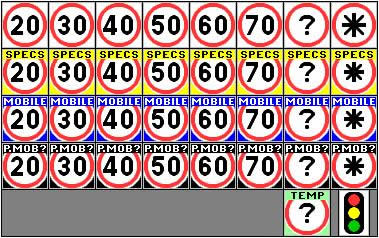
These icons are an alternative and much improved set of map and alert icons. They are intended for use with our speed camera POI database and have been designed and are provided here with the full permission of the author, PocketGPSWorld.Com forum member GerryC.
Background
The default set of icons that we (PocketGPSWorld.Com) bundle with our database downloads was designed to be the most compatible across the wide range of platforms that we cater for. We needed a basic set that would ensure the widest compatibility and thus simplify support issues.
However, in recent years newer systems have come to market that can take advantage of icons with a greater range of colours and higher resolutions. Icon Author GerryC has designed a superb collection of replacement icon sets to take advantage of this that are both clearer and in some cases larger than the default set that we supply.
These icons put greater emphasis on the speed limit and are colour coded for quick recognition. They also have some "shading" to produce a less blocky image.
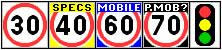
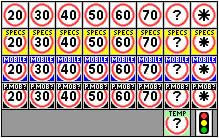
22x22 pixel icons are the standard size of icons used as POIs. As newer TomToms are capable of using 24x24 pixel icons, this size has been used for the main "Speed Zoned" collections. On these, conversions to the other speed limit is also shown as an option.
On the speed zoned sets, conversions to the other speed limit is also shown as an option. Garmin devices appear also capable of using 24x24 icons. Due to how they use the database, consolidated and single sets are also provided.
| Please Note: The icon files available on this page are supplied for your personal use only. You may NOT share these files on other web-sites, distribute them or share them through P2P or TT HOME without the express permission of the author who retain copyright at all times. The original files remain copyright of the author but are used here with his permission. Please consult the Licence terms at the foot of this page before use. |
We do not have a concise list of which devices can use these sets yet but will over time update the compatibility matrix table below with those systems known to work or not as they are discovered.
Device |
44x44 |
24x24 |
22x22 |
| Garmin i3, 7x, 60Cx, CSx, 76Cx & CSx, Colorado |
No |
Yes |
Yes |
| Garmin iQue 3600 |
No |
No |
No |
| Navigon v6/POIWarner v3, v5/POIwarner v2 |
N/K |
N/K |
Yes |
| Navman S-Series |
N/K |
Yes |
N/K |
| TomTom v8 |
Yes |
Yes |
Yes |
| TomTom v7 |
Yes |
Yes |
Yes |
| TomTom v6 |
No |
Yes |
Yes |
| TomTom v5 |
No |
N/K |
Yes |
Large icons
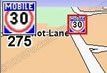
TomTom recently added a new feature which enabled users to share their content with others through the Home application. Buried in the documentation on the site is a quick paragraph noting how you can make a separate, large icon for the warning flash in the top corner.
TomTom notes in the documentation that Navcore 7 is required for the large icons to work. Older versions should just ignore the extra files. One unusual thing found so far is that pure red (255,0,0) does not become transparent when using the large icons contrary to TomTom's notes.
There are now large (44x44) sets that match all the standard sets. When using large icons on TomTom devices, a standard set is also required to show on the map itself and in list options. You can pick and choose which set to use for a particular function. The authors recommendation is to use the 24x24 standard set if possible but to combine its use with the 44x44 large icons if your device support them.
If using the "dual-speed" mph/km/h icons, it is possible to use single-speed standard icons on the map (not showing the converted speed) and dual-speed large ones for the alerts. Any pairing of same type icons will work.
The author's personal recommendation is to use the 24x24 standard set matched with the 44x44 large icons if your device supports it. This is due to both the 44x44 showing correctly in the "6 icon" menus and the circle is more, well, circular.
Download
Please refer to the licence below before downloading the files.
Before changing anything on your device, always ensure you have a FULL backup (preferably done with Windows Explorer etc and not just TomTom Home).
To download the icons zip files, either click the name or icon block below. Once unzipped, the icon names are set by default to match those used by our database so can be copied straight into the map folder overwriting the original files (making sure you have a backup of them).
When large icons are being used, BOTH a standard set and a large set should be downloaded and copied. The filenames for the two icons are different (the large ones finish "_X2.bmp"). The two sets do not have to be based on the same size (e.g. a 24x24 standard set and a 44x44 large set can be used).
| 44 x 44 Large icons |
| |
UK |
| |
Speed Zoned (mph)

|
|
Speed Zoned
(mph)
for TomTom v8.3

|
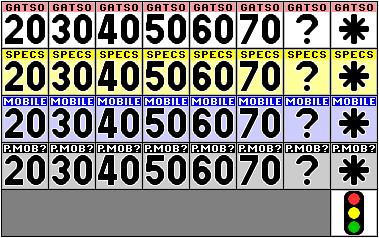 |
v8.3 reduced size of the on-screen alert so this set has larger numerals to compensate |
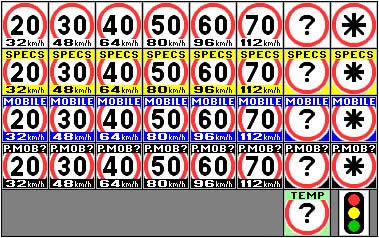
Speed Zoned (mph)
with km/h conversion |
 |
Consolidated by type |
|
Single File |
|
| |
Europe |
| |
|
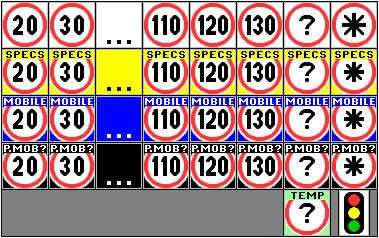
Speed Zoned (km/h) |
 |
| |
|
N.B. Selection of icons shown - all speed limit icons (20-130) are in download |
| |
|
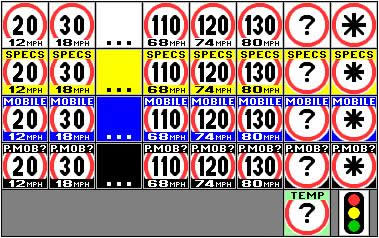
Speed Zoned (km/h)
with mph conversion
|
 |
| |
|
N.B. Selection of icons shown - all speed limit icons (20-130) are in download |
| 24 x 24 Standard icons |
| |
UK |
| |
|
Speed Zoned (mph)

|
 |
| |
|
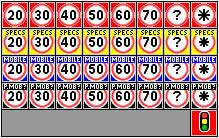
Speed Zoned
(mph)
for TomTom v8.3

|
 |
| |
|
v8.3 brings re-introduces support for transparency |
| |
|
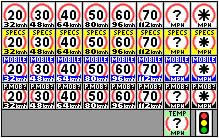
Speed Zoned (mph)
with km/h conversion |
 |
| |
|
Consolidated by type |
 |
| |
|
Single File |
 |
| |
Europe |
| |
|
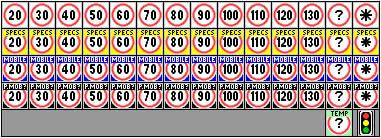
Speed Zoned (km/h) |
 |
| |
|
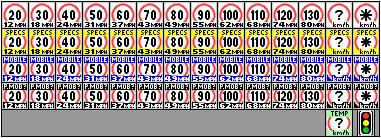
Speed Zoned (km/h) with mph conversion |
 |
| 22 x 22 Standard icons |
| |
UK |
| |
|
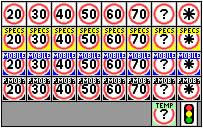
Speed Zoned (mph) |
 |
| |
|
Consolidated by type |
 |
| |
|
Single File |
 |
| |
Europe |
| |
|
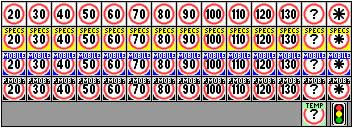
Speed Zoned (km/h) |
 |
| Square Redlight icons (for Garmin devices) |
| |
These replace the rectangular icons from the main downloads above
|
| |
|
24x24 icon |
 |
| |
|
22x22 icon |
 |
Colour Scheme and Icon Key
The colour scheme used is partially based on the original download set. The number inside is the speed limit in mph or km/h, as appropriate, when known. The icon in the first column below is used for the speed zoned sets. The icon in the second column is used in the consolidated and single file sets.
In the single file version, all cameras in the Gatso, Specs, Mobile and Temp categories are together and show the "Gatso" icon. The Pending Mobile category is also included separately and shows it's own icon.
|
|
Gatso (and other "fixed location") cameras have a standard red roundel on a white background. This category has all fixed cameras including Gatso, Truvelo, Monitron and Redspeed. |
|
|
Specs cameras have a yellow background. These measure average speeds between cameras in the zone so preventing people speeding up between cameras. |
|
|
Mobile cameras have a blue background. They show the locations where mobile cameras have been spotted and the site verified. |
|
|
Pending mobile cameras (pMobiles) have a black background. They are mobile sites that have been reported but not verified. |
|
|
Temporary cameras : No longer used. |
|
|
Redlight cameras show traffic lights cameras. When also operating as speed cameras when the lights are on green, they are in the speed zoned "Gatso" download. Who said icons had to be square? (EDIT: Well, Garmin actually - see above.) |
|
|
TBA cameras have not had a speed limit logged in the database. When it gets updated, it goes into the correct speed category. Speed TBA cameras exist in all categories. |
|
|
Variable speed limit cameras are shown with an asterisk in the middle instead of a speed limit. These are currently in the ATM sections of the M25 and M42. |
Notes
The speed zoned icons may be copied and renamed for non UK or Europe cameras (e.g. the UK set could also be used for the USA and the Europe set for Australia etc). The consolidated by type and single file sets can be copied and renamed for any country/continent.
Note that not all of the possible variations are actually used by our database. They are included here for completeness. It is expected that the number of non-UK categories in use will rise as more locations are added. Having extra icons loaded does not count towards the overall limit of categories allowed.
Licence
By downloading these files you are deemed to have agreed to the following conditions:
You may copy these files for you own or others use without financial gain.
You may NOT use the files for commercial purposes.
Any copies must include this agreement crediting the original author (GerryC) and PocketGPSWorld.Com Ltd.
The files are provided "as is" without warranty, either expressed or implied. In no event shall there be any liability for any damages whatsoever.
PocketGPSWorld.Com have not been involved in creating the original files.
Copyright (C) GerryC, 2007, 2008. |