|
|
 |
 |
 |
 |
| TomTom Navigator HP Edition review |
29th January 2005 |
|
 Review by Mike Barrett Review by Mike Barrett
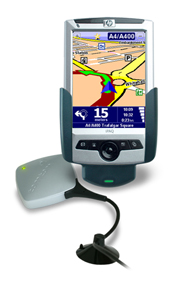
HP are well known for their PDAs, PCs and Printers. Of course we are only interested in their PDAs here. More importantly we are interested in GPS navigation on PDAs, and this is what HP have produced in conjunction with TomTom. With a retail price of £299.99 this represents real value for money. How does it shape up? Read on to find out...
This of course isn't the first time HP have offered complete navigation bundles, but this is the first time with respected TomTom Navigator software.
The navigation bundle we are reviewing here was provided to us by Handnav Technology. |
|
| Overview |
The new HP Navigation Pack is a complete GPS navigation system in a box. It contains everything you need to get started including the PDA, maps, and GPS. The core of the software is based on the same common navigation engine as the TomTom Go, TomTom for Palm and TomTom Mobile products. The underlying PDA interface is obviously different to support the PDA hardware.
The HP Navigation Pack is available with different country mapsets. The version we are reviewing here is for the UK.
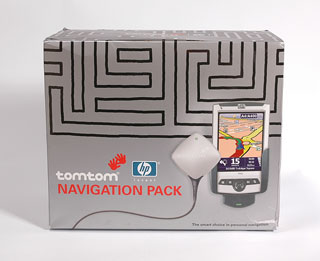
As can be seen from the picture to the right the packaging for the bundle carries the main TomTom branding, with a small HP logo. |
 |
| What's in the box(es) |
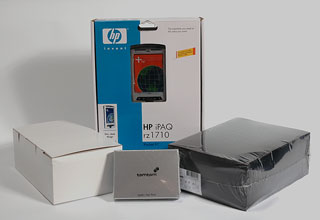
Opening the packaging is a real Russian doll experience. There are boxes and boxes in there.
In fact there are are three boxes with the TomTom hardware and software and one box which contains the HP PDA.
When I first opened these it was a bit like christmas, so many boxes you didn't know which one to open first.
The TomTom boxes came in silver, black and white variations.
|
 |
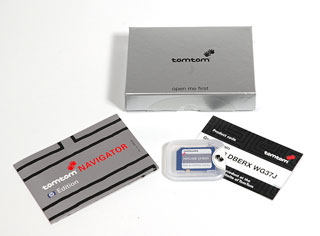
The Silver Box
The silver box contains the software pre-installed on a SD card along with a card containing the product code which is required to activate the software.
This box also contains a small getting started booklet.
Be careful when opening the SD card box as I broke my thumb nail rather painfully having not removed the seal properly.
The UK maps and software are provided on a 128Mb SD card, which leaves just a little space for adding custom POIs, of which more later. |
 |
The White Box
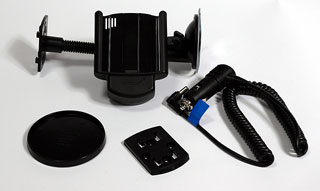
The next box to be opened was the white box. This contained the car mount and power source.
As with the other TomTom mounts that we have reviewed this is a quality mount made in Germany by Harald Richter. These are very well made and form part of an interchangeable system of mounting options, which offer great flexibility when commissioning and positioning your system.
The mounting system provided is a windscreen suction mount. This is one of the best windscreen mounts on the market at the moment. It consists a flexible gooseneck terminating at one end in a strong suction cup and the other in a generic mounting plate.
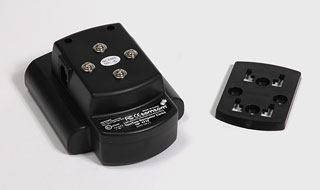
The picture to the right shows the mounting plate and the rear of the PDA holder. The design is such that the PDA can be mounted either vertically or horizontally. As this is a windscreen suction mount that is of little issue as the whole mount can be rotated to any angle. This is more useful when you want to use a more permanent mounting system. |
|
The Black Box
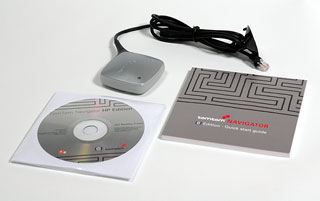
The black box is shrink wrapped and that immediately says this has the expensive goodies in it. Indeed this is where the GPS receiver and the software CD is. It also contains the instruction manual.
The GPS provided is the tried and trusted silver diamond device that TomTom have been supplying for a while now. It does it's job and it does it well so why change it?
Included with the software CD disk are the complete maps of Europe. Don't get too excited though as they need to be purchased.
|
 |
The HP rz1710 PDA
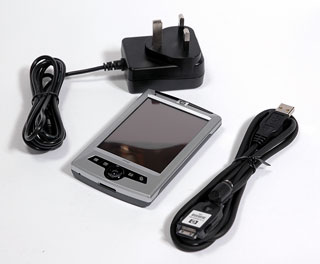
The final box in the bundle is the HP PDA. This is the bottom of the range rz1710. It comes complete with power adapter and a rather useful power/synch cable. I say rather useful as this PDA package does not have a cradle, just this cable. The cable though is a boon for me whilst traveling. The connector is a standard iPAQ connector so it works with all my PDAs except the XDA, this means that I can now synch the devices with my laptop and not have to carry 3 cradles around.
The PDA comes with Windows Mobile 2003 Second Edition pre-installed so you get the latest software.
Apart from that it is pretty basic: no bluetooth; no WiFi; and not too much memory. You can of course add additional external storage in the form of a larger capacity SD card.
|
 |
| Manufacturers Specifications |
HP rz1710 PDA
- Samsung S3C 2410 processor (203MHz)
- Windows Mobile 2003
for Pocket PC, Professional Second Edition
- Full Pocket
PC functionality
- Up to 25MB user-available memory
- 3.5" transflective
TFT screen with portrait, landscape modes
- IrDA – Supported (Serial IR)
- USB – Supported via cable interface
- Serial – Supported
- Sync / Data Connector – Full
RS-232 support
- Microphone
- Speaker
- 3.5 mm headphone jack
- MP3 stereo (through audio jack)
- Internal Rechargeable
1000 mAh Lithium-Ion battery
- Estimated usage time of
fully charged battery is up to 7 hours
|
TomTom Navigator
- All-in-one car navigation system with HP iPAQ rz1710,
navigation software, maps, GPS and car mount.
- Easy to use: simple touch screen operation, intuitive
interface.
- Clear: sharp spoken route instructions and easy to read
3D maps.
- Up to Date maps: the very latest maps with excellent
street number coverage.
- Accurate: precise navigation from door-to-door.
- Portable: easy to take from one car to another.
- High-performance GPS receiver.
- Thousands of points of interest in over 50 categories,
including hotels, car parks, restaurants, petrol stations,
shops, parking and much more.
- Route recalculation: avoid traffic congestion, roadwork,
accidents or any roads you don’t want to drive.
|
| Compatibility |
The TomTom Navigator HP Edition
is a complete package and is not dependant on any external
components. The one thing to be aware of is usage in cars
with coated windscreens. GPS reception can be difficult unless
the GPS receiver is positioned in an area with an unrestricted
view of the sky.
The software has its basis on TomTom's "Common
Navigation Engine" (CNE) a system that enables TomTom to develop
navigation products with the same core functions, sharing
the same code, but on different hardware platforms. This
software is identical in almost every way to TomTom GO, TomTom
Navigator for Palm, and TomTom Mobile, and obviously TomTom
Navigator 2004 released in the USA.
All the add-ons (at the moment just POIs) work on all the
different hardware platforms. The only one with additional
features is TomTom Mobile, which also has a Traffic module
available, this is not yet available on any of the other TomTom
CNE products.
The PocketGPSWorld.com library of POI collections are available
and can be added to this package, though you may need a larger
memory card to utilise the full capabilities. But more of
that later.
|
| The Review
This review focuses on the GPS Navigation side rather than the PDA. The PDA comes with a standard set of WM2003 applications which are beyond the scope of this review.
What does the HP Navigation Package Do?
The TomTom Navigator HP Navigation package provides all the components to enable you to navigate from your current position to anywhere in that you have maps for. If you make a wrong turn the system will detect it and provide rerouting to get you back on track again.
The TomTom Navigator software provides "voice navigation" to get you to your destination. Voice navigation is spoken instructions, it does not have voice recognition capabilities.
This review take you through the installation of the software to the actual use of the navigation system.
|
 |
System Installation
TomTom have learnt from their experiences with other GPS navigation software products and have now perfected an almost foolproof installation process.
First you need to do is charge the PDA as documented in the HP user guide un till fully charged. The next thing to do is to set the PDA up. All this is documented in the HP setup instructions.
The next thing to do is install TomTom navigator software. This is achieved by inserting the SD card and following the on-screen instructions. It really is as simple as that. To give you an idea of the installation process click here for a sequence of the screens you will be presented with.
To finish up you will have to assemble the windscreen mount.
This involves connecting the mounting plate to the mount. There
are two ways to connect the plate which will allow you to have
either portrait or landscape orientation of the PDA screen.
This will then clip into the gooseneck suction arm. The square
plug on the end of the GPS cable fits into a socket on the
mount and the power cable fits into the power socket.
That it all you need is to add a car and off you go.
|
 |
Your First Journey
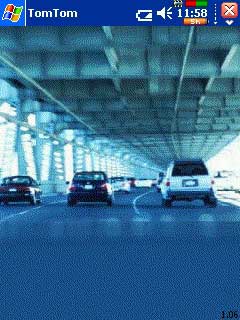
Well maybe not your first journey, but your first with GPS
Satellite guidance. When you turn the system on and start
the TomTom programme the GPS will not know your position
and the map will be "greyed out". It will take around about
3 minutes or possibly longer to actually get the first "GPS
fix" (that means tracking enough satellites to determine
your current position). Subsequent startups will be considerably
quicker, normally about 15-30 seconds.
When you have a satellite fix the map will suddenly change
into a colourful display and will zoom in to your current
position.
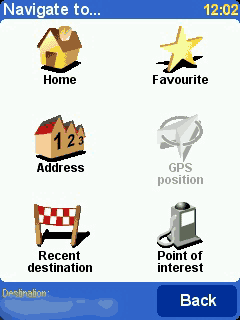
You are now ready to start calculate your route. To do this
simply tap on the screen and then the "Navigate To" icon.
This then shows the "Navigate to..." screen. From this you
have six options. The one we are interested in at the moment
is "Address". I will cover the others later.
Next you will be prompted for a town/city. At this point
you can either enter the town or the first few characters
of the post code. As you enter the details a list will be
populated with the nearest matches to the text you have entered.
This "smart" entry system helps to cut down on the number
of characters required to locate your desired address. Interestingly
the next time you start navigating a list of recently entered
details is presented until you start entering characters.
Another thing I find a bit irritating is that the data entry
is arranged in a panel of alphabetical buttons. I find it
very hard to input in this format as opposed to the standard
"QWERTY" format. I have been using this style of
data entry for nearly a year now and I still cant get used
to it.
Having selected the town you move on to the Street, which
is entered in the same way. An irritating feature now can
be the smart entry system which will attempt to apply it's
"intelligence" working on text entered rather than distance.
Basically if you are looking for "My Street" in "Home Town"
as soon as you enter the 'M' you will get Main Street, Moreish
Road, etc based on a radius around the town, but not bringing
up those closest to the town centre first. I have found this
irritating on a number of occasions.
If you don't know what street you want, you can just enter
the town name again and you will see an image of a Town Hall.
Selecting this will take you to the town centre.
Assuming you selected a road you will now be asked for the
house number. You can also hit a button to select an intersection.
When you have finished hit the "Done" button.
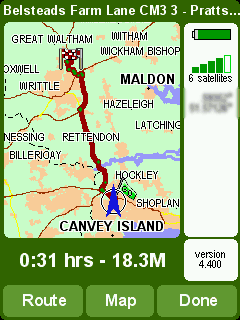
The route will now be calculated and the route summary will
be displayed. The image to the right shows a route overview
from one of my trips. This highlights the suggested journey
in dark red, with start and end pins. As you can see there
is a blue arrow at the start of the the trip. This is your
current position this will move on the overview as you travel. The overview can be called
up at any time whilst navigating, allowing you to get an idea of how far through the trip you are.
On the overview there are 3 buttons at the bottom: Route;
Map and Done. You can also tap the satellite/battery panel
to pop up the GPS status display.
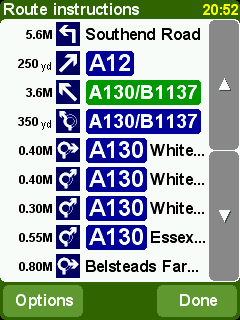
Tapping "Route" shows the route card, "Map" will take you
to the map display whilst tapping "Done" will allow you to
start driving.
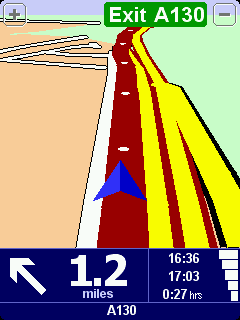
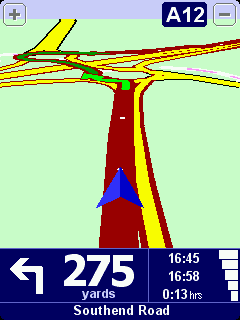
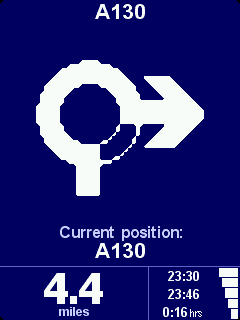
The navigation display is shown on the right. As you drive
along you will be given spoken instructions along with visual
indications of the next maneuver.
While you are following
your route you take a wrong turning what happens? You go
the wrong way of course! But seriously, what will happen is
that TomTom will realise you have gone off route and will recalculate
the required turns to get to your destination.
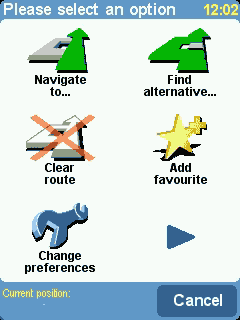
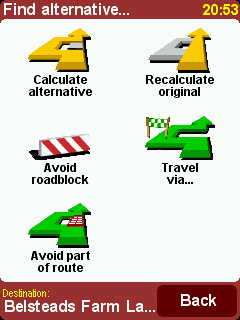
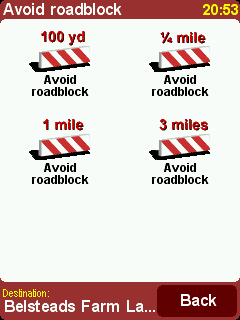
OK so it re-routes you. What happens if there are problems
on the road ahead? Again quite simple just tap the screen and
select "Find Alternative" this will then give you the capability
to determine what criteria you want to set to create a workaround.
On this screen you can also add a "Travel Via". This will
allow you to select a single stopover on your journey.
You also have options to show display the navigation screen in 2D or 3D, you can select a night vision mode with a more subdued colour scheme preventing you from being dazzled at night.
So that is the basics of the system. Now we can move on and
look at some of the specifics.
|
|
|
 |
 |
 |
Route Quality
Routing is one of those areas where there is always a lot of heated discussion with people claiming that the routing is poor and doesn't produce optimum routes. Well that is always going to be the case as far as you are concerned around your local area because you know all the little tricks to save a minute here and that small detour to get you past a well known bottleneck, whereas the navigation software does not have this advantage. Not only that but you may well know that one short cut works well at 9:00 in the morning, but at 3:00 it just doesn't work. How do you fit that wealth of local intelligence into the navigation application. Well the simple answer is that you don't!! Anyway how many times do you take the shortcut and find you cannot get out at the other end?
Enough of all that. The real question is: "does the planned route get you to your destination easily and without problems?" Well here the answer is almost always going to be yes. There will be a few occasions where the map data is not up to date or there is an error in the map data. This is not really the fault of the software provider, but the mapping company.
As an example of bad mapping data. TomTom Navigator will route you along roads that the mapping data provider tell them are of particular types, grades, and speeds. This is fine until you find that The mapping data company have got it wrong. With older versions of TomTom Navigator leaving my house and heading in a particular direction TomTom would try and route me of a major A road down a residential road, through an unmade road, to join back with a second major A road which intersects with the original. Obviously TeleAtlas (the map data provider) have not surveyed the road correctly, or if they have it is given the same priority as the A roads. Interestingly this doesn't always pick this route so it must be marginal. This routing issue was the same for all navigation product using TeleAtlas data. I am pleased to say that the map data provided with TomTom Navigator HP edition does not route like this in my area.
The routing algorithm is not configurable in TomTom Navigator. This means that you have no way to tweak the route to suit your driving style. In fact TomTom Navigator seems to place a strong emphasis on Motorways and Major Roads rather than the fastest or shortest route.
Having said that I feel that the routes generated are normally the ones that I would use, in areas that I know well. So far there has never been an occasion that I didn't arrive at the place I was heading for in what I considered to be a reasonable route.
|
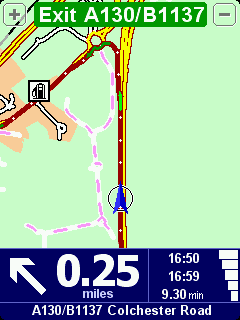
The Main Navigation Screen
The main TomTom Navigator screen is split into three functional
areas: the zoom buttons; the main map; and the information
panel.
The zoom buttons are at the top of the screen and zoom in
and out. This only works momentarily as TomTom Navigator has
automatic zooming which will soon revert to the applications
idea of a perfect zoom level. As you zoom out you will notice
that the minor roads will not be displayed.
The main map can be configured to display either in 2D or
as most people seem to have 3D. Your route is indicated by
a plum coloured overlay, with white arrows indicating direction
of travel. As can be seen I am going round a roundabout here
and the green arrow indicates the next (or current in this
case) maneuver. Tapping anywhere in this area will display the
main menu.
The information panel is displayed at the bottom of the screen.
This provides a number of details about your current status.
From Left to right, the first item is a graphic of the next/current
turn instruction. To the right of that is the distance to the
instruction.
The next group of figures show the current time, the estimated
time of arrival, and the estimated time left to go. This is
followed by a GPS strength indicator. Under all of this is
the road name, this will either be the name of the next road,
or the name of the current road.
So far all the review has concentrated on the screen in the
"normal" portrait mode some of my comments earlier eluded
to landscape display. As the rz1710 is running WM2003 second
edition it supports both portrait and landscape modes. Irrespective
of this because TomTom Navigator HP edition uses the TomTom
CNE the screen can be rotated using the "Change Preferences"
settings. This puts the navigator into landscape mode. This
displays additional data in the information panel. |
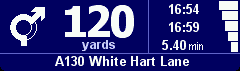
The portrait mode information panel
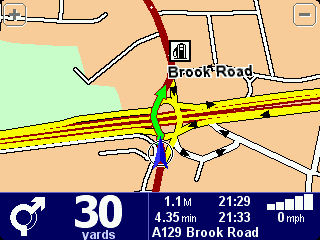
The landscape mode information panel
|
Points of Interest :: POIs
The POIs that are installed with TomTom Navigator HP Edition come from the mapping provider Teleatlas. The country map set that you buy will determine the type and number of POIs provided.
On the whole there are a large number available, but they are by no means complete. For instance looking at Golf Course POIs in my area less than a third of the courses are in the database. However that is probably an extreme example and really a lot of people use POIs to find the nearest restaurant, or bank etc so it doesn't matter if only 30% of them are listed you will still get to where you want to go.
One of the big plus points for the TomTom Navigator 3 Pocket PC version is User Customisable POIs. Indeed PocketGPSWorld.com
has our own Safety Camera database to assist in safer driving based on User Customisable POIs. |
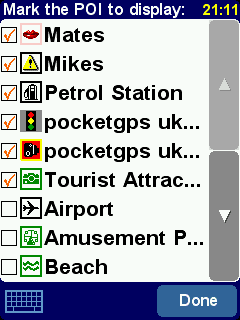 |
Fortunately this has been implemented for this version of TomTom Navigator, and not only that it is compatible with the POI databases from all earlier TomTom Navigator products.
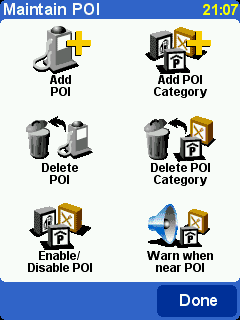
Built in to TomTom Navigator HP Edition is a POI management system. This allows you to add and delete your custom POIs and POI categories. You cannot delete or modify any of the inbuilt POIs.
Another feature built in to TomTom Navigator HP Edition is a POI proximity warning system.
What is that? and what use is it? I hear you ask.
Well if you have a set of POIs that you want to be warned about as you approach then this will do it for you.
OK but what use is it?
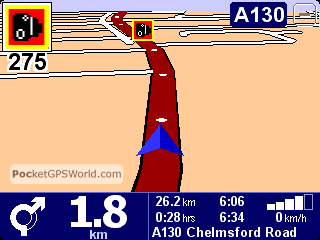
Well scattered all round the UK at "Accident Black Spots" are cameras set up to take your picture should you be exceeding the speed limit. The POI Warning system can be used to warn you as you approach one of these locations to enable you to monitor the road conditions!
At PocketGPSWorld.com we have been compiling a database of these camera locations for over 3 years now, and have captured a significant proportion of the UK speed (sorry officer I meant safety) cameras, we also have contributors across Europe contributing cameras in their own countries.
On the assumption that these sneaky devices are only located at "accident black spots" then it seems very sensible to be warned when you are approaching some form of danger where you need to be more aware of what is happening on the road. (or something like that!)
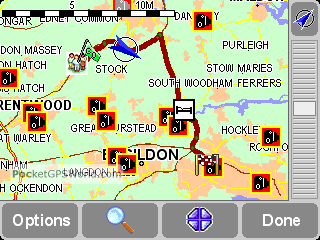
As you can see from the images to the right the South East of Essex is a very dangerous place to drive judging by all those safety cameras scattered around. Fortunately the TomTom Navigator HP Edition provides a good, but basic, audible and visual warning as you approach your points of interest.
Each different POI category can be configured to provide a different warning sound so you can set up your system to have a personally acceptable level of POI proximity indications. |
|
Mapping Data
The previous sections have focused on the TomTom Navigator
software but the software is only half of the navigation
system. The navigation application succeeds or fails based
on the quality of the maps.
There are 2 main technologies for map data Raster Graphics
and Vector Graphics.
Raster Graphics can be thought of as a picture. It is made
up from lots of individual coloured dots none of which have
any relationship to the dot next to it. This sort of mapping
is obviously no good for street routing as the software has
no idea where the roads are.
Vector Graphics on the other hand are lines linked together
to form a matrix of interconnected paths. These paths are
assigned attributes (or labels) identifying certain properties
such as name, type, etc. They even contain details such as
speed, and direction. Obviously this data can be used to
create a highly detailed map with all the sort of information
required to get you from A to B without sending you to a
dead end, or the wrong way up a dual carriageway.
Whoa all this is far too technical!! Don't worry you don't
actually need to know how it works, I was just giving an
insight into the amount of data that goes in to making these
maps.
There are two main suppliers of Vector based maps TeleAtlas
and NavTeq. The Maps for TomTom Navigator HP edition are
supplied by Teleatlas. They are dated Q2 2004 (I think), but that
is the date they were released not when all the latest roads
have been added.
The TomTom maps provide complete coverage of a country
or region. What you get is linked mapping data for those
countries in the area, but if you buy 2 separate countries
you cannot route between them easily. Therefore if you invest
in the whole of Western Europe and commute between Switzerland
and France, or Italy and Austria you cannot do straight through
routing. You have to get to a border and then switch maps
and complete your journey.
The other TomTom mapping products have a cut down version of the whole of Europe called the Major Roads of Europe or MRE. This mapping data is not provided with TomTom Navigator HP Edition.
TomTom have also in a clever marketing ploy included CDs
with maps for the whole of Western Europe on them. The drawback
is that they are not activated and to activate them you need
to buy a license from TomTom. This is a really simple process of inserting the CD and selecting the option "Purchase maps online" this takes you to the TomTom site where you pay €189 and you then get a product code which will activate the maps.
Having said that it does make
it very convenient if you are going on holiday and want
to load your destination quickly. It works for me, but will
probably irritate some of the GPS suppliers as they rely
on this additional up selling to help reduce their prices
of the main packages.
Mapping Issues
There are two possible
main issues with mapping data: The currency of the
maps, and the accuracy of the roads attributes.
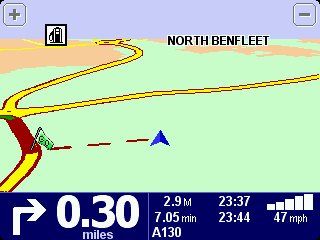
The picture to the right is not me driving over
some poor farmer's field, but driving down a new by-pass
that was opened over 12 months before the map data was
released. Not only that but the planning had been
known about for well over 2 years before that. By
itself this is not a great problem if you live nearby,
but it is difficult for people who do not know the
area.
There really is no excuse for major road data that is that
much out of date. This is not really an issue for TomTom
but for TeleAtlas, however as TomTom sell the bundled data
as a package then they will also get the fall-out from this. |
 |
On the other hand when we were driving from Hamburg to Hannover
to get to CeBit last year (using the TomTom Navigator for Palm) we found that there were some autobahns
that were under construction that we were correctly routed
down and off at the end of the construction. Now either these
had been like that for a long time, or the German maps are
right up to date. Either way we had no problems navigating
round this construction area. So I suspect that this is an
organisational issue from TeleAtlas's point of view.
Not only are there issues with the currency there are also a few issues with road classifications and directions on some one way streets. Although these are few and far between if one is on your commonly traveled route it can be very irritating. I will not go into the map errors in detail here, suffice to say that these maps are the same as released with TomTom GO (v390) so all discussions relating to this version of map on the TomTom GO will also apply to this version of TomTom Navigator.
|
The Views of a New User
Normally we produce the review of products from an experienced user point of view. This time I have press-ganged a complete novice into testing the TomTom Navigator HP Edition package with no help from myself. Not only is he a first time GPS user he has never used a PDA before.
John oversees a number of surveyors for Essex County Council maintenance contracts. His daily job consists traveling round numerous sites throughout the county, most of which he had never heard of before.
This is an account of his experiences:
 |
User Profile
| Name: |
John Craske |
| Age: |
60 |
| Occupation: |
Manager |
| GPS Experience: |
None |
|
 |
Hardware Profile
| Car: |
Peugeot 407 |
| PDA: |
HP rz1710 |
| GPS: |
TomTom Wired |
| Software: |
TomTom Navigator HP Edition |
|
The quick start instructions and installation instructions are concise and easy to follow.
Once the computer is charged and programme installed the TomTom programme is easy to use, with clear voice instructions and easy to read display, however some of the voice instructions are misleading i.e. turn left at roundabout third exit. I suggest this is changed to turn right at roundabout third exit. As the driver would be getting in the left lane instead of the right lane.
The computer has a habit of crashing and can be annoying when you need to re-programme a new route. I was caught out when I went away for a few days and did not place the computer on charge. When I tried to use it again it had reset to its original settings.
The computer is easily removed from the display holder for security and can fit nicely in a pocket.
Overall the product is good and should attract purchasers that are on the road full time, as this does save a great deal of time looking at maps and planning your destination.
I suggest tomtom target Sales representatives, Truck drivers, Surveyors as well as the Emergency services for this product.
WELL DONE TOMTOM a great help with my job. |
|
After John told me about his experiences I asked him how he used the PDA. John said that he would start TomTom then select his destination and drive to it. He would then turn the PDA off and go about his job. On return to the car he would switch the PDA back on again and select his next destination. This probably accounts for the crashes he is experiencing. TomTom is only ever exited when he performed a soft reboot. The system used to crash once or twice a week. This always happend when stationary and planning a route.
|
Closing Thoughts
Now surprisingly I have been told that a large number of these bundles are being sold in Germany. I was a little surprised when I heard this as the Germans have a reputation for market leading precision equipment.
It also turns out that an almost similar number of unused HP iPAQ 1710 PDAs are sold on ebay.
The reason: The Germans buy the bundle, sell the 1710 and buy a 4700.
Not only is the 4700 the top of the range HP PDA available at the moment, it also has a VGA sized screen. Why should that matter? Well when you couple a VGA PDA with a VGA aware application you suddenly get a lot more real estate to play with. For an experienced GPS user the results are quite stunning. All the previous displays have shown actual dot for dot the image displayed on the PDA. The following is the same taken from the 4700. The image is so wide that I can only include a portrait version here.
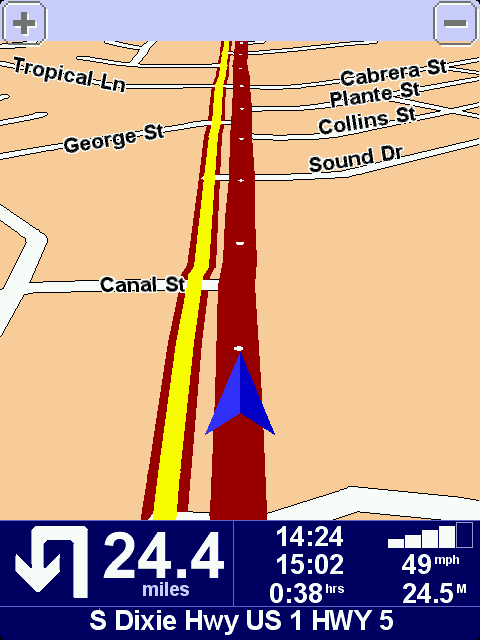
And all of this on a screen sized 2.5 by 3.25 inches... Now I understand!
|
| Issues and Problems
Whilst I was testing I didn't really experience any major problems. John seemed to have more issues with the PDA crashing whilst he was using it. My main problem was when I was using the software with my HP iPAQ 4700 the software never crashed when in use, but frequently had lockups when exiting the application.
John's experience with having the PDA drain it's battery is likely to be caused by a problem highlighted by Lutz in his review of the US version of the software. So make sure you exit the TomTom Navigator before switching the PDA off.
Quote Lutz
| WARNING: The new TTN 2004 does also ignore the power setting both of the GPS control applet and of the Pocket PC itself. If you leave your Pocket PC in the car and keep TTN 2004 running this will lead to a complete power drain and loss of all volatile data on your Pocket PC. So - make sure to exit TTN 2004 when you leave the Pocket PC unattended for a longer time. |
The other issue that presented itself (again on the 4700) is that I have a "Think Outside" BT Keyboard. This is a lovely bit of kit giving me a PDA keyboard as big as large as my laptop one. The problem is that it installs a keyboard driver, and when TomTom needs some keyboard input it assumes that the Think Outside keyboard is active even when it isn't. The only workaround I have found for this is to remove the Think Outside keyboard driver.
|
|
| Conclusions Well I am in two minds about my conclusions.
On the one hand TomTom Navigator is a cracking piece of software, easy and intuitive to use, providing accurate and (mainly) reliable routes. It is missing some of the functionality of previous TomTom Navigator versions, but is a much more suitable product for a first time user.
On the other hand the bundle is completed with the bottom of the range HP PDA. I can understand why they have done this to keep costs really low at £299.99 street price it is difficult to criticize. Having said that I would have preferred a more powerful PDA. The 1710 is fine if all you are using it for is TomTom, but start adding one or two applications to it and it will start to complain. These are of course the views of a PDA Power user.
As far as the mounting system is concerned again it is the top quality Harald Richter products. The only minor thing is that I would have liked to see the inclusion of the recent rigid windscreen mount, as I feel this provides a much more stable mounting solution.
Overall the bundle gets a big thumbs up from me.
|
Pros
- Superb package for new GPS users
- Easy to use
- Full Functionality
- Full Europe Map data provided (need to pay to activate it)
- Can use the PocketGPSWorld.com Safety Camera database
|
Cons
- Low end PDA
- Does not use full 7 digit UK post codes
- Lacks some TomTom Navigator 3.0 functionality
- Had a couple of system crashes during the review evaluation.
- Not so well suited to the Advanced GPS user
|
|
|
|
 |
 |
 |
 |
|
|