SatNav,GPS,Navigation
Free Email Updates
Get speed camera database update alerts, news and reviews. Example

Enter Your Email
(for our eyes only & one click unsubscribe)
No Spam Guaranteed!
Navigate Our Site

MEMBERS AREA
Subscribe Now
Speed Camera Download
Submit Cameras
Free Competition
Member Discounts
Your Account
Member Forums

PUBLIC GPS FORUMS
Register to Post
Log in to Post
Private Messages
Your Account
Public GPS Forums
FORUMS BY BRAND
POINTS OF INTEREST
Free POIs
Submit POIs

REVIEWS & ARTICLES
Full Listing
[+] Anquet
[+] Apple
[+] Article
Viewranger in for review : Nov09

TomTom add support for iPod Touch and iPhone 2G : Nov09

Popular Free iPhone Dating App Adds GPSBased Chat Feature : Nov09

NDrive Dominate GPS Software for Phones Comparison : Nov09

M11 Speed Camera Increases Accidents and Raises 500kYear : Nov09

Nav N Go Powers GPS RearView Mirror : Nov09

iPhone Touch GPS Cradle launched by Dual Electronics : Nov09

TurnbyTurn Nav For The iPod Touch Approved by Apple : Nov09

NDrive London with Aerial Photo View Released iPhone : Nov09

Reviewed Roadhawk RH1 Black Box InCar GPS Camera : Nov09

Smartphone GPS Usage Surges Ahead in China : Nov09

Carcomm TomTom x40x50 Cradle Available : Nov09

Residents take action against satnav map errors : Nov09

RouteBuddy Atlas 150K OS Great Britain Map Available : Oct09

Google unveils free turnbyturn navigation for Android : Oct09

125 Casualties x 5 years 17 Speed Cameras : Oct09

TurnbyTurn Navigation Comes to The iPod Touch : Oct09

New French Speed Cameras Predicted For UK Roads : Oct09

Columbus nGPS geotagging dongle for Nikon cameras review : Oct09

GMap UK Ireland for iPhone Released : Oct09

DIY Speed Camera Slows Traffic : Oct09

Can Speed Save Lives : Oct09

UK Speed Cameras Safety or Votes : Oct09

NDrive iPhone UK and Ireland Now Available : Oct09

Calling All Speed Camera Warning Virgins : Oct09

Navigon win the Stuff Award 2009 for SatNav : Oct09

Build your own GPS Satellite Build Win A Subscription : Oct09

Wales Plans Mobile Average Speed Cameras : Oct09

Gaia GPS iPhone GPS App with Topo Maps : Oct09

NDrive Coming to iPhone and Android Phones : Oct09

There are new waze in town : Sep09

Speed Cameras Cash Machines or Safety Systems : Sep09

RoadTour Announce Britains Finest : Sep09

LBS Start Up Tops Up His Half Million Dollar Prize : Sep09

Directional Warnings for All Well Nearly : Sep09

Does This Signal the End of Mobile GPS : Sep09

Driver slapped with 900 fine for following TomTom : Sep09

Communicating with Subscribers Newsletter Subscriptions : Sep09

Smartphones Integrated into Vehicle Infotainment Systems : Sep09

Geocoded PostCode Database Leaked Online : Sep09

GyPSii launches on Android : Sep09

Traffic4England RealTime Traffic Alerts for Android : Sep09

TomTom Announce New Location Referencing Technology : Sep09

90 Percent of Wakefields Speed Cameras Are Dummies : Sep09

OS Map Ordnance Survey Maps on Android : Sep09

Garmin Announces Edge 500 Cycling GPS Device : Sep09

Augmented Reality Navigation Wikitude Drive : Sep09

Number Plates Unnecessary For Speed Camera Prosecution : Aug09

Only 27 of UK Drivers Believe Speed Cameras Improve Safety : Aug09

We need your help FREE Two Year subscriptions on Offer : Aug09

Bournemouth Speed Cameras Torched : Aug09

Free Priority Delivery for TomTom Refurbs : Aug09

Speed Cameras A Personal View : Aug09

End of an era for GPS as GPS 2RM8 is launched : Aug09

OpenStreetMap Data Now Available on Submission Maps : Aug09

Spanish Tunnel Vision : Aug09

Warning Reindeer Ahead Speed Limit 40 Kilometers per hour : Aug09

NAVTEQ Study Confirms SatNav BoyToy Status : Aug09

Sygic Mobile Maps coming to Android : Aug09

Bournemouth Consider Copying Swindon to Switch off Speed Cams : Aug09

O2 Joins with Telmap to Bring Navigation App to Customers : Aug09

Speed Camera Support Declines : Aug09

Driver issued Redlight Ticket making way for 999 van : Aug09

PocketGPSWorld.com Support Ticketing changes : Aug09

Navteq maps out Jordan : Aug09

iGO My Way 2009 Now Available for iPhone : Aug09

TeleNav Announce Turn-by-Turn Navigation for myTouch 3G : Aug09

Tracking Trips With Trimble AllSport GPS for iPhone : Aug09

Pocket GPS World surpasses 300,000 members : Aug09

Swindon Scraps Fixed Speed Cameras : Jul09

Sales of GPS Smartphones to Reach 77 Million in 2009 : Jul09

CSR announce the SiRFstarIV GPS Chipset : Jul09

Gokivo BlackBerry Support Expanded : Jul09

Garmin-Asus Nuvifione Available NOW! (If you live in Taiwan) : Jul09

TomTom Beats 2nd Quarter Forecasts : Jul09

Richard Solo 1800 Smart Backup Battery for iPhone and iPod : Jul09

Canalys Mobility Forum EMEA London, 17 November 2009 : Jul09

Vodafone signs digital mapping deal with Tele Atlas : Jul09

Speed Cameras Only Catch Good Guys : Jul09

Muttacar Sorry Business : Jul09

PocketGPSWorld support the London Bikeathon 2009 : Jul09

Smartphones Versus SatNav : Jul09

Overboard Waterproof iPhone case reviewed : Jul09

RouteBuddy Announce Atlas for iPhone : Jul09

Sygic Mobile Maps Europe for the iPhone is back in the AppStore : Jul09

Speed cameras are going digital in Victoria Australia : Jul09

iO-BTAPOD iPhone and iPod Stereo Bluetooth Adaptor review : Jul09

iPhone 3GS GPS Spy Software Released : Jul09

iPhone 3GS GPS Spy Software Released : Jul09

TwittARound : Jul09

M25 more SPECs Average Speed Cameras in Essex : Jul09

Michelin Road Atlases Partner With Pocket GPS : Jul09

TruePower iV Battery Extender review : Jul09

Livingston Parish Louisiana fight back against speed cameras : Jul09

BMW motorcycles offer customised Zumo660 : Jul09

TomTom iPhone - Stop Press - No sorry, as you were : Jul09

More Augmented Reality - Nearest Tube for iPhone 3GS : Jul09

CTIA Partner With Pocket GPS for San Diego Wireless Show : Jul09

GatsoGate tape may prove expert witness changed evidence : Jun09

CoPilot Live launches on Android : Jun09

£20m in Essex speeding fines may be refunded due to blunder : Jun09

Nav N Go Announce iGO for iPhone : Jun09

Dorset deploys dual-role speed and red-light cameras : Jun09

AT&T reveal iPhone Turn-by-Turn App : Jun09

Video iPhone launch day in Apple Store UK : Jun09

Tele Atlas to offer HD Traffic Solution to OEMs : Jun09

Cambridgeshire - Safety or Speed Camera Partnership : Jun09

Mio Navman Spirit TV - Satnav and Freeview TV : Jun09

Pocket GPS Partner with Euro Market Leader Inforad : Jun09

£1.5m in speeding fines from Dorset GATSO could be refunded : Jun09

Navigon MobileNavigator for iPhone launches in AppStore : Jun09

Pocket GPS partner with GeoLife : Jun09

Watch out there are thieves about : Jun09

Augmented reality browser - the shape of things to come : Jun09

Navteq announce APAC LBS Challenge Winners : Jun09

Sygic Mobile Maps for iPhone launches in Australia : Jun09

ALK move from Navteq to Teleatlas for mapping data : Jun09

SpeedCam Detector for Android Phones now available : Jun09

Doh - Homer Simpson original voice now available : Jun09

Apple new iPhone 3GS hardware and software roundup : Jun09

Grab free power and keep your gadgets topped up this summer. : Jun09

TomTom shares rise as talk of Apple buy-in spreads : Jun09

Arnie says haste la vista to ban on windscreen mounts : Jun09

PocketGPSWorld has had a makeover : Jun09

Roadhawk in-car camera GPS and black box system : Jun09

Destinator 9 Announced : Jun09

Navigon to release a Turn by Turn iPhone app : Jun09

Apple WWDC - New iPhone Today? : Jun09

Garmin nuvifone - will Asia see a launch next month? : Jun09

WWDC: TomTom show iPhone App - available this Summer : Jun09

RIM acquires Dash Navigation : Jun09

A127 SPECS - 90 percent funded by a private company. : Jun09

Range Rover 2010 - Dual View ICE Satnav : Jun09

Broadcom announce first PND-on-a-chip : Jun09

CompeGPS Aventura now shipping : Jun09

NavNGo Q1 2009 Map Updates now available : Jun09

TomTom goes designer - Meet the White Pearl Special Edition : Jun09

TomTom XL Live SatNav press launch : Jun09

South Wales Police hope beanbag mounts to cut satnav crime : Jun09

TomTom Navigator 7 now on Sale - Warning U-Turn Ahead : May09

Mobile VAS Forum choose Pocket GPS as Media Partners : May09

NAVTEQ chosen by Mio as Australian Map suppliers : May09

New SPECS install on notorious stretch but why no barriers : May09

AA on-line route planner busy this Bank Hol : May09

Cambridgeshire SafetyCam Partnership goes blue : May09

Talex accused of dodgy dealing : May09

Americas Com choose Pocket GPS as Media Partners : May09

TeleAtlas denies talks of TomTom Split : May09

Space Command Expert will discussed report on Twitter : May09

Volkswagen partner with Garmin - Meet Click & Ride : May09

TomTom Announce XL Live : May09

Price reduction on satnav voices : May09

Satmap release SatSYNC Version 1.2 : May09

GPS Constellation, is the service in trouble? : May09

Pocket GPS Interview Tracking Specialists Navman Wireless : May09

Garmin nuvifone - another delay - dead in the water? : May09

Navman Mio launch the Spirit range of SatNavs in the UK : May09

Transport for London trial digital speed limiter : May09

Rumour control: TomTom seeking iPhone developer candidate? : May09

Speed camera nabs 23,500 drivers in 14 days : May09

SPECS3 average speed cameras launched Motorcyclists beware : May09

Mio S401 and S501 Global launch 12 May : May09

RoadTour launch AA Best Drives for Garmin : May09

TomTom release v8.350 for GO x20, GO x30 and GO x40 : May09

Speed Camera Van hidden by advertising board : May09

Gatso UK Boss caught driving at 102mph on a 70mph road : May09

Samsung sign up Navteq to provide mapping for GPS phones : May09

Navigon pulls out of US Market : May09

Couple fighting speed camera fine face £15k bill : May09

Pioneer Navigation Centre coming to VW, Skoda and Seat : Apr09

Ambulance Drivers urged to use AtoZ as Satnav System Fails : Apr09

Garmin announce ultra-slim nuvi 1490T with 5-inch screen : Apr09

William Wales causes panic at White House : Apr09

More Speed Cameras but do the statistic bear scrutiny? : Apr09

Satmap European Mapping goes Live : Apr09

Australia - Speed Camera Operator Attacked : Apr09

Garmin Zumo 660 Coming to The UK Soon : Apr09

TomTom Reports Euro 33m Loss for Q1 2009 : Apr09

Garmin Forerunner 405CX Announced : Apr09

Renault Scenic Launches With In-Dash TomTom Option : Apr09

Garmin Forerunner 310 Gets a Facelift, Meet The 310XT : Apr09

Traffex 2009 Speed Camera and road technology showcase : Apr09

Mobile speed cameras suspended in Arizona after fatality : Apr09

Egypt Removes the Ban on Consumer GPS : Apr09

Nav N Go Announce 6 New Maps for Eastern Europe : Apr09

Industry Events: MetaPlaces 09 Location Business Conference : Apr09

iO Play In-Car Audio Streaming via Bluetooth : Apr09

Garmin Oregon 500 leaked on resellers sites : Apr09

GMP to target motorists with Smart Car CCTV Fleet : Apr09

Mio closes US offices : Apr09

iOSMaps - An OS Map viewer for iPhone - and its free! : Apr09

Self led cycling tours from Velodays : Apr09

Sony launches pocket format HD camcorder with GPS : Apr09

Video : Installing the Speed Camera Database on Garmin SatNavs : Apr09

GPS Tracking of the Florida Panthers is not threatened : Apr09

A Prized Location... and the winner is... : Apr09

TomTom sign TrafficCast to deliver x40 Traffic Data in US : Apr09

TomTom GO 950 with Google Talk - 500 To Give Away : Apr09

Apple Patents In-Car GPS with Safety Features : Mar09

Transport for London Digital Speed Map - TomTom & Garmin : Mar09

Travelodge Launch iBooker - GPS Enabled Room Booking : Mar09

Driver gets ticket for speeding in a parked car : Mar09

Garmin Launch nuvi 465T Truck SatNav in US - EU to follow : Mar09

TomTom Takes Up the Fight And Countersues Microsoft : Mar09

TomTom Launch One and XL IQ-Routes Editions : Mar09

Satmap Launch Active 10 Plus : Mar09

Navigation and Location Europe 2009 Conference : Mar09

GPS 2R-20 Scheduled For Launch Tomorrow : Mar09

Sun Traps Turn Up The Heat In Abu Dhabi : Mar09

Twitter: Follow PocketGPSWorld : Mar09

New Features On SpeedCam Download Page : Mar09

Google StreetView launches in UK : Mar09

Pocket GPS Partners With Where 2.0 Conference : Mar09

Latest (Q4 2008) Maps Now Available for iGO 8 and iGO 2006 : Mar09

iPhone OS 3.0 - Turn-By-Turn Nav Gets The Green Light : Mar09

TomTom GO Celebrates Its 5th Birthday Today : Mar09

Canalys: US overtakes Europe as largest SatNav market : Mar09

Satmap On-Line Route Planner Goes Live : Mar09

SatNav blamed but alcohol the real cause in car on tracks : Mar09

More Cameras for Essex but stats suggest they dont work : Mar09

PocketGPSWorld Red Nose Day TomTom Splash Screens : Mar09

OpenStreetMap - Now YOU can take control of the maps : Mar09

Red Light Programme in the Red : Mar09

HP Bin the iPaq 316 (310) - No More PNDs : Mar09

iTIS Interim Results Published : Mar09

Average Speed Cameras to Police UK Rural Speed Reduction : Mar09

Navman to be axed? : Mar09

FBI Helped Decrypt GPS from Mumbai Terrorist Attack : Mar09

CeBIT Special Published : Mar09

Speed Camera Discount Ends Sunday : Mar09

iGO Pirates Walk The Plank at CeBIT - Agents Seize Software : Mar09

Handheld Europe release Nautiz X5 a rugged PDA with GPS : Mar09

The OS Outdoors Show 2009 Birmingham NEC : Mar09

Speed Camera Shy Colin is Petrified of Points : Mar09

Pocket GPS Announce Partnership with NavNGo : Mar09

Navigon Launch Three New PNDs : Mar09

Getac introduce a rugged PDA with GPS : Mar09

Sygic Announces Sygic Mobile 2009 for iPhone 3G : Feb09

TomTom 8.25 Maps released : Feb09

Microsoft Sues TomTom Over Patent Breaches : Feb09

PocketGPSWorld Newsletter Out Friday : Feb09

MWC 2009 Wrapup: My view of the event and the market : Feb09

MWC 2009 Video summary : Feb09

30 Percent Decrease in US Peak Time Traffic Jams : Feb09

Wokingham May Retire Speed Cameras : Feb09

TomTom HOME 2.6 Beta Now Available : Feb09

TomTom Reports Net Loss of £870m : Feb09

TomTom LIVE - Success or Failure? : Feb09

Philips Net Tcv - TomTom Channel : Feb09

Dodge Charger fails to Dodge Speed Camera Charges : Feb09

GPS Central To New York Babysitter Murder Trial : Feb09

Foreign Drivers Immune to Speed Camera Fines : Feb09

Nokia Launch Ovi Store at MWC in Barcelona : Feb09

Speeding Police Evade Penalties : Feb09

TeleNav Launch Turn By Turn Nav for Android Phones in US : Feb09

Telmap enters MID market with GPS application : Feb09

Qstarz launch the BT-Q1300S GPS based Fitness system : Feb09

CSR and SiRF combine forces for Bluetooth and GPS : Feb09

Review of 2008 from a GPS perspective : Dec08

Top 25 Speed Camera Stories : Dec08

SatNavs and Speed Cameras: Lies, Damn Lies And Statistics? : Dec08

Redlight cameras active in Orlando Florida. : Dec08

Dubai Speed Cameras to Double up as Crook Catchers : Dec08

New SPECs Speed Cameras on the A127 in Essex : Dec08

GPS and SatNav reviews and articles : Aug08

There is No Silver Bullet Accurate Traffic Information Requires Multiple Data Sources : Jul08

PocketGPSWorld.com Active Speed Camera Statistics : Jul08

Pocket GPS Terminology : Dec07

Galileo European GPS Constellation Gets Go Ahead : Nov07

A Day in The Life of a PocketGPSWorld.com Verifier : Nov07

Nikon D300 and D3 GPS enabled cameras : Nov07

The Ordnance Survey have 4 million POIs : Nov07

3,2,1 Liftoff... The latest GPS Satellite is successfully launched into orbit : Oct07

Mike's Muses: Diving with GPS? : Mar07

[+] Binatone
[+] Blaupunkt
[+] Brodit
[+] Carcomm
[+] CoPilot
[+] Destinator
[+] Directions Ltd
[+] Event
[+] Evermore
[+] Fugawi
[+] Garmin
[+] Magellan
[+] Mio
[+] Nav N GO
[+] Navigon
[+] Navman
[+] Navteq
[+] Other
Groundspeak's Geocaching iPhone App Review : Oct09

Exspect Triple USB Travel Charger reviewed : Sep09

Speed Camera Database Installation Guide: ALK CoPilot 8 : Sep09

IMPORTANT Subscription renewals recurring payments : Sep09

Proclip Adjustable iPhone Cradle 915290 : Jun09

PocketGPSWorld at The Gadget Show Live : Apr09

Speed Camera Database Installation Guide: TChart GPS Speed Sentry : Feb09

Tchart GPS Speed Sentry Review : Jan09

OtterBox for iPhone 3G Impact Series review : Dec08

Intrinsyc announce Destinator 9 : Dec08

Nokia Navigator 6110 & ViewRanger : Sep08

ATP Photofinder Review : Sep08

Nextar launch the bilingual M3-MX SatNav : Sep08

AMOD AGL3080 Photo Logger review : Aug08

Letter Logger review : Aug08

ROADTOUR Satnav Tour Guide Review : Jun08

Subaru World Rally Team Points Of Interest POI : May08

Red Hen Blue2CAN for Nikon D3 and D300 GPS cameras review : Mar08

Sygic Drive 7 Review : Feb08

Pocket GPS UK Safety Camera Database - CheckPOInt : Jan08

Pocket GPS UK Safety Camera Database - POI-Warner : Jan08

Speed Camera Database Installation Guide: Kenwood POI Loader Devices : Jan08

Speed Camera Database Installation Guide: ALK CoPilot 7 : Jan08

Speed Camera Database Installation Guide: Nissan Connect : Jan08

World Tracker PLD review : Dec07

The GiSTEQ PhotoTrackr image tagging system review : Dec07

Hama UK Product Roundup : Oct07

WondeX BT-100Y Bluetooth GPS Receiver review : Oct07

WondeX BT-100Y Bluetooth GPS Receiver review : Oct07

HTC Advantage review : Aug07

eBonTek Bluetooth GPS Datalogger review : Aug07

Ultimateaddons Solar Backpack 50 Litre 2200mAh : Aug07

Z1 Solar Bluetooth GPS Data Logger Review : Mar07

Ontrak Position Tracking Device review : Feb07

[+] Otterbox
[+] Qstarz
[+] RouteBuddy
[+] Royaltek
[+] Satmap
[+] Sygic
[+] Tele Atlas
[+] TomTom
TomTom release FREE iPhone navigation update : Nov09

TomTom Announce GO I90 Integrated Navigation : Oct09

TomTom announce the iPhone Car Kit We get our hand on it : Oct09

TomTom Start Launch in London First impressions : Oct09

TomTom START will get UK 7 Digit PostCodes in future update : Oct09

TomTom moves into Mexico : Oct09

TomTom START launched : Oct09

TomTom unveils GO 7000 TRUCK : Oct09

TomTom Investigated for Insider Trading : Oct09

TomToms iPhone Car Kit Does A Vanishing Act Again : Sep09

TomTom Announce new x50 Range 550 750 950 : Sep09

TomTom iPhone Carkit gets FCC Approval : Sep09

TomTom and Fiat Announce Partnership : Sep09

TomToms iPhone App finally breaks cover : Aug09

TomTom XL IQ Routes Edition : May09

TomTom - Andy Siddell : Feb09

Voice Alerts (TomTom Format) for the PocketGPSWorld Speed Camera Database : Feb09

TomTom - Liz Whitaker : Feb09

TomTom - Vicki Archer : Feb09

TomTom - Andrew : Feb09

TomTom - PocketGPSWorld Voice : Feb09

: Feb09

TomTom - Simon : Feb09

TomTom - Crystal : Feb09

TomTom - Kate : Feb09

TomTom - Nick : Feb09

TomTom GO x40 Mount Disassenmbly : Jan09

TomTom Launch On-Line Route Planner : Dec08

TomTom launch the GO940 Live SatNav in the UK : Nov08

TomTom GO 930 SatNav review : Sep08

TomTom Announce GO 940 LIVE Connected PND at IFA Berlin : Aug08

Carcomm x20/x30 Cradle CNM-167 Review : Aug08

TomTom - How to remove cameras Tutorial : Jul08

Speed Camera Voice Alert Downloads for Garmin and TomTom : Jun08

Speed Camera Voice Alerts - Andy Siddell : Jun08

Speed Camera Voice Alerts Install Guide : Jun08

Customise your GPS/SatNav : May08

TomTom Navigator Custom Cursors : Apr08

Speed Camera Icons by GerryC : Feb08

Speed Camera Voice Alert Collections for TomTom and Route66 : Feb08

Speed Camera Voice Alert Collections for TomTom and Route66 : Feb08

TomTom GO 920T In-Depth Review : Jan08

Pocket GPS UK Safety Camera Database - TomTom Go/Rider/One - OV2 : Jan08

PocketGPSWorld Safety Camera Database - TOMTOM GO 910, x20, x30 and x40 : Jan08

Speed Camera Database Installation Guide: TOMTOM Navigator 5 & 6 - Deprecated : Jan08

Speed Camera Database Installation Guide: TOMTOM Navigator 5, 6 & 7 : Jan08

TomTom NavCore 7.2 Device-Dependent Feature List : Oct07

TomTom Version 7 : Mapshare Moving a POI : Jun07

TomTom Version 7 : Map Share blocking/unblocking a road : Jun07

TomTom Bluetooth Remote Control Review : Jun07

TomTom Cannes Announcement report : Jun07

[+] Trimble
[+] ViaMichelin
[+] Wonde Proud

GPS CENTRAL
About Pocket GPS
Contact Pocket GPS
Corporate Enquiries
Free GPS Downloads
GPS Events
GPS Event Blogs
GPS Related FAQs
GPS Reviews
News Archive
Report Piracy
Stolen GPS Register
Submit GPS News
Suggestion Box
Site Map

HELP
Registration Help
Subscription Help
Speed Cameras Help
How GPS Works

SEARCH
Search GPS News
Search the GPS Forums
Google Pocket GPS Search
Pocket GPS
Web

Bookmark & Share!


Tweaking and Testing your GPS Receiver

14th June 2003

 Review by Dave Burrows  


Something we find ourselves explaining time and time again in the forums is how to run diagnostic software against your GPS Receiver to check to see if it's working, has a problem, or if you just have it configured wrongly.  These instructions help to walk you through the diagnostic software of choice that we use (Leadtek WinFast Navigator) on the Pocket PC.  The is a version available for the PC also, but this article will specialise in the Pocket PC version.  We will also detail how to test Time To First Fixes (TTFF) with your GPS Receiver which will show you how to reset the receiver into a Factory, Cold, Warm and Hot state.


WARNING!  If you do not follow these instructions completely, or you start to mess around with figures in various screens, we cannot be held responsible for rendering your GPS Receiver useless.  Although you cannot physically break your GPS Receiver, if you start messing around with NMEA or SiRF settings you can effectively make your GPS Receiver appear that it's not responding, trying to get it out of this state is difficult to talk you through, so be warned, do not stray from these instructions!


Installing WinFast Navigator

We have a version of WinFast Navigator available from our download page.  Download this and install it to your Pocket PC.  Once installed you should find Navigator showing on your Start Menu.


Brief Introduction of SiRF and NMEA

Connecting to the GPS Receiver is the first hurdle to overcome, but first a brief introduction.  Firstly there are two GPS Standards, NMEA and SiRF.  Although SiRF is the up and coming new boy on the block, NMEA is the acquired standard and one used by 95% of GPS applications.  Why two standards ?  NMEA is getting old, it was designed to talk at 4800 baud (4kbps).  Modem speeds today are 56kbps so you can see NMEA is slow.  SiRF has brought about that change by increasing speeds and utilising full serial speeds up to 115200kbps.  The thing is although NMEA is slow, some GPS Receivers will work at higher than 4800, but this is what NMEA prefers.  The amount of GPS data sent down the serial port is very small and can easily be transmitted in 4800 baud so although you could reach higher speeds, there isn't really any necessary to do so.  SiRF uses higher speeds because it can transmit the data quickly and put the processor into a wait state which in theory means it utilises less power, newer SiRF chipsets like SiRF IIe also have low power consumption which help even further with sustaining power to the GPS Receiver.


Connecting to your GPS Receiver

Now you know there are two standards, and that most applications work in NMEA, what we need to do is connect to the receiver in NMEA.  Run WinFast Navigator and you'll be greeted with the WinFast Navigator Screen.


The first thing you need to do is tap VIEW | DIAGNOSTICS.  This will present you with another blank screen.  This is the diagnostics screen and it's best to be sitting on this when you try to connect. 
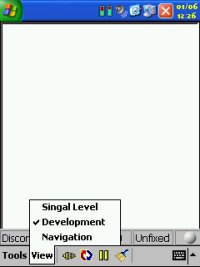


If you don't see any legible data appear on screen when connected (later), then you've got the wrong settings.  Connecting to the GPS Receiver is hit and miss, trial and error until you find the correct settings.
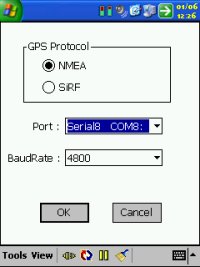
 

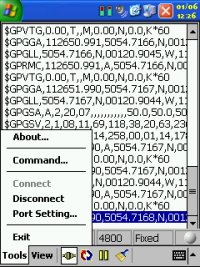
Now tap TOOLS | PORT SETTINGS and you'll be greeted by a screen like below.  This shows you the protocols available (eg NMEA and SiRF), the Serial Port you will connect on and the Baud Rate to use. 


We said earlier we would use NMEA, so make sure this is selected, skipping to the baud rate, we know that NMEA prefers most of the time to use 4800 so we can set this easily. 


Jumping back to Port, if you know you are connecting to a GPS Receiver that plugs into the bottom of the sync port, 99% of the time this is regarded as Serial1 COM1, so you can set it to this. 


If however you have a Compact Flash GPS Receiver, the easiest way is to cancel, eject the receiver, and then plug it back in again and it should pop up a dialog box and tell you what COM port it will use. 


If you're using a Bluetooth GPS receiver, you can check the COM port that's being used by going into the Bluetooth Manager and checking the settings as it should tell you which COM port will be used for Bluetooth connectivity.  With that said, we should now have all of the settings we need.


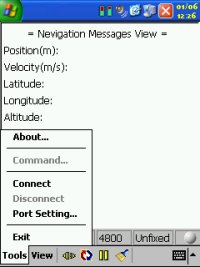
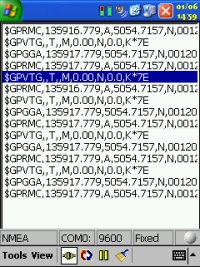
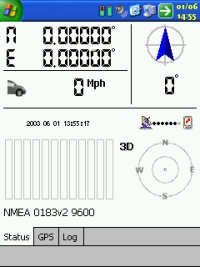
Tap the OK button.  What should happen is that you'll be taken back the the Development screen in WinFast Navigator.  You should see a screen like the one below (left).  If you don't, and you are seeing a screen like the one below (right) then you have the wrong settings.
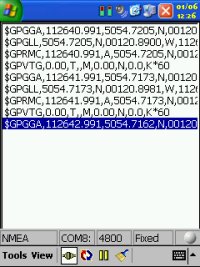


The data in the above (left) screenshot should start appearing within 5 seconds of reaching this screen.  If it doesn't, go through the process again.  If you are sure you have the correct COM port, then all you need to do is change the baud rate.  Try 9600 (this is what the Pretec Compact GPS Receiver uses).  Other receivers like the Pretec LP use COM 5 or COM 6, the Navman sleeve does something similar.  Like we said above, it really is a matter of trial and error.  At this stage you can not break the receiver, all you are trying to do is connect to the device on the above settings, so don't worry if it doesn't work, it won't cause problems with other applications as you are not saving anything to the EPROM (chip).


At this stage if you have managed to successfully see the data coming through on the development screen and you have been experiencing problems with your GPS Receiver not working, then there is nothing wrong with the receiver, the problem is probably in the driver of the software you are using.  If you were experiencing problems and still are, with no data appearing on screen, then it could be either you still have the wrong settings, or the GPS Receiver is faulty.


Testing for Time To First Fixes

We know that TTFF's can change, and do erratically.  It all depends on whether you have clear line of sight to each satellite, and there are countless things that can delay the data, or the GPS program assumes data which may not be correct.
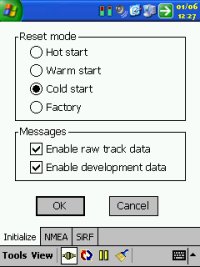
 

Once you have a successful connection and you have NMEA data coming through on the Development screen, then what you can do is tap TOOLS | COMMAND and you'll be greeted by a screen like to the right.  This will by default put you on the Initialize tab.  In here you have options for resetting the GPS.  If you didn't know, the GPS has two types of databases.  The Almanac details what satellites are out there, and their projected positions in the sky, and this is usually current for a couple of months use.  The Ephemeris data is more accurate data about signal strength, altitude and where they are exactly in the sky.  The Ephemeris data is only current really up to a couple of hours, after this time you have to download the complete Ephemeris data which takes 30 seconds under supreme conditions.  Almanac data with Ephemeris will take around 12.5 minutes.  One way of testing a receiver in a cold state would be to acquire a 3D fix and then power it off for 4 hours, then test again and you should then have to re-download the Ephemeris data.  Another way is to foil the GPS into thinking it doesn't have it by wiping that data.  This is what the options on this screen does.  A Cold restart will lose all Ephemeris data, a Warm restart will lose a small segment of this data, and a hot start will lose virtually no data, and this will effectively simulate a GPS Receiver being powered off for a period of time.  Once you click Hot, Warm, Cold or Factory and leave the MESSAGES tick boxes enabled and tap OK, this is what you will be doing, simulating this type of start.  This is a harmless test, and you can time TTFF's yourself.  The one thing to bear in mind is you can initiate a cold start and it will come in say at 49 seconds, another cold start may come in at 36 seconds, a third cold start will come in at 53 secs.  You'll see a picture forming here, no TTFF will ever be the same due to conditions and data.  That's why in our tests we take 5 Cold TTFF's and take an average.  Cold TTFF's are what people are mainly concerned about, mainly because a Cold TTFF is what you'll see when you come home from work, power off the GPS Receiver, then power it on 8-12 hours later in the next day when you go to leave for work.  Cold TTFF's are always what people complain about if it takes a long period of time.  Now if you are receiving a TTFF of 2 mins plus, you either don't have a good sight of the sky, or you have a weak antenna, if you see TTFF's of 3-5 mins, get a new receiver, it shouldn't take this long!  50 seconds is probably the norm you will see, certainly below 60 seconds.  Remember when you tap OK you'll be taken back to the Development screen.  Once you're happy you know data is coming through, you can select VIEW | SIGNAL LEVEL or VIEW | NAVIGATION for a different perspective of where satellites are.


Getting Technical

Okay, so you've been messing about a bit and you feel as though you're happy with all of the above, you can consistently get a connection with the GPS Receiver, and you're happy with it's output.  You want to start tweaking the GPS Receiver.  Perhaps with the GPS Receiver you are using, you're getting the amount of satellites you have a lock on, but you're not seeing any signal strength in the GPS application you're using, or in WinFast Navigator ?  This is where we get technical.  Under NMEA (protocol) you get different string types.  All of these contain data like a database.  A table of the current NMEA sentence codes are listed below and a description has been added.  We have also highlighted some sentence codes in bold.  These are the ones you will normally see a lot of.


String Type Description
$GPAAM Waypoint Arrival Alarm
$GPALM GPS Almanac Data
$GPAPA Autopilot format "A"
$GPAPB Autopilot format "B"
$GPASD Autopilot System Data
$GPBEC Bearing & Distance to Waypoint, Dead Reckoning
$GPBOD Bearing, Origin to Destination
$GPBWC Bearing & Distance to Waypoint, Great Circle
$GPBWR Bearing & Distance to Waypoint, Rhumb Line
$GPBWW Bearing, Waypoint to Waypoint
$GPDBT Depth Below Transducer
$GPDCN Decca Position
$GPDPT Depth
$GPFSI Frequency Set Information
$GPGGA Global Positioning System Fix Data (Time, Position, Elevation)
$GPGLC Geographic Position, Loran-C
$GPGLL Geographic Position, Latitude/Longitude
$GPGRS GPS Range Residuals
$GPGSA GPS DoP (dilution of precision) and Active Satellites
$GPGST GPS Pseudorange Noise Statistics
$GPGSV GPS Satellites in View
$GPGXA TRANSIT Position
$GPHDG Heading, Deviation & Variation
$GPHDT Heading, True
$GPHSC Heading Steering Command
$GPLCD Loran-C Signal Data
$GPMSK Control for a Beacon Receiver
$GPMSS Beacon Receiver Status
$GPMTA Air Temperature (to be phased out)
$GPMTW Water Temperature
$GPMWD Wind Direction
$GPMWV Wind Speed and Angle
$GPOLN Omega Lane Numbers
$GPOSD Own Ship Data
$GPR00 Waypoint active route (not standard)
$GPRMA Recommended Minimum Specific Loran-C Data
$GPRMB Recommended Minimum Navigation Information
$GPRMC Recommended Minimum Specific GNSS GPS/TRANSIT Data (time, position, velocity)
$GPROT Rate of Turn
$GPRPM Revolutions
$GPRSA Rudder Sensor Angle
$GPRSD RADAR System Data
$GPRTE Routes
$GPSFI Scanning Frequency Information
$GPSTN Multiple Data ID
$GPTRF Transit Fix Data
$GPTTM Tracked Target Message
$GPVBW Dual Ground/Water Speed
$GPVDR Set and Drift
$GPVHW Water Speed and Heading
$GPVLW Distance Traveled through the Water
$GPVPW Speed, Measured Parallel to Wind
$GPVTG Track Made Good and Ground Speed ( Course over ground and ground speed )
$GPWCV Waypoint Closure Velocity
$GPWNC Distance, Waypoint to Waypoint
$GPWPL Waypoint Location
$GPXDR Transducer Measurements
$GPXTE Cross-Track Error, Measured
$GPXTR Cross-Track Error, Dead Reckoning
$GPZDA UTC Date / Time and Local Time Zone Offset
$GPZFO UTC & Time from Origin Waypoint
$GPZTG UTC & Time to Destination Waypoint


What does an NMEA and SiRF stream look like ? 

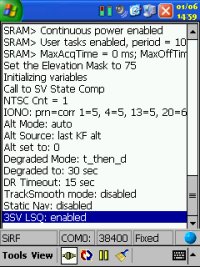
Take a look at the two screenshots below, the first is an NMEA stream, and the second is a SiRF stream.  As you can see, these are totally different and require specific knowledge on both NMEA and SiRF string sets.


Now one problem a lot of people experience is that you are receiving the total number of satellites you have a 3D fix on, but you are not seeing any satellite information for each satellite that would usually show signal strength.  The reason for this would be that GPGSV isn't enabled as part of the NMEA string.  You'll see this in the first screenshot below.  If you exit TomTom GPS Status screen and then run up WinFast Navigator, connect to the GPS Receiver, then go into the COMMAND option and for this test we will make sure GSV is set at 5, then tap OK.  What I would recommend is that you set GGA=1, GLL=0, GSA=5, GSV=5, RMC=1, VTG=1, MSS=0, User=0, User=0, User=0.  When you tap the OK button, it should then enable it.  Disconnect, run up your regular GPS program and check the satellite status now, you should now see satellite bars like in the second screenshot below.


Later on you may want to change the above settings, e.g. these will depend on the requirements you have against your navigation program.  Do you see the need to see the satellite status every five seconds ?  Or is it enough to see them every 20 seconds ?  All you really need for your navigtation program is a frequent update of your location (either RMC or GGA will do) and speed (VTG).  Again when you make these changes verify that your navigation program does still work as expected.  Unfortunately some applications prefer different sets of base data, so you may have to adjust the NMEA output to your program's preferences.  You also have to be careful when changing these settings on the NMEA and SIRF screens.  The settings you see here are not from the GPS Receiver, these are default settings within WinFast Navigator. 


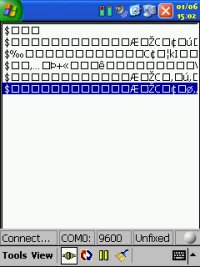
There is no way of easily telling what the GPS is set to with WinFast Navigator, so if you set something here, it could look like it's rendered your GPS Receiver useless.  If you start getting garbage appear on the DEVELOPMENT screen, e.g. lots of % or fraction symbols or square blocks, then there's something wrong. 


This can sometimes happen when you try to set the GPS to an invalid baud rate.  Simply switching it back to the correct baud rate can still appear as though the receiver is not functioning correctly.  You'll see some garbage in the screenshot to the right.


The best thing you can do here is to switch it to SiRF mode, you will see a different set of text (eg not the sentence strings in the table above), but you should be able to read it as the text will be in English.  If this then works, go back into the COMMAND option and switch back to NMEA.


Breakdown of the GPS Sentence

If you take the GPRMC line from the NMEA sentence as:-

$GPRMC,181573,A,4823.029183,N,07384.874834,W,000.09,183.4, 131200,1.8,W,D*25

You will then be able to break this down as follows:-

$GPRMC = Sentence ID


181573.00 = UTC (Coordinated Universal Time) of position fix in hhmmss.ss format (18 hours, 15 minutes and 73.00 seconds)


A = Status (A = data is valid, V = warning)


4823.029183 = Geographic latitude in ddmm.mmmmmm format (48 degrees and 23.029183 minutes)


N = Direction of latitude (N = North, S = South)


07384.874834 = Geographic longitude in dddmm.mmmmmm format (73 degrees and 84.874834 minutes)


W = Direction of longitude (E = East, W = West)


000.09 = Speed over ground in knots (0.04 knots)


183.4 = Track made good (heading) (183.4)


131200 = Date in ddmmyy format (December 13, 2000)


1.8 = Magnetic variation in degrees


W = Direction of magnetic variation (E = East, W = West)


D = Mode indication (A = autonomous, D = differential, N = data not valid)


25 = Checksum (following asterisk delimiter)

If the GPS receiver is not operating properly or it hasn't received a 3D Positional fix then most of the values will be left out and you will just see commas instead.  In the above example you can see that both the latitude and longitude values included in the NMEA sentence are represented in degrees, minutes, and decimal minutes. The latitude is shown as ddmm.mmmm, and the longitude is shown as dddmm.mmmm (see the extra d). You will then see the direction of Latitude and Longitude as N, S, E, W (North, south, east and west).  


Summary

Hopefully this tutorial has given some insight into what happens behind the scenes with your GPS Receiver, and has helped you see how GPS operates and how to fault find problems with your GPS Receiver.  Hopefully it has also empowered you into taking your own TTFF's and seeing whether or not you should be looking to change and upgrade to a better GPS Receiver.


Comments ?

Have any comments about this review ?  Post them here.

GPS Shopping