
Review by Mike Barrett
Wayfinder Mobile Navigator for Nokia 6600 mobile phones
Over the last few years mobile phone technology has been improving at a rapid pace. This has included not only the introduction of faster data connections, but also highly specified and powerful mobile phones.
There are currently 3 major
competing hardware/ software platforms in the mobile phone market:
- Nokia Series 60 mobile phones;
- Symbian OS mobile phones; and
- SmartPhones.
The first two use variants of the Symbian Operating System, whereas the SmartPhones use a version of Windows Mobile. Wayfinder will only work on the Symbian based mobile phones.
Wayfinder is a Swedish company who have been operating in the mobile phone market since 1995, and in March 2000 a venture capitalist company bought a controlling interest in Wayfinder.
Wayfinder has entered the navigation market offering an innovative mapping and routing system to rival the more traditional navigation systems on PDAs and Dedicated systems.
The Wayfinder mobile navigation software is installed on all Nokia 6600 mobile phones as a demonstration application. This is likely to bring portable navigation systems to the mass market as the sales of mobile phones far outstrip those of PDAs
This review looks at what the Wayfinder package is, how it works, where it works, and in the usual style of the PocketGPSWorld.com reviews we give you an in depth insight into the features and usage of the product.
This review was carried out using a Nokia 6600 mobile phone connected to a UK O2 monthly contract airtime agreement using the "Software Only" version of Wayfinder and both an Emtac and a Delorme Bluetooth GPS receiver. The Wayfinder software was kindly supplied by www.totalpda.co.uk
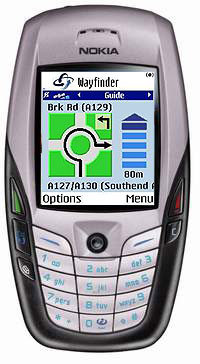
 Wayfinder on the Nokia 6600 mobile phone overview Wayfinder on the Nokia 6600 mobile phone overview
So what is Wayfinder Mobile Navigator?
It is a combination of cutting edge technologies brought together in a fusion of innovative hardware, software and networking to provide a truly flexible and modern GPS navigation system running on your mobile phone.
Basically you need a mobile phone (not supplied as part of the package), the Wayfinder software, a Bluetooth GPS, a GPRS mobile network calling plan (again not supplied) and a Wayfinder service license. There are two different packages available: a full "GPS bundle" and a "Software Only" version for those of you who may already have a Bluetooth GPS.
Wayfinder works by connecting over the Internet to a server which plans and returns the routing instructions. This map server also has access to digital mapping and can send maps to the mobile phone allowing your current position to be plotted on the phone's screen.
Whilst on your journey the phone will give you turn by turn voice instructions. If for any reason you go off course Wayfinder will detect this and try to re-route you to your destination.
Map coverage is provided by TeleAtlas and is available for Western Europe now. From second half 2004 coverage for the United States of America will be available.
Wayfinder Mobile Navigator Software only
The Wayfinder mobile navigator software only package is available for people who already have a Bluetooth GPS receiver, and just want access to the service. This package comes with: 12 months access to the Navigation service; a CD rom containing the user manuals; and an activation code. The cost of the software only version is €249 and can be bought in the UK for about £215.00 including VAT.
Wayfinder Mobile Navigator GPS Bundle
The Wayfinder mobile navigator GPS bundle provides all the components you need to get up and running with the exception of the mobile phone and airtime agreement.
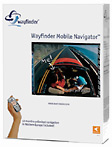 This includes: This includes:
- Bluetooth GPS receiver
- GPS charger (multi standard 110-240v)
- Leather case for GPS
- 12 Month access to the navigation service
- Activation code
- User guide.
The GPS unit that is currently being supplied is a rebadged version of the excellent Emtac BTGPS. We reviewed this GPS receiver over a year ago click here to read the review.
The Wayfinder GPS bundle is proceed at €499 and can be bought in the UK at around £320.00 including VAT.
Wayfinder Mobile Navigator Software Features (Manufacturers Description):
The following is a list of the features of the Wayfinder Mobile Navigator as provided by Wayfinder:
- The map is always up-to-date.
- The solution gives access to personalised databases such as favourite destinations and points of interests.
- The solution also gives access to company information such as yellow pages and other types of points of interests. (Not available on all markets)
- The solution provides the widest map coverage.
- You can enter the destination in many ways, both inside and outside the car and through a call-centre.
- Traffic information is taken into consideration when routes are calculated. (Not available on all markets)
- The route is calculated and downloaded extremely fast compared to traditional systems.
- The solution is completely portable and versatile and can be used inside the vehicle as well as while walking or biking.
- The solution can easily be integrated with other existing business systems for professional users.
- The service is operator independent.
- The solution can use GSM, GPRS as well as future 3G networks.
- The product can easily be upgraded for additional functionality such as a drivers journal in the future.
- The solution has substantially lower cost of ownership than traditional navigation systems.
First Things First: Getting signed up.
Before you can do anything you need to get the service activated. This is done online using the activation code supplied in your installation bundle. Wayfinder have 2 websites www.wayfinder.com is a marketing site whereas www.mywayfinder.com is the support and service site. It is at www.mywayfinder.com where you activate the account.
Wayfinder had created an account for me so I didn't get the chance to go through the activation process, but I have been informed that it is simple and efficient.
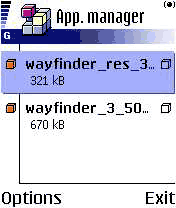 Installing Wayfinder Mobile Navigator on the Nokia 6600 Installing Wayfinder Mobile Navigator on the Nokia 6600
Once the Wayfinder service is activated you will have access to the services offered at mywayfinder.com. I will cover these in more detail later, but you will now have access to download the software required to be installed on the phone.
Once again as Wayfinder set my account up for me they also selected the phone that I was going to install to: the Nokia 6600 mobile phone. All I had to do was to download the installation files to my PC and run the PC Suite for Nokia 6600 to install the files.
Once on the Nokia 6600 the Application Manager had to be used to complete the installation. The final part of the installation occurs when you start Wayfinder for the first time. A SMS message is sent to the Wayfinder data centre
All in all it was quite a simple and painless operation. Having said that my account was already set up for me.
Connecting the Nokia 6600 to the GPS receiver
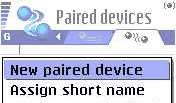 Connecting the Nokia 6600 to the GPS was also reasonably easy. Connecting the Nokia 6600 to the GPS was also reasonably easy.
First you need to select the applications menu by using the middle button on the left. Then you can navigate to the "Connectivity" folder and open that. Then you click on the Bluetooth Icon this displays the Bluetooth settings.
The Bluetooth settings has two tabs: the settings and the paired devices. Selecting the Paired devices tab you now click on options to show a context sensitive menu.
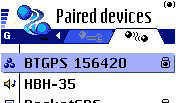 Select the new paired device option from the menu and then follow the instructions inputting a passkey as required. For the Emtac it is '0183' . Select the new paired device option from the menu and then follow the instructions inputting a passkey as required. For the Emtac it is '0183' .
When the pairing is complete you should see the GPS in the list of paired devices. This can be seen above where the GPS is "BTGPS 156420".
A word of warning regarding BT connections on the Nokia 6600. There can be only one Bluetooth connection at any one time. Is this a severe restriction? Well it could be. You will not be able to use a wireless headset, or BT hands free carphone kit at the same time as Wayfinder. This could present some legal issues about using the phone for voice conversations whilst using Wayfinder.
Connecting the Nokia 6600 to the GPRS Access Point
This is notoriously the most difficult part of the entire installation. I had had plenty of experience connecting a previous Nokia 6310i and a Sony Ericsson T610 to the O2 GPRS network so had no problems achieving this. Having said that if this is your first time it can be somewhat daunting.
Don't worry though help is at hand.
On the www.mywayfinder.com website there is a 'Configure Access Point' wizard. This takes you through each option you require from country, to Airtime provider, to phone... and eventually you will be sent the configuration details to your phone. These settings can then be applied on the phone and all should then be working correctly.
With this set up properly you will not only be able to use the Wayfinder service, but you will also be able to browse the Internet, and send/receive email. If you have a PDA or Laptop computer you will also be able to connect to the Internet using Bluetooth to these devices. Wow isn't technology fun!!
Wayfinder Mobile Navigator Functions
OK you are now all installed and ready to go so what does Wayfinder Mobile Navigator do, and how does it work.
The application is controlled through a set of 5 functional tabs: Menu; Map; Guide; Itinerary; and Destination. At the bottom of the screen are two buttons: Options and Menu. The options button displays a selection of context sensitive and application tasks, the menu button returns the main display to the menu.
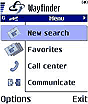
The menu screen |
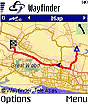
The map screen |
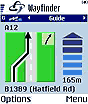
The guide screen |
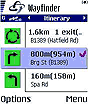
The itinerary screen |
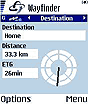
The destination screen |
The Wayfinder Menu Display
When you start Wayfinder the first screen displayed is the Menu Screen.

From the menu screen you can search for a start and finish points. Having done that you hit the options button and calculate your route.
This can be made easier by using Favorites as the starting and ending points in a route. You can just browse down the list and select your required favorite and off you go.
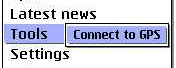
The GPS can be connects to Wayfinder on by using the tools setting on the options menu. This will show a list of bluetooth devices that you can connect to. After selecting the Bluetooth GPS you will then be able to route directly to your destination without having to enter a start point.
 When the GPS is connected to Wayfinder a satellite icon is displayed with a signal strength indicator in the main tab bar at the top of the screen. The active Bluetooth connection is shown by the dot in brackets at the top right of the screen. When the GPS is connected to Wayfinder a satellite icon is displayed with a signal strength indicator in the main tab bar at the top of the screen. The active Bluetooth connection is shown by the dot in brackets at the top right of the screen.
|
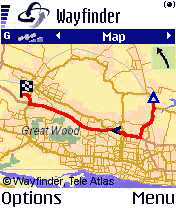
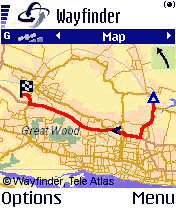 The Wayfinder Map Display The Wayfinder Map Display
Once you have your route planned you will be shown the guide screen. You can move the joystick to the left to select the map display.
Wayfinder has to go back to the map server to get the image to display and this takes a number of seconds. When it is complete the map will load showing both start and end points on your route, with the route highlighted and sufficient detail on the map for you to get an idea of your location.
When the map is displayed a small arrow head indicates your current location in the journey. This will be updated with your position as you drive the route. If you do not deviate or zoom in then there are no further requests made of the map server.
 At the top right of the map display is an indication of the next turn to be made, in this case bearing left. At the top right of the map display is an indication of the next turn to be made, in this case bearing left.
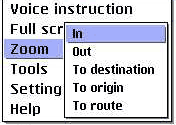
The options button brings up the context sensitive menu to the left. From this menu you can set the display to full screen, or select one of the zoom options displayed.
The options are self explanatory. If you are in the middle of a route and your GPS is on, as would be normal there is another option: Zoom to Position. This gives a detailed map of your current GPS position. |
The Wayfinder Guide Display
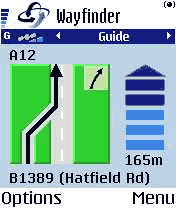 The Wayfinder guide display is the heart of the navigation system. This single screen contains all the important navigation information you require. The Wayfinder guide display is the heart of the navigation system. This single screen contains all the important navigation information you require.
First and foremost it shows what you are to do at the next turn. This is the large graphic. Tucked into the top of the large graphic is the following instruction indicator.
To the right of the turn indicator is a distance to turn marker. When you are approaching your turn the marker gradually changes from dark blue to light blue.
Above the turn indicator is the name of the road you will be turning onto, whilst underneath is the name of the road that you are currently on.
You get plenty of warning before turns. The first notification comes at 2 kilometres, then 1 kilometre, 500, 300, 200, 100 meters and "turn now".
|
 The Wayfinder Itinerary Display The Wayfinder Itinerary Display
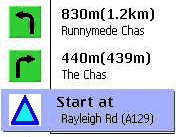
The Wayfinder itinerary screen shows three turns.
Each of these turns contains a small graphic depicting the action to take at the turn, and various details about the turn, distances between turns and overall, and the name of the street.
 There is not a lot more to be said about the itinerary display other than that you can move around the turns by using the up down actions on the joystick. There is not a lot more to be said about the itinerary display other than that you can move around the turns by using the up down actions on the joystick.
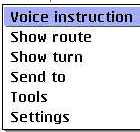
Interestingly you can use the context sensitive menu to play the voice command for that turn. I am not too sure the benefit of that, but it is nice the hear your navigator's voice again.
You also have options available to get a map view of the entire route, or the selected turn.
|
The Wayfinder Destination Display
 The Wayfinder destination display simply shows the basic information about your route. Your destination, the distance to go and the Estimated Time of Arrival (labeled ETG). The Wayfinder destination display simply shows the basic information about your route. Your destination, the distance to go and the Estimated Time of Arrival (labeled ETG).
There is a compass indicating the general direction you should take to arrive at the destination.
Again not a lot else to say about this screen either.
One thing that I should mention is that the screen on the Nokia 6600 is not too large. It is 176x208 which is about 35mm x 45mm or 1 3/8 x 1 3/4 inches, which makes it quite difficult to see some of the smaller lettering whilst driving. It is certainly almost impossible to see the GPS cursor on the map display. This makes the guide and itinerary screens probably the most useful.
|
Routing with the Wayfinder Mobile Navigator
The previous sections looked at the main functionality of Wayfinder, but what is the routing like? How accurate are the planned routes? How much data is downloaded?
As mentioned above the routing for Wayfinder does not take place within the phone software, but on the Wayfinder map server on the Internet. This means that if there are any tweaks or changes in either the maps or routing algorithms then these happen centrally and the next time you request information you get the latest data or programming.
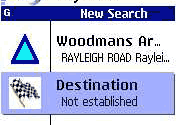
So how does it work? Firstly when you are creating your route you will probably search for a place. You do this by selecting a country and a town, then selecting a road. When you select some of the items the software will query the Wayfinder server. For instance I was looking up Guarda in Italy and I got a list of places with Guarda in the name. Scrolling down the list I selected the one I was interested in and went to find the street in a similar manner.
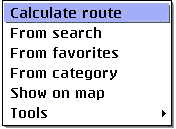 Once the start (or Origin) and destination details have been set all you have to do is to hit the options button and select calculate route. This then sends your details off to the server which will calculate your route and then send the route details back to the phone. Once you start moving if you don't deviate from the planned route then there will be no further exchange of information with the Wayfinder server. You can, of course, request the download of a map which will involve additional data transmission. Once the start (or Origin) and destination details have been set all you have to do is to hit the options button and select calculate route. This then sends your details off to the server which will calculate your route and then send the route details back to the phone. Once you start moving if you don't deviate from the planned route then there will be no further exchange of information with the Wayfinder server. You can, of course, request the download of a map which will involve additional data transmission.
When selecting your start and end points you can use either the search as described above, your favorites, or a Point Of Interest (POI) category.
Routing is much easier when you have the GPS connected and fixed. In this case the origin can be taken from the GPS and all you need to supply is the destination. If you want to navigate to a favorite all you need to do is select it and the route will be generated. This is a great feature to get you back home or to the office, or one of many common places you visit. The real beauty is that you don't actually need to know where you are, as long as you are within the map coverage of Wayfinder.
Quality of the routes generated
Having driven a large number of routes during the testing period I think that on the whole most of the routes generated are valid. By that I mean that they will get you from A to B in probably the fastest way possible.
I tried it on a couple of routes from Essex UK to Wales, and though not difficult to plan the routes came out as I would have driven them anyway. As with most routing applications 'Local Knowledge' will always provide better routes where you know the blockages and holdups and can skirt round them. A few journeys where taking a longer route using trunk roads rather than negotiating town centres would have been more appropriate were made. But there again I still reached my destination.
 I did find however that on a couple of occasions Wayfinder tried to route me down two unmade roads when the natural route goes down two main roads, and a faster route would start off in the opposite direction. Typically this happens when I leave my house and travel in a southerly direction. The result of this is that I get my route planned then immediately go off route, and the route needs to recalculate before I have traveled 500 metres. I did find however that on a couple of occasions Wayfinder tried to route me down two unmade roads when the natural route goes down two main roads, and a faster route would start off in the opposite direction. Typically this happens when I leave my house and travel in a southerly direction. The result of this is that I get my route planned then immediately go off route, and the route needs to recalculate before I have traveled 500 metres.
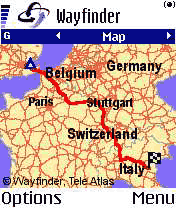 A very large plus for Wayfinder is that it can navigate across country boundaries. There are no blockages as with some other applications. It even knows how to get over the English Channel, which again is more than a lot of other street routing applications can do. A very large plus for Wayfinder is that it can navigate across country boundaries. There are no blockages as with some other applications. It even knows how to get over the English Channel, which again is more than a lot of other street routing applications can do.
To test this I planned a route from Essex UK to Guarda in Italy, a place we visited this year on vacation. Although I did not examine the route in minute detail it did get to where it was supposed to and it broadly took the same route as we did. Not only that but the time taken to generate the route did not seem much longer than normal route generation. So full marks for long distance routing.
Re-routing
Depending on your settings (see later) if you drive off the planned route the software will automatically re-route you which may involve just 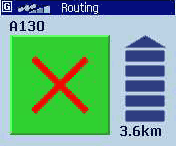 putting you back onto the original route or completely changing the route if a new route is more appropriate. putting you back onto the original route or completely changing the route if a new route is more appropriate.
Re-routing works in the same way as routing with the exception that the start point of the route is taken from the current GPS position. The Wayfinder server is accessed again and a new route is created.
Interestingly I tried this on one of the town centre avoidance journeys and once the application had decided to change the route it managed to pick the exact route I would have taken without GPS. This compared to a routing system that I had on my PDA which attempted to send me through back streets avoiding an obvious route.
Data Transfer and Data Costs
One of my great concerns with this sort of system is that you have no control over the amount of information being downloaded from the server. In some circumstances the cost of GPRS data can be quite high and is compounded by different roaming agreements.
In the four weeks that I have been testing Wayfinder I have made a journey about once every 3 days, some long some short. in that time I have used less than 1 Mb of GPRS data.
As a simple test I created the route from the UK to Italy as described above. This transmitted 15k and received 24.5k for the selection of the route, the routing, and the download of the overview map a total of 39.5kb. If I had then managed to drive the route without deviating, and assuming no increase in GPRS data costs (I wish), I could do that journey about 25 times for the cost of 1Mb of data or £2.65 (on the O2 contract).
Roaming fees are one of my main concerns about international travel using Wayfinder. It is a wonderful concept just being able to fire up the GPS and navigate to wherever you want to go without the need to preload maps and all the fuss and possible errors that can creep in. What if you have to take an unexpected detour? Wayfinder is perfect for these situations. The drawback is the charges and terms phone providers. On the O2 network Roaming GPRS cost between £7.05 and £21.15 dependant on the country and the provider you are using.
You need to be careful to select a single provider when you enter a different country as some have minimum charges and if you switch between providers you will be hit twice for minimum downloads.
Settings
There are a few settings available for wayfinder split into 3 categories: Phone, Route and Comm. All of the settings are accessed from the context sensitive options menu.
Phone Settings
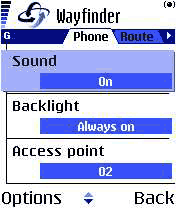 There are 4 settings for the Phone tab section: Volume, sound, backlight and Access Point. There are 4 settings for the Phone tab section: Volume, sound, backlight and Access Point.
The volume setting is self explanatory. This just sets the volume level of the voice instructions.
The sound setting can be either on or off.
The backlight can have 3 settings:
Normal operates as per phone settings.
Only on route back light on whilst navigating
Always on keeps the backlight on whilst Wayfinder is running.
The last setting is the access point. This can be set to "Always ask" in which case you will be prompted to select the access point to connect to each time the server needs to be contacted, otherwise you can set a default access point and you will not be prompted.
Route Settings
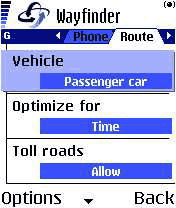
There are a number of configuration options available to control the routing of the Wayfinder software:
Vehicle: can be set to Car, Pedestrian, or Taxi. I was a bit confused about Taxi at first until I read the help file. The teleatlas data knows about Bus Lanes and routes that are restricted to normal cars and can allow for this in the routing.
Optimise for: Your route can be based on distance, time or traffic information (where available).
You can select to route using toll roads or avoiding them.
You can select to use or avoid motorways.
Finally, you can select to have automatic re-routing on or off. If this is selected then whenever you go off route then Wayfinder will contact the map server and recalculate a new route for you.
Missing Settings
The most obvious missing setting is the units of distance. All distances reported in Wayfinder are metric. This is obviously not a problem if you are on Mainland Europe, but a large portion of the potential Wayfinder Market still uses imperial measurements. With the introduction of USA mapping later this year the ability to report in miles and yards as well as kilometres and meters will be crucial to the success of the product.
Other Features
There are many other features that I have not mentioned, such as communicating your route and position with other Wayfinder users, the availability of a call centre to assist you whilst traveling etc.
Probably the one of most interest is the integration of
TMC (Traffic Message Channel) this is not actually available at the time of writing, but is scheduled for introduction in Q1 2004. Initially it will be available in Germany. With Traffic Information available Wayfinder can advise users when they are approaching trouble spots and re-route around them as appropriate.
Maps and Coverage
The Wayfinder maps are provided by TeleAtlas one of the main GIS data providers. The maps are currently updated on a quarterly basis and will shortly have updates available when they are updated at TeleAtlas dynamically.
The current coverage area includes: Western Europe (
Denmark, Finland, Austria, Belgium, France, Germany, Great Britain, Netherlands, Italy, Luxembourg, Norway, Portugal, Spain, Sweden and Switzerland) and from second half 2004 the service will be expanded to include the USA.
Despite having the map coverage of the above countries, the actually data varies from country to country. For instance the UK, Germany and others are 100% covered to street level, whereas other countries such as Portugal and Ireland only have 100% coverage in the main cities, and major roads elsewhere.
The POI database is part of the Mapping data and this can also vary considerably with the UK having 85600 and Italy having
288300.
Currency of Maps
With the mapping data being held in a central location one would expect that the roads would be completely up to date and the quality of the data would exceed that of other mapping products. TeleAtlas supply quarterly updates to Wayfinder so the maps should be no more than a few months old, reflecting all recent changes.
Sadly that does not seem to be the case. A new road was built over 2 years and opened in February 2003 over 10 months ago. That road is not included in the TeleAtlas data. As this road is a major North-South route linking the A13, A127 and A12 it is a common route to be taken in my travels. The effect of not having this road in the database causes Wayfinder to continually nag about being off route, and then trying to re-route as we cross over other roads.
It will be interesting to see when the new Toll section of the M6 in the UK will be included in the map data. I had a quick look for it on the www.mywayfinder.com site, but couldn't find it.
In the near future TeleAtlas will be providing dynamically updated maps to Wayfinder. This means that any new roads or corrections will be included as they occur. What this will actually mean is that Wayfinder will be as current as TeleAtlas. If TeleAtlas have not got round to surveying the new roads they will not be included.
mywayfinder.com Website support functions
So far everything described has been centred around the functionality in the phone and the connectivity to the Wayfinder map server. The design of Wayfinder is, as mentioned above, centred around the map server and not the Wayfinder application. This means that there is more than one way to access your service. As you may have guessed when you signed up the second way is via the Internet.
Wayfinder have provided a second website called www.mywayfinder.com which provides 4 main functions: Management of Favourites; Localise; Route; and Service.
Management of Favorites
Although the favorites can be managed on the Nokia 6600 it is far easier to handle them on the Internet. Selecting one of your existing favorites displays the location on a map and allows you to modify its location, or description. You can use the Localise function to create new favorites. These will be synchronised with the phone when a connection is made to the server.
Localise
The "Localise" function is really a search facility. You enter the address, city and country and the server will locate the position on a map for you. Once you have found a particular place you can then zoom in and out and also set the place as a Favorite.
Route
mywayfinder.com also allows you to creates and email routes. These routes don't seem to be transmittable to your phone though. Having said that it produces a good route plan with turn by turn instructions.
I repeated my route from the UK to Italy on the website and was able to download and check the route plan. Strangely ;-) the route selected was identical to the one I mapped out using a paper atlas.
There is scope for lots of enhancements on the routing page, primarily: the use of Favorites for Origin and Destinations; and the ability to browse and click to set origin and destination points.
Service The service section of the mywayfinder.com site allows you to modify your personal details and settings. It also contains some help facilities such as the Wayfinder manual and the Access Point configuration wizard.
Issues and Problems
A number of issues and problems were encountered during my testing. It would be fair to say that these were irritating rather than critical. Most of the problems seemed to revolve around GPRS or lack of GPRS to be more precise.
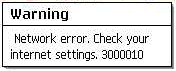 When there is no GPRS signal then the Wayfinder system simply cannot work as it cannot make the connection back to the map server. This should not be an issue if you create your route when you are in an area with a strong signal, but what happens when you go off route in the middle of a weak or no signal area? When there is no GPRS signal then the Wayfinder system simply cannot work as it cannot make the connection back to the map server. This should not be an issue if you create your route when you are in an area with a strong signal, but what happens when you go off route in the middle of a weak or no signal area?
The answer is that Wayfinder will try to re-route you. The problem is that a connection cannot be made to the map server. Therefore no route can be provided.
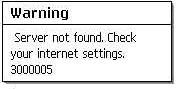 I have also experienced a couple of failures to connect to the Wayfinder Map Server even when I have had a strong GPRS signal, proven by Web and email access. Again this prevents routes from being generated. I have also experienced a couple of failures to connect to the Wayfinder Map Server even when I have had a strong GPRS signal, proven by Web and email access. Again this prevents routes from being generated.
On a couple of occasions I have experienced Wayfinder and or phone crashes. Sometimes these seem to be related to a weak GPRS signal where the system is continually trying to re-route at others it seems to be connected with a failure to connect to the Wayfinder server.
Although I have documented these problems they were never significant except in the case of the application or phone crashes when it would have been dangerous to try and reset the application.
The volume level of the voice instructions on the Nokia 6600 was adequate when driving at town speeds without the radio on, but was far to quiet at motorway speeds. As the phone will only accept one Bluetooth connection at a time there is no way of overcoming this issue.
There is an implicit reliance on Wayfinder to continue to provide the service. With traditional navigation systems you are buying the map data and application and these will still work if the company goes out of business or stops development on a particular product line. With Wayfinder you are buying the service of the map server, and are totally reliant on that service.
Conclusion
Wayfinder is an innovative leading edge technology navigation system. It melds the GPS, Bluetooth and Wireless technologies into a very useable navigation system.
I did have some initial reservations about the amount of data and the cost of the data connections. My experience seems to indicate that the cost of use is very reasonable, though this will be borne out in time. I am still concerned about roaming GPRS costs.
During my testing and evaluation there were a few issues with the server and network access, but these were few and far between.
I was impressed by the ability of the package to precisely route from the UK to just about anywhere in Europe. Though there were some minor issues with local routing and map currency.
All in all I think that 2004 will be the year of mobile technologies. Wayfinder is the first of a new breed which will broaden the use and functionality of portable navigation systems. |
Pros
- No need for maps and PC connections
- Routing throughout Europe over borders
- Lightweight and portable
- Great battery life on Nokia 6600
- Can be used for driving, walking and boating (no proper topo maps though)
- Maps are the most current available
- Portable across Symbian based phones
- Central server based easy upgrades
Cons
- Reliant on central server availability
- Reliant on GPRS (or Wireless) availability
- Poor volume on voice instructions at speed
- Needs imperial measurements
- Maps could be more up to date
- Potential cost of roaming GPRS data
- No hard copy of map data should Wayfinder stop providing the service.
|
Purchase from

|
































