
Click here to go to the PocketGPSWorld Speed Camera Database
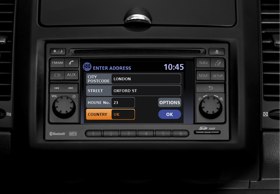
You will need:
A PocketGPSWorld Subscription
A USB mass storage device (256k or larger)
Installation
1. Select and Download our Nissan Connect database here. Choose UK or another country as required.
- NB - there are 2 options: 'Nissan Connect' and 'Nissan Connect (Old)' - both have the same data, the only difference is how the text is displayed on screen.
2. Extract the files from the .zip file that is downloaded.
3. Delete all files in the download except pocketgps_xx_sc.csv (xx = country code for your choice of files e.g. uk, eu, us etc) so for uk files it would be pocketgps_uk_sc.csv.
4. Connect USB mass storage device device (USB memstick) to your computer.
5. Create a folder on the USB stick, and call it myPOIs. Then make ANOTHER folder inside the myPOIs folder. Call that one myPOIWarnings.
(So the folder structure is now x:\myPOIs\myPOIWarnings, where x= the drive letter of the memory stick. The : and \ characters are computer terms used to indicate these are folder names. You do not type these characters.)
6. Copy the .csv file downloaded in Step 1 into the myPOIWarnings folder on the memory stick.
7. Connect the mass storage device to the USB audio socket on your Connect System. Note that other models may have the USB port by the gearstick.

8. If a USB mass storage device with new POI data is connected, the system will ask if you want to transfer the data.
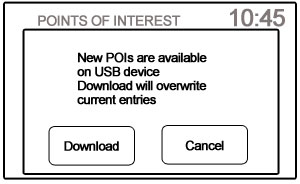
9. Select the 'download' option using the touch screen. After about 20 seconds the installation is complete.
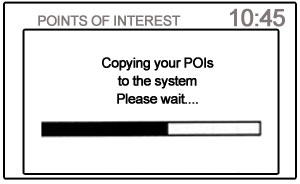
10. New POI data will overwrite POI data already in the internal memory Once downloaded, the POIs will be shown in the list as follows:
Navigation > Destination > Points of Interest > My Points of Interest > myPOIWarning > pocketgps uk sc
11. You can modify the warning distance from the default 250yards by changing the setting in the setup menu (Setup > Navigation > POI Warning Distance)
12. A maximum of 8 MB of POI data can be added. The PocketGPSWorld.com datbase will use about 0.5MB.
IMPORTANT: PLEASE BOOKMARK THIS PAGE NOW FOR FUTURE REFERENCE
Add this page to your list of favourites/bookmarks. Please right click here.
NEED HELP? - > - > - > |
Please note that the safety camera warning software is a free add-on to membership and as such is not a commercially guaranteed product. Both the camera database and the site offer community support and help only. That said, the answers to the vast majority of questions are provided within 24 hours.
Click here if you have membership sign-up problems.
Click here if you're downloading problems after reading the instructions above. |
|































