 Review by Dave Burrows Review by Dave Burrows
Introduction
TeleType is a product that has been around for a while now, currently in it's latest incarnation, TeleType provides software for both Street Routing and aviation. The version of TeleType we are reviewing here is v092003 (Sept 2003).
Peter has recently reviewed TeleType for aviation use, and this review is geared towards street routing. One thing I should start with and point out is TeleType is predominantly a US based company, and because of this the application is geared more towards a US based market. In the current version navigating roundabouts is an issue, but this will be rectified in the next minor release.
I was surprised to see that TeleType are using TeleAtlas as their geodata provider and not NavTech. The reason being for this is that NavTech are usually used when maps can be imported onto the PC, but this is the first product I have seen that uses TeleType maps on the PC also. Maps are clear, concise, and very colourful.
Dual Purpose
TeleType is the only application I know that is designed for Street Navigation and Aviation all in one hit. There are other products like Memory-Map, but these are oriented more towards topographical use, TeleType have done well to include both Aviation and Street Navigation maps in a single product set (maps obviously purchased separately)
In the box
TeleType World Navigator comes in a whole host of different bundles. You can purchase WN just as software, or in a hardware bundle that comprises of either a rugged Compact Flash/PCMCIA GPS Receiver, GPS Mouse, or TeleType's new Bluetooth GPS Receiver.
There are also two software bundles that you can select. Either European which covers European Street Maps, or the Aviation edition which covers European Streets and WorldWide Aviation Maps.
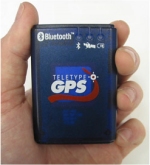 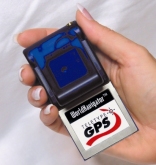
The copy we received from TeleType was the latter to write both an aviation review (available here) and this comprehensive road review.
Installing Software
Installing the software is pretty easy and straight forward. Like several other products on the market, you have the option of installing TeleType both to PC and Pocket PC. TeleType also support older legacy systems like Windows CE.
First you have to install TeleType and maps to the PC. You then need to install the maps for your region onto the PC. Once completed, you can run TeleType on the desktop and use these maps by using the FILE | LOAD | LOAD MAP and LOAD IN VIEW | STREET to see street level maps. Once you are happy that the maps are fully installed for your region, then you can transfer these to the Pocket PC by using TRANSFER | STORAGE MAPS | STREETS and this will then commence transferring maps to the Pocket PC. Street Level maps for the UK came in at 93mb in size, which is on par with most maps from other GPS companies, especially those that use TeleAtlas. Another way of installing all maps is to use the TRANSFER | STORAGE MAPS | EXPORT ALL MAPS TO PDA from the PC.
Pocket PC Setup
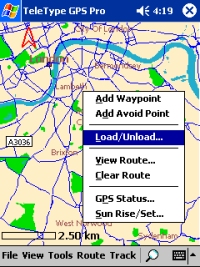 Once TeleType and maps are installed on the Pocket PC, you can run up TeleType and tap FILE | LOAD | LOAD MAPS (as we did earlier on the PC), select a file to load, e.g. country file GreatBritain_place.ttm and then zoom in to an area of the country you want to use and select FILE | LOAD | LOAD IN VIEW | STREET MAPS to gain street level maps on the Pocket PC. Once you have selected this, you can zoom in to great details on street level maps. If you want to go to an area of the country that doesn't have street level maps loaded, you can again move to that area and select FILE | LOAD | LOAD IN VIEW | STREET MAPS and this will show you street level maps. Once TeleType and maps are installed on the Pocket PC, you can run up TeleType and tap FILE | LOAD | LOAD MAPS (as we did earlier on the PC), select a file to load, e.g. country file GreatBritain_place.ttm and then zoom in to an area of the country you want to use and select FILE | LOAD | LOAD IN VIEW | STREET MAPS to gain street level maps on the Pocket PC. Once you have selected this, you can zoom in to great details on street level maps. If you want to go to an area of the country that doesn't have street level maps loaded, you can again move to that area and select FILE | LOAD | LOAD IN VIEW | STREET MAPS and this will show you street level maps.
This feature allows you to cut down on memory usage which is a good thing, but if you were traveling from one end of the country to another, you may need to load the tiles for street level use when you start driving them.
Another very useful feature to cut down on memory usage by not having all the maps loaded at once is to tap and hold an area of the map that you see on-screen to bring up the context menu and select Load/Unload and this will unload that small segment of the map associated with the map file.
 Custom Settings Custom Settings
Like many products Teletype have all the default options like Center on screen, show a trace cursor, use full screen mode, etc. TeleType also have options specifically for Aviation users like showing all Aviation Display Preferences, Night Vision, marking of bearing etc. For Street Navigation use which is what we are concentrating in this review, you have the ability to show Highway maps, POI's, Auto Loading/unloading of Local Maps and POI's, setting the maximum amount of visible waypoints, showing all types of Restaurants (US Maps only), audible and visual indicators for directional turns etc. TeleType also let you set quite vigorously the speed, length, angle and position in various unit types which is a gripe I always have not being able to select on most products. Under the Preferences | Navigation tab, you also have the option to change your cursor to an (!) exclamation sign and beep if you drive over a certain speed (customisable), change the display to head up or track up, and customise the navigation to land usage or aviation usage (very important!). Night vision in v092003 is available via the Aviation tab in the preferences screen, but in v122003 this will be moved to where it should be for Road users under the Display tab.
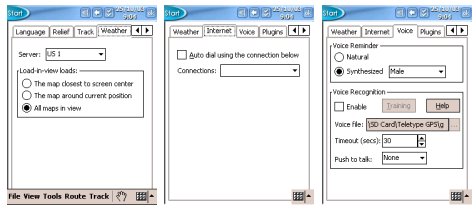
TeleType also has the option of enabling/disabling a track menu for further tack usage work, a weather tab that allows you to connect over a mobile data connection to a server on the internet that will allow you to download weather reports for TeleType which could be very useful but only US and Canada servers are currently supported.
Voice Navigation and Voice Recognition
One thing I have started to like is Fonix text to speech (TTS) engine, and like CoPilot, TeleType also offers this feature. You have the option of selecting a natural (WAVE) file, or synthesised Male, Female, Child, Aged male, Aged female voice. One feature I love the look of is Voice Recognition, you can train TeleType to your voice and assign it commands which is a great feature, but when driving with a lot of background noise, I'm not sure how good this feature will be when in the field. TeleType do give you an option at the bottom of this screen where you can specify how long you want the PDA to listen to your commands before it automatically turns off it's "listening mode". You can also use the Push To Talk feature to manually configure which buttons you should press to toggle the PDA's"listening mode". This should minimise the background noise interference that might occur in Voice Recognition mode.
Searching the Database
One of the first things you will want to do once you have TeleType installed before driving a route is to search the database for a destination point. TeleType's address lookup worked fairly well using the Tools | Find | Address option. It wasn't perfect as I did manage to catch it out on a number of occasions. Searching for the country, city and street name provided more desirable results. However, trying to create a new route using Route | New at first and typing the same information came back with an error saying "Your search doesn't match any of our data". No matter which address I typed, I couldn't get an address to be accepted for a new route. After talking to TeleType we realised I was opening up one of the other map files and not the GreatBritain_place.ttm file. Once I opened this I managed to enter new addresses for destination with ease.
 Navigating Navigating
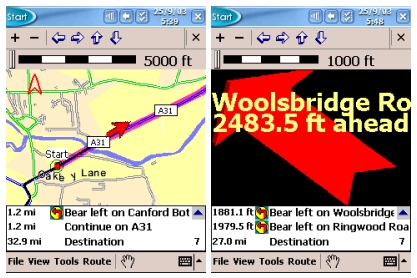
Whilst driving you will see the standard display from TeleType which is a large map window, a ruler above and below a list of directions.
When approaching a turn, the screen will change for approx 2 seconds and display a big directional arrow, giving the road name to turn onto and also speak the text allowed if you are using the Fonix TTS engine. One thing I didn't like is that there was no way of customising this screen. Two seconds really isn't enough time to glance down at the screen and interpret the information. I believe this has been programmed this way to make sure you keep your eyes on the road, and just listen to the voice directions, but sometimes you do have to glance down, and this screen doesn't stay on for as long as it really should which is a shame.
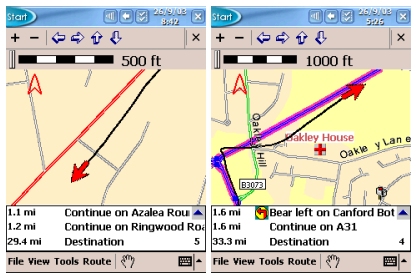
 If you turn off the Re-Routing option, you can see the track being drawn on the map for where you are driving, which I kind of liked, because if you did veer off course, you could see what you needed to do to get back on course. Great for if you wanted to go out walking around town, but didn't want to be redirected at the next corner all the time. If you turn off the Re-Routing option, you can see the track being drawn on the map for where you are driving, which I kind of liked, because if you did veer off course, you could see what you needed to do to get back on course. Great for if you wanted to go out walking around town, but didn't want to be redirected at the next corner all the time.
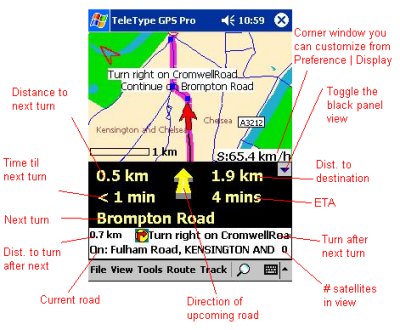
TeleType do offer multiple configuration options here for how the initial map screen looks.
You can either have a standard map style view like above with a white border information bar that gives you information about your next three turns/route instructions, or you can go for a more of a navigation panel look to give you this information on screen all the time.
The screenshot to the right (above) shows how you can customise the map screen and choose which features you see on screen when you want them.
 Snap To Road Snap To Road
One thing that many Navigation users take for granted now is the snap to road function. No GPS system is 100% accurate, the best is only 95% accurate, and the faster you travel, the more inaccurate they become. Due to this you will not always be on a road, so most software will entail complex algorithms to "snap" you to the nearest road. Sometimes this can sometimes cause problems because snapping may snap you to the wrong road (as many have found out), but snapping is usually 80% accurate. TeleType don't snap you to road, and also include a track of where you have been, so don't be disappointed when you see you are off road, this means that either your positional data is not accurate (requiring more satellite data), or there may be differences in the map data to your current position.
 Tracks Tracks
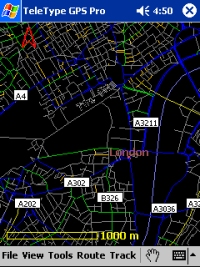
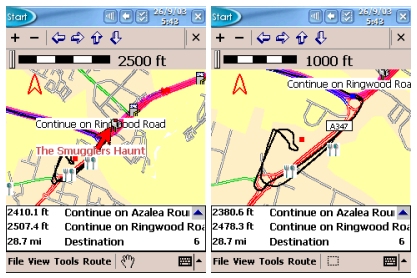
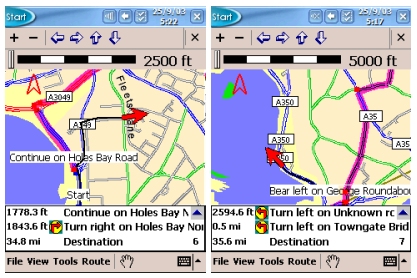
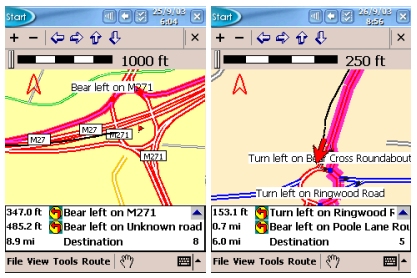
Track information can be very useful if you want to see where you have been. I decided to take a stop on my journey to the local supermarket, and like most supermarkets, they have large car parks, all off road with minor roads adjoining them. You will see from the two screenshots on the right at different zoom levels, coming along the blue road and turning right at the roundabout, along to the next roundabout (bottom left of screenshots), around the roundabout into the supermarket, then re-commencing my journey by coming out of the supermarket car park, turning left at the roundabout, and a left again at the next roundabout taking me back to the blue road. If you would like a log of where you have been you can also use the Auto-Mark Current Position feature under TOOLS | POSITION | AUTO MARK POSITION and you can then customise how often a point is created (like a breadcrumb trail).
Satellite Screen
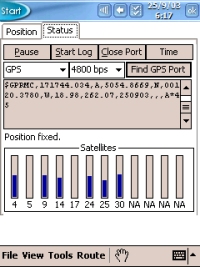
The Satellite screen shows the various satellites you have a lock on. If you look at the screenshot on the right, you will notice from top to bottom on the status screen a PAUSE button to pause the NMEA stream, a START LOG button to create a log file, CLOSE PORT to close the GPS port and turn off the GPS Receiver (if Compact Flash), and a TIME button (allowing you to reset the time of the PDA).
Below this you will see the GPS settings with baud rate, a FIND GPS PORT button, below this the NMEA window where you will see the data being received from the satellites, and at the very bottom a list of satellite numbers and signal strength bars.
This can be used as a good diagnostics program. If you are experiencing problems receiving a satellite signal, you can go to the GPS Status screen, see if you are getting any blue bars appearing, the higher the bar the better.
If you are not seeing any bars, then check the NMEA window above this as you may not be receiving any data, or any legible data.
 Re-Routing Re-Routing
By default because TeleType is a multipurpose product, it is used for both Street Navigation and Aviation, the re-routing option is defaulted to disabled. This is mainly because of aviation users, the last thing you want to do is to have Teletype automatically start to divert you by road when you're flying a plane. This could have been done a little better, when you install TeleType, an option could be given to pick Land use or Aviation use, or both. If you had this option, a default config file could be applied for the relevance of use, and I think this is something TeleType should look at for future versions, and will make it easier to get TeleType up and running quickly. Perhaps even a wizard screen which can be turned off when you start TeleType giving you the option to use the current settings, or aviation or street navigation perhaps ? I have spoken to TeleType about this and they are happy to add this to their wish list for future releases. This will only be seen when complete and when both Aviation and Street Navigation products are installed. If you leave Auto Re-Routing off, then you will see the original route calculated and highlighted, and also your track of where you are driving. This can be good if you want to visually see where you are going wrong, but personally I would prefer Auto Re-Routing enabled.
Preferences
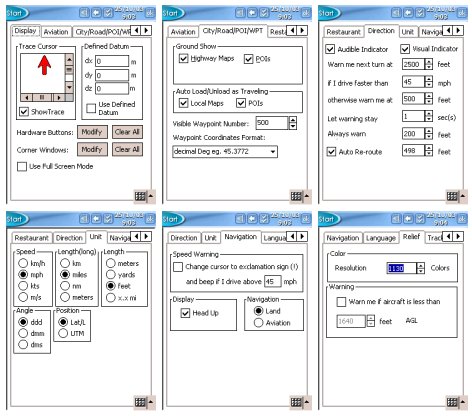 Under VIEW | PREFERENCES there are a whole host of options you can set. Under the Display tab, you can set your trace cursor, whether to show a trace on the map screen, and modify the hardware buttons or corner windows for various functions. Also you have the option to view full screen. Under VIEW | PREFERENCES there are a whole host of options you can set. Under the Display tab, you can set your trace cursor, whether to show a trace on the map screen, and modify the hardware buttons or corner windows for various functions. Also you have the option to view full screen.
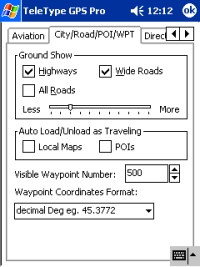
Under the CITY/ROAD/POI/WPT screen you can choose whether to show ground entities like Highway Maps and POI's. You can also set the maps to Auto Loading and Unloading to free up memory and set the maximum of visible waypoints which can help speed the program up if a lower number is selected.
Under Direction you can set whether to be notified by voice, also add a visual indicator, and set the various warning segments, e.g. Warn at 500 feet, warn me next turn at 2500 feet and the most important feature Auto Re-route.
Under the Unit tab, various units can be set for speed, distance, angle and position.
 The Navigation screen gives you the option of changing the cursor to an exclamation if you are over a set configured speed limit, change view to head up or north up, and specify whether you are using TeleType for land or aviation usage. The Navigation screen gives you the option of changing the cursor to an exclamation if you are over a set configured speed limit, change view to head up or north up, and specify whether you are using TeleType for land or aviation usage.
TeleType also has the option of retrieving weather data from an internet server. Currently US and Canada servers are the only ones configured. You can also change the internet settings and change the voice setup between a natural or synthesised voice, and set Voice Recognition.
Routing Algorithms
Routing Algorithms weren't as spot on as I would have hoped, I suspect giving a percentage wise I'd rate them at about 80%. It was better than some programs I have tested where you would be taken way off a major route to use minor routes. TeleType was fairly good here, but algorithms could be improved. Peter experienced a lot of problems with TeleType around the countryside rather than being taken down major roads, TeleType would direct him round the local farms.
Road Avoidance
TeleType do have the facility of being able to avoid a road on your journey by tapping and holding the stylus on the road in question and then selecting ADD AVOID POINT or you can just tap a road and then select the Avoid Here button and then tick the box that says Then Re-Route.
 Problems Encountered Problems Encountered
Being able to route to a destination without using Waypoints but using addresses was near on impossible. This is not good for a Street Navigation product and seriously needs to be addressed in the next release!
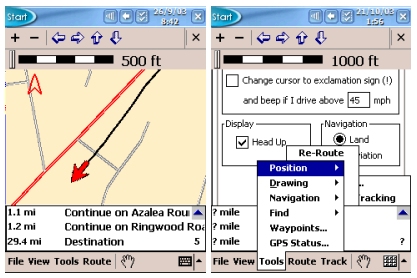
Another problem I experienced on a number of occasions was that sometimes the display became corrupted. The first screenshot on the right shows the map. After I had pulled over, decided to go into a few menus, the display started corrupting. You can see this as it still shows parts of previous screen options, and also two menu overlays on screen. The main part of the display where the map sits really wouldn't refresh. Even forcing a manual refresh created the second screenshot on the right. The only recourse I had was to exit and re-open TeleType. However soon after it I would experience a corrupted screen. I thought initially this may have been due to too much maps being loaded, or too many POI's, so after unloading the maps and disabling the POI's, it didn't make any difference. This has happened both in the 092003 release and the latest beta copy TeleType sent me.
 I also experienced a screen refresh problem where TeleType would refresh the screen every 2 seconds, but it would take another 4 seconds to re-draw the screen, followed by another 2 second refresh. I also experienced a screen refresh problem where TeleType would refresh the screen every 2 seconds, but it would take another 4 seconds to re-draw the screen, followed by another 2 second refresh.
This bug was fixed in the late 092003 beta TeleType sent me, which made life much easier. I am told that existing customers in June/July 2003 had received the patch if they had registered via email and should already have this patch.
A further problem we experienced which we usually only see on NavTech maps is that on a number of motorway junctions we were asked to come off a motorway, drive up the slip road, drive straight across the roundabout and back down the slip road to re-join the motorway. These instructions were given rather than continuing on a motorway. NavTech maps tend to have this problem, but this is the first time I have really seen this on TeleAtlas maps, which did surprise me a little. Perhaps this was more down to the routing algorithms of TeleType. The Routing settings we used were Quickest Path with Via Ferry ticked, and Routing Area Size set at 40%. The journey consisted of 60% motorway and 40% major roads. I spoke with TeleType about this and they are aware of this problem as of the 092003 release and have been in the process of making modifications to work with the map data they have for the 122003 version as well as creating a patch for 092003 version customers.
How does TeleType Stack Up
TeleType has all the fundamentals of a good product, however many of the features need to be worked on. If routing algorithms for the UK can be improved upon, and address searching fixed, this will go a long way to making it a better product for the UK/European market. How does it compare with the Top 5 ? It still has a long way to go. TeleType doesn't include any of the bells and whistles that you would expect from the Top 5 products for instance, no Customisable POI's, third party plug-in support, select an alternative route, safety screen, large navigation buttons for ease of use when driving, 3D or birds eye view, ability to demonstrate route offline, ability to give the driver much more information on a Safety Screen like next road/motorway, current road, ETA (Estimated Time of Arrival), time to destination, distance to destination, journey length, display of current speed. Also the ability to always zoom to planned route, congestion zone avoid area and warnings, ability to set road speeds to fine tune routing algorithms and ETA's. If TeleType can start looking at adding these sorts of features, then I can see no reason why TeleType won't enter into the Top 5 products in the future.
New Features in December (1203) Release
 TeleType have just released December (1203) Release and have included the following new and updated features. We will be re-reviewing TeleType shortly with this new release, but for now you can find the new features at the TeleType Website. I have been talking with TeleType about some of the features that should be added into future releases and TeleType have come back and said they will be aiming to release the following features in the 1203 release or the release there after. These include:- TeleType have just released December (1203) Release and have included the following new and updated features. We will be re-reviewing TeleType shortly with this new release, but for now you can find the new features at the TeleType Website. I have been talking with TeleType about some of the features that should be added into future releases and TeleType have come back and said they will be aiming to release the following features in the 1203 release or the release there after. These include:-
- Proper Support for Roundabouts
- Ability to select how many roads are on screen at once by use of a horizontal slider bar in the City/Road/POI/WPT screen. This will then allow you to pick the percentage of local roads (local streets, alleys, etc) which are displayed on screen regardless of the zoom level. Setting the slider all the way to Less will still show highway/motorways (red roads) to 50km.
- Routing tweaks to help alleviate problems where sometimes you are directed off a major road, down a slip road, around a roundabout (under the major road) and back up again to rejoin the road.
- Ability to add Favorites for your home and office locations
- Ability to zoom to planned route
- Congestion Zone Avoidance (US only) and subscription based
Future versions should also see
- Large Navigation buttons to aid in easy driving
- 3D or Birds eye view
Developer Kit
TeleType do offer a free developer SDK for third party developers to be able to write programs that will interact with TeleType.
Summary
TeleType has the basis of a good program, however it does still look and feel as though it's in it's infancy with lack of features both in terms of bell's and whistles, and productivity. If you are new to GPS, then you won't know any difference, and you will feel at home with TeleType, however if you have tested other programs, especially the Top 5 Street Navigation Products for the Pocket PC, them you will find a lot missing from the program that you will be accustomed to. TeleType do have a lot of work ahead of them, but they are willing to listen to new features and bugs, and I don't think it will take them long to bring TeleType up into the same category as the Top 5.
|































