Wireless networking or WiFi has been around for some time now in one form or other. Initially It was targeted at the PC market, but has quickly moved over to the PDA market.
I have been using a 5450 with built-in WiFi networking for some time, but have been frustrated that I cannot use it on my 2210 or XDA II. Well this has all changed with the socket SDIO WiFi SD card. A neat little device that turns any PDA with SDIO capabilities into a Wireless enabled device.
When you insert the wireless networking card into your PDA you can browse the internet, use MSN Messenger, Pocket Skype, Email, and many other network dependant applications. You can even use ActiveSync over the airwaves removing the need to connect your PC to the PDA.
This sounds like Utopia and all for about £80.00. How does it work, is it really that good? Read on to find out...
The Technical Bits
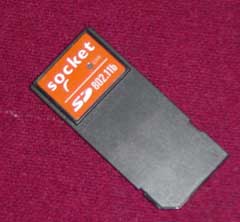
Physically the Socket WiFi card is exactly the same as a SD memory card, but is about half as long again at just under 55mm. Electronically it has exactly the same number of contacts as a memory card.
The WiFi card is only compatible with PDAs that have a SDIO slot. Some PDAs may also need a ROM upgrade to work properly. Please check with your manufacturer. |
 |
As mentioned above I tested the WiFi card in both my iPAQ 2210 and my XDA2 with differing results, more of which later. The 2210 did need a patch to the ROM to work properly.
The Socket Wireless card is an 802.11b protocol device and supports both Infrastructure and Ad-Hoc configurations. This means that you can either connect to a Wireless Access point or to a stand alone computer that has a wireless network adapter.
The 802.11b wireless protocol runs at up to 11Mbps. This will drop to lower speeds in areas where there is a weak signal. If you are using the 802.11g (54Mbps) Access Points then check that they support the lower speed protocol as well. Most should nowadays but a lot of the early access points didn't.
The card also supports WEP encryption to allow you to connect to secured networks as well as open public networks. |
 |
Getting started The first thing to do is to load the WLAN SDIO drivers. These are provided on a CD. It may be worth checking the socket site: this page has the latest drivers on it.
The version I used for the review was downloaded and installed via ActiveSync, in the normal way. This gave me version 3.01.04.03.0038.
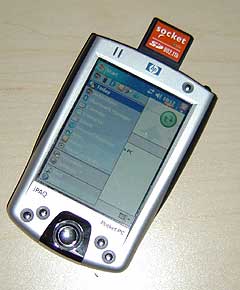
The next thing is to slip the SD card into the PDA. Your PDA will detect the card and start to initiate the network drivers.
The first indication you will get that something is happening is that the small LED will start flashing. This means that you are not connected to a network and that the software is searching for a wireless network signal.
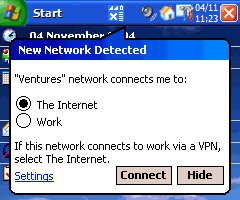
The next thing to happen is that (hopefully) a network will be located. This will then display the message bubble shown to the right top. This is prompting you to specify where the connection is made to. When I use a network access point in the office I still select Internet as this allows me to connect through the access point to any of the computers on my office network.
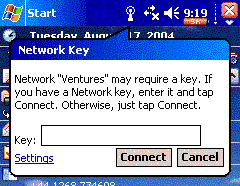
As the office network "Ventures" is protected using WEP (set up on the access point) I need to enter my Network Key. This will be available on the interface for the access point or from your network administrator.
Once you have completed these simple steps you are connected to a wireless network. At this pont the LED will be lit solidly.
|
|
Using the WiFi Card.
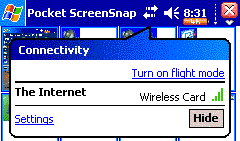
I normally use a WizBar which hides a lot of the normal WM2003 icons. When this is disabled you can see the connectivity icon. Tapping on this shows your connections.
In the example to the right I do not have a GSM phone signal, but I am connected to the Internet via my wireless card.
As mentioned above in getting started you need to install the driver to get the card to work. This software installation also installs some utilities to control it.
|
 |
WLAN Tools
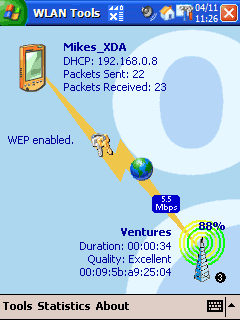
The diagnostics and configuration software is known as "WLAN Tools". This presents the screen displayed to the right. There are two ways to access the functionality: by tapping on the various icons, or by using the menu system at the bottom of the screen.
The actions are identified here and described below:
- Tapping on the PDA icon executes the "IP Addresses".
- Tap on the KEYS icon to display the "Manage Certificates".
- Tapping the WORLD allows you to start the internet explorer or email applications.
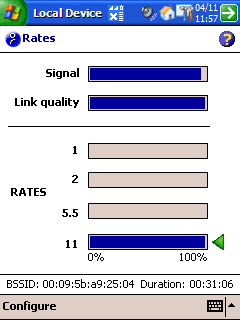
- The SPEED icon displays the Rates screen when tapped.
- Tapping the AERIAL displays the Configure Networks screen.
|
 |
|
 |
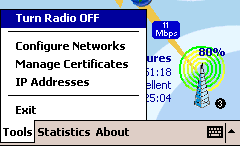
The menus above show the functions that are available for the WLAN Tools software. These are covered below:
The "Turn Radio Off" menu option allows the Wireless Network card to be switched on and off so that the card can be removed, or just to save power.
The next menu option "Configure Networks" is a short cut to this function in the WM2003 Settings menu. With older versions of the software it was difficult to find this unless you knew exactly where to look: Settings->Connections->Connections->Advanced->Network Card which as you can see is quite a deep setting option.
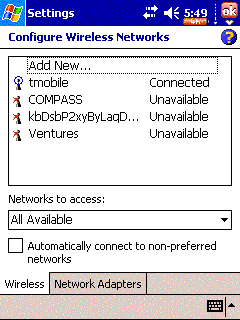
From this screen you can remove or edit your settings. Even add new ones. The image to the right shows me connected to a T-Mobile access point in Heathrow airport. None of the others are available.
The next menu option (not shown) is Manage Certificates this is a short cut to the WM2003 Settings->Certificates function. This allows you to manage your identity when using public key certificates to log onto secured networks. (Don't ask me I have never used them!!)
|
 |
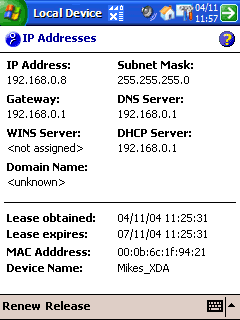
The last option on the tools menu is "IP Addresses". This is a diagnostic display which allows you to 'manage' your network address.
Essentially it shows you your current IP address, the addresses of all the important network infrastructure devices, and also when your IP address lease expires.
You can use the menu options at the bottom to release or renew your IP address lease.
Too much information? Don't worry about it most of this is handled automatically and you will only need to refer to this when you encounter any problems. Hopefully never.
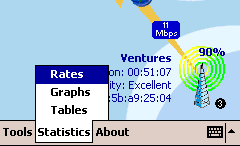
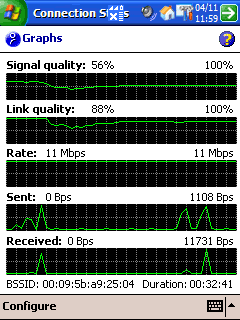
The next screens below left and right are available from the Statistics menu. This allow you to view how the network, and more specifically your card is performing. This can be useful to determine how strong the signal is in various locations.
The graph displaying signal quality shows a dip when I move from one room to another, and then coming back up again when I get closer to the access point. More of which later. |
 |
 |
 |
Using the WLAN Card with ActiveSync
Before you can use the WiFi card in a PDA to create an ActiveSync link you must:
- Configure the WLAN card and have it working correctly.
- Create a Partnership between the PDA and the PC using a serial or USB cable.
Both of these steps need to be completed for the network link to work correctly.
On the PC under the Connection Settings for ActiveSync there ia a tick box "Allow network (Ethernet) and Remote Access Service (RAS) server connection with this desktop" this must be checked.
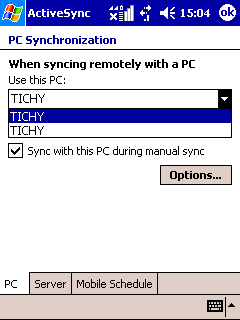
No on the PDA open ActiveSync and from the tools menu select options this will display the screen shown to the right. Make sure that you select your PC name in the "Use this PC" drop down box. You will also need to tap on the options button and select "Maintain Connection" when syncing remotely, otherwise the connection will be dropped when the sync has completed.
That is it you are all configured.
ActiveSync does not connect automatically so you will need to tap on the Synch icon to make the connection and start syncing.
|
 |
Using the WLAN Card with public networks
OK so we have seen how this works well with Local Private networks, but how good is it with Public Networks?
I haven't really used it too much with public networks for a number of reasons, primarily I don't have an airtime contract and I am loath to pay what amounts to a couple of week's mobile phone rental for what is effectively an hour of access on a WiFi network. The airtime operators need to seriously review their business models and pricing for this to work effectively in the UK.
OK rant over.
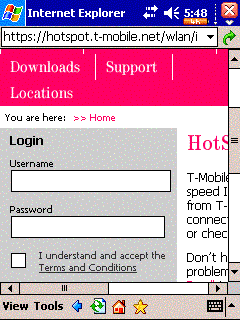
The main problem with most of these access points are that they are not "PDA aware". Most of them are built with a PC in mind and the real estate that is available on it. There is also on some portals the assumption that Javascript is enabled and that the connected device can display pop-up windows. Combine all of this and you get a system that does not display or function well under the restrictions of Pocket Internet Explorer.
I find that on average I can only use it at about 50% of the WiFi hotspots that I visit. This is not high enough value for me to rely on it for running my business applications. I do not want to be playing around trying to get the PDA to connect to a hotspot for ages when I could be downloading my data on the laptop with no problems.
|
 |
Range
There are a lot of figures banded about regarding the range of WiFi, some of which are 'optimistic' to say the least. It is often quoted that WiFi can be effective up to 500m. Well I haven't found that to be the case. Using standard consumer Access Points ( I use a NetGear 834G) you can normaly get good reception throughout a house, and often into the garden. I find that the reception drops off after about 75m.
When I go next door to my neighbours house I am lucky to get any reception at all. This is tru of my laptop as well as my PDAs so it is a generic WiFi issue, not a specific SD card problem.
That said I find that this is fine for my purposes at home and actually has the benefit of adding a little security by preventing my network from being hijacked.
|
Problems and Issues
A well known and documented issue of SDIO in general (not specifically the SD WiFi Card) with some iPAQs including the 2210 is that they will often fail to re-initialise the SD port after the PDA has been switched on and off. To overcome this the PDA will need to be soft-booted. This is more of an irritation than a big issue, but is a firmware problem with HP not Socket. This is not something that I have experienced on the XDA2, in fact this is where I use it all the time now.
Using the SD slot causes problems when you are trying to copy data to the PDA as the WiFi card is now taking up the slot where you normally have your memory card. This is not a problem with devices like the iPAQ 2210 which sport both a SD and CF interface.
|
Conclusions
I am impressed with the SDIO WiFi card, I find it a convenient way of communicating with my laptop whilst away on business trips. On the occasions when I do get PDA friendly WiFi access at a hotspot then the whole system works very well.
|
Pros
- Opens up fast network and Internet channels
- Allows wireless syncing between PC and PDA
|
Cons
- Takes up a memory card slot
- Not compatible with all WiFi hotspots.
|











 Article by Mike Barrett





















