 Review by Dave Burrows Review by Dave Burrows
LiveWire Traffic £6.00 a month / £64.80 a year
LiveWire News £3.50 a month / £37.80 a year
GSM / GPRS costs still apply
Introduction
Pocket Live Wire is a program that originally started out as an addition to CoPilot 3.5 users as a subscription based service. Since then, Live Wire has been re-written and is now available for any Pocket PC based user who wants live traffic management, news and weather reports.
Until recently LiveWire was a complete package offering Traffic, Weather and News all in a single bundle price, however TeamWarrior have now implemented a more attractive pricing structure as not everyone that wants access to traffic reports want news reports, so instead of the £9.69 a month / £116.28 a year, you can now split LiveWire into several modules and only purchase what you need (this does not include mobile call costs or GPRS costs). A 10% discount is also available for paying for a 12 month subscription. It should be said that LiveWire is a platform of applications, currently supporting Traffic Reports, News, Weather, Talking Mail and SpeedCare. In this review we are currently focusing on Traffic Reports, News and Weather.
Installing and Configuring Pocket LiveWire
Installation of LiveWire and configuration is very easy. When you run LiveWire for the first time it will take you through the configuration process. This can be re-configured at any stage by re-running the configuration icon in START | PROGRAMS.
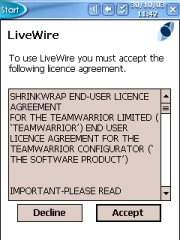 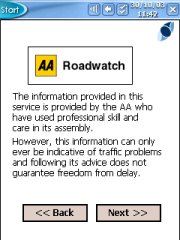 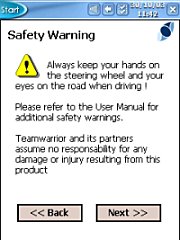
All you need to do is ACCEPT the warning screen, tap NEXT on the AA Roadwatch screen, choose your internet connection, as none are showing, click NEXT on the Safety Warning screen.
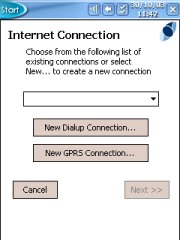 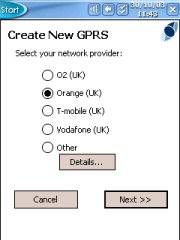 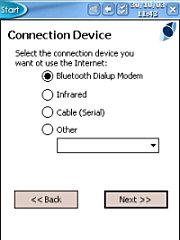
Above you will see the Internet Connection screen. Click NEW GPRS Connection and this will take you to the Create New GPRS screen. Select the Mobile operator that your GPRS or GSM connected mobile phone is on, then tap NEXT. Select the type of connection on the Connection Device screen.
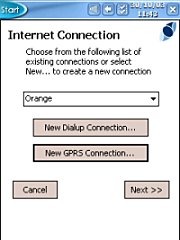 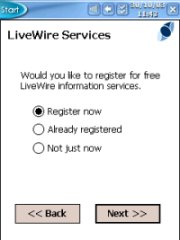 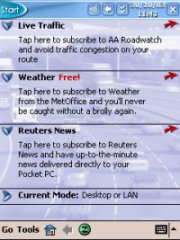
On the Internet Connection screen you will now see the mobile operator you had chosen earlier. Now tap NEXT. On the LiveWire Services screen, you can now register and activate LiveWire Services. This involves creating a LiveWire account centered around your email address and an activation code which will be emailed to you. Once completed, you enter the activation code, and you are good to go. Once completed you will see what will be the familiar LiveWire screen with Live Traffic, Weather (Free), and Reuters News.
So how does LiveWire work ?
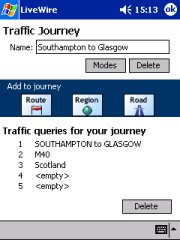
If you had used LiveWire under CoPilot 3.5, you will know that LiveWire interfaced with CoPilot. This has now changed. LiveWire is now a standalone product. When you run LiveWire, you can obtain the latest information including News and Weather within seconds. You can also get Live Traffic Data, so if you are stuck on the M25 in a traffic jam (who isn't), just tap the Live Traffic option, enter the departure and destination cities, and any roads that you know you will be taking, OK these and LiveWire will go off and bring back any data relating to these particular roads, or any congestion/accidents in the vicinity. Note that LiveWire now no longer uses a GPS Receiver.
It's difficult to interface it with one product, but near impossible to interface it with all the GPS products out there, and remember that once your GPS application is using the GPS, nothing else can receive the data from it, so rather than having LiveWire fighting over the GPS, it's been made as a simple standalone product. This does mean that you have to start entering data which can be dangerous when driving, but the beauty of this is, you can enter the data before you leave and see what congestion there is before you get into the car.
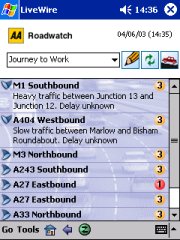
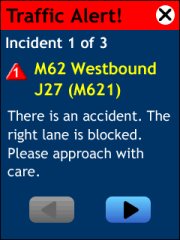
When using LiveWire, you get to enter your details like in the first screenshot above. Once you have specified your journey and any roads you may be taking, you will then see any details of roads that may have congestion or accidents on in the second screenshot above. In the third screenshot you will periodically receive Traffic Alert messages which will alert you of new data when it becomes available.
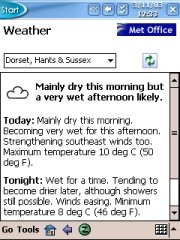  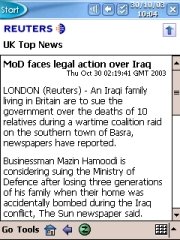
Once LiveWire is up and running, and you either have received the latest set of data either via a cradle connection or via a GSM/GPRS connection, you simply tap the red arrows on the main screen next to each of the traffic, news, weather and this will display the various screens above. Tapping on sub menus like in news will bring up the full news story. Great if you're away from an internet connected PC, TV or radio.
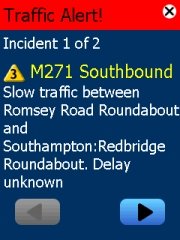 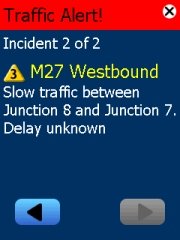 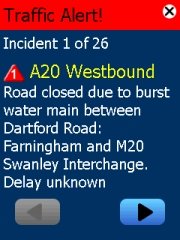
When driving you if you place LiveWire into update mode, it will go and check the LiveWire servers every 10 mins for new data. If new data is available especially for traffic, you will be notified of new data bringing a LiveWire warning screen to front. This is great if you are using other programs like a GPS Navigation program, as this will then overlay over the top of the previous screen you had, you can then scroll left and right if there are more than one incident or close the screen (top right) and it will return to your previous application you had viewed.
Team Warrior as of the date of this review, are offering a free 30 day trial available from their website.
Problems Encountered
Pocket LiveWire is a good all round service. Throughout the review period we did witness a blip on the LiveWire server which we were informed was unusual where the client couldn't connect to the server.
The main issues though were with the Mobile Provider. We used Orange on our trials, and GRPS still isn't 100% fool proof. Many times I sat there waiting to create a GPRS connection and although the GPRS signal status on my phone said I had 3 or 4 out of 5 bars of signal on my Sony Ericsson T610, the network just did not want to respond, which left me fighting with it in-car. I would hope other networks have implemented GPRS better and give less connectivity problems but from what I hear from others, GPRS really does need to be made a more stable platform from the mobile operators. Unfortunately when I couldn't get a GPRS connection, the Pocket PC either just kept trying to connect, or I could cancel. If I cancelled the Pocket PC GPRS connect screen, then LiveWire couldn't then enforce the Pocket PC to redial a connection (nothing happened) requiring a soft reset of the Pocket PC before it could work again. I found it much better to use LiveWire by establishing a GPRS connection before leaving the house or office, and if I had problems, to put the Pocket PC into the cradle and get a traffic update before I left. LiveWire will work both in GPRS and GSM modes, so you could use LiveWire in GSM mode if you didn't have a connection via GPRS but it will be a lot slower in initalising the connection.
Summary
Pocket LiveWire is a very useful program, and one I think will take off. It's a shame very little TMC applications are available in the UK and across Europe and the United States, hopefully this will change in the near future, but for now, Pocket LiveWire will give you the data you need for the UK. For Traffic Reports only, LiveWire will cost £6 per month, or for News Reports £3.50, combined £9.50 per month. A great utility for road warriors and company car drivers.
|































