|
Review by Darren Griffin
Overview
Origin Technologies bluei Speed Trap Warning System was a market leader including many features that were either wholly new or additional cost options on other units. The latest Origin b2 safety driver safety system builds on this success with a long list of desirable features and innovations.
In common with offerings from Morpheous, Cyclops, Snooper and BlackSpot it uses an internal database of known Gatso locations, combined with a GPS receiver to warn the driver as you approach a camera site. In addition the Origin b2 will also alert you to SPECS, Truvelo, DS2 (Speedmaster) installations, accident black spots, mobile radar speed traps, mobile laser speed traps, school proximity warnings and the London congestion charge zone.
Three options will be added shortly, a radar module that interfaces with the Origin b2, a cable to allow use of a Target LRC1000 Laser Diffuser and a NMEA output cable which will allow the Origin b2 to interface with any suitable PDA to provide GPS data for navigation applications.
 What's In the Box? What's In the Box?
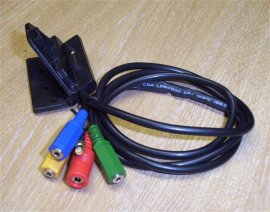
Open the large box and you will find the Origin b2 display, a cradle and connecting lead set, a GPS antenna, a Laser detector, 12v power lead, serial cable and 240v PSU. In addition origin supply a small Allen key and sticker pad for installing the adjustable mounting bracket, a comprehensive instruction manual and a CD containing the software needed for downloading database updates to the unit as well as a cleaning cloth to prepare for installation. You get everything you need to install the system. Most purchasers will want to take time installing the system to ensure that all the wires are hidden out of view etc. Origin has helpfully ensured that all the connecting leads are long enough to allow for this. The mounting bracket is hard wired to a single cable management system. At the end of this cable are the colour coded connectors for antenna, laser detector, power, radar option and laser diffuser option. This makes installation much simpler and reduces the number of wires you need to route and conceal; the laser detector and GPS antenna leads are very long indeed.
Installation
I was able to install the detector behind the rear view mirror and route the cable along the headlining, down the A post and back under the dash with cable to spare. The GPS antenna was similarly lengthy! Initially I stuck the display unit onto my dashboard, connected the power, antenna and laser detector wires and had the unit powered up within 5 minutes.
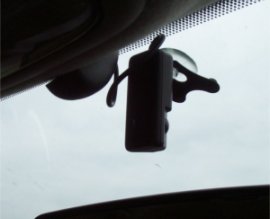 
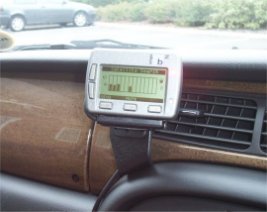
Later on I spent some time re-installing so that all the wires were tucked out of the way behind trim etc and ended up with a very nice installation. The beauty of Origin's system is that the display can be mounted low down in the centre console out of sight, the antenna is a small low profile magnetic model that can be installed externally or internally as you wish and the laser detector is very small and discrete. I ought to explain at this point what the laser detector does! It's a small unit that you install on the inside of your windscreen.  Sensors are mounted on the front and rear of the unit and should a laser gun be pointed at you the unit will detect the beam and fire off a very loud alarm! This happened to me once during testing and the alarm nearly gave me a heart attack but it did its job!! Although ideally this unit should have a clear view out of the front and rear of the vehicle it is more important that it can see out of the front and so I fitted mine in front of the rear view mirror. Sensors are mounted on the front and rear of the unit and should a laser gun be pointed at you the unit will detect the beam and fire off a very loud alarm! This happened to me once during testing and the alarm nearly gave me a heart attack but it did its job!! Although ideally this unit should have a clear view out of the front and rear of the vehicle it is more important that it can see out of the front and so I fitted mine in front of the rear view mirror.
Fitting the optional LRC1000 Diffuser would additionally provide a 'cloaking signal' which defeats a laser speed gun for a brief period, the legalities of this are doubtful though!
The end result is that from the outside you are not advertising the fact that you have such a system installed even with the optional Radar and Laser Diffuser modules. The display unit slides onto its vehicle bracket and uses a magnet to ensure a solid fit. This allows removal within seconds so that it can be hidden in a glove box or taken with you when leaving the vehicle unattended.
 Although the unit is 'ready to go' out of the box Origin advise that the first thing you should do is to update the unit's internal database. To do this you need a PC equipped with a 9-pin serial port and internet access. Plug the display unit into the 240v power supply and serial cable, connect to your PC and install the supplied software. Updating is a simple procedure, establish an internet connection and launch the Origin software. This then checks for any updates, if one is available it will download and update the unit automatically. The unit is supplied with a 6 month database subscription. Although the unit is 'ready to go' out of the box Origin advise that the first thing you should do is to update the unit's internal database. To do this you need a PC equipped with a 9-pin serial port and internet access. Plug the display unit into the 240v power supply and serial cable, connect to your PC and install the supplied software. Updating is a simple procedure, establish an internet connection and launch the Origin software. This then checks for any updates, if one is available it will download and update the unit automatically. The unit is supplied with a 6 month database subscription.
In common with other similar devices, users can log new camera sites that the unit is not aware of, when you perform an update this information is transmitted to Origin. A dedicated team then visit the location and physically verify the information. At the same time they log additional information such as the direction the camera is facing, whether it can be rotated to face both ways and the current speed limit in force at that point. Though this process can delay the inclusion of a new camera site it does guarantee the integrity of Origin's database and eliminates false alarms.
 In Use In Use
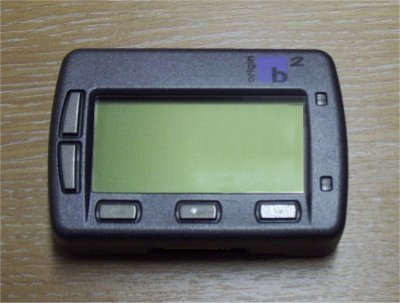
Plug the display unit into the cradle and it will power up automatically (If you leave it connected to the cradle then it will automatically power off after 15 minutes if the vehicle speed has not changed). The first thing to appear is the Origin logo followed by a couple of status screens showing unit settings and a subscription status screen. You then see the satellite status page which shows how many satellites have been locked on to. With the GPS antenna on the dashboard I never had to wait more than a minute before lock was achieved and often considerably less.
As soon as a lock has been achieved the unit defaults to displaying vehicle speed, time and compass heading. Five soft buttons around the main display allow you to access the configuration menus, scroll through options etc. I found that once I had amended the configuration to my liking I had no need to access any menus. One of the soft buttons allows you to log a location. You can do this if you wish to add a new camera site or to log a site where a camera no longer exists. Additionally you can log user waypoints which are stored in your unit and not uploaded to Origin, you will then receive a visual and audible alert as you approach this waypoint.
As you approach a camera location you get both audible and visual warnings, a spoken voice will announce the warning type and speed limit i.e. "Gatso 30" or "Truvelo 50", a loud beep then begins rising in frequency as you approach the camera. On the display a wealth of information is displayed, camera direction, distance, road number, speed trap type, speed limit, your vehicle speed and a countdown indicator. Origin has added a number of excellent features, you will only receive an alarm for cameras that are on your side of the carriageway or are mounted on the central reservation and can be rotated to face either way. You can additionally configure the unit such that it alarms only if you are exceeding the speed limit in force at that site, approach at the correct speed or less and you will not be bothered by an unnecessary alarm.
A limitator feature is also provided, you can configure a maximum speed, exceed it and the unit will alert you, a superb feature which may help protect your licence! The unit's screen is subtly back-lit in green, the brightness and contrast can be altered and I found the display easy to read even in the brightest sunlight. The user configurable options are far too extensive to list here, every alert can be customised, made louder/quieter or even switched off.
Conclusion
I loved this unit, it was easy to install, it could be fitted covertly and performed far better than I had expected. In the four weeks I had the unit I covered 2,500 miles and am happy to report the Origin b2 alerted me to every camera a 100% success rate. I was particularly impressed whilst travelling home from Norfolk one day. Approaching the M25 from the M11 where roadwork's are in place not only did the 'Origin b2' know of the temporary trailer based Gatso's that were installed in the coned off area but it correctly alerted me to the temporary 40mph speed limit in force within the road works.
It is without doubt a superb product, I am fortunate enough to be able to test many such devices and this is the first I have wanted so much that I will actually spend my own money on, that's praise indeed! Even my wife approved of it; she especially liked the speed nag feature!! If I was to find fault with anything and it is hard then I would say that the voice alerts are not the clearest at high volume and the cable management system whilst being a good idea could do with locking connectors as on one occasion the laser detector came undone. Having said this it would need nothing more than a strip of electrical tape to prevent them from coming adrift.
Couple this unit with the radar option and you have an unbeatable package that combines the very best of GPS and Radar detectors. If you were to add the NMEA output cable and couple this to a PocketPC you would have a system unrivalled at any price.
|
































