SatNav,GPS,Navigation
Speed Cameras

Click here for the PocketGPSWorld.com Speed Camera Database

Download Speed Camera Database
8.074 (28 Jul 10)


WORLDWIDE SPEED CAMERA SPOTTERS NEEDED NOW!

Click here to submit camera positions to the PocketGPSWorld.com Speed Camera Database


We've already awarded 1000's of free life downloads for verified new camera spottings!

Submit Speed Camera Positions Now


Free Email Updates

Get FREE speed camera database update alerts, news and reviews. Example

Enter Your Email
(for our eyes only & one click unsubscribe)
No Spam Guaranteed!

Navigate Our Site

MEMBERS AREA
Subscribe Now
Speed Camera Download
Submit Cameras
Free Competition
Member Discounts
Your Account
Member Forums

PUBLIC GPS FORUMS
Register to Post
Log in to Post
Private Messages
Your Account
Public GPS Forums
FORUMS BY BRAND
POINTS OF INTEREST
Free POIs
Submit POIs

REVIEWS & ARTICLES
Full Listing
[+] Anquet
[+] Apple
[+] Article
The NotuptoSpeed Cameras of Maryland : May10

GPS Selective Availability lifted 10 years ago : May10

TomTom app store in development : May10

CoPilot Live HD heads to iPad 3G : Apr10

Google Nav coming to other platforms inc iPhone : Apr10

CamerAlert v102 has been approved : Apr10

Leica introduce camera with GPS and Geotagging : Apr10

Googles Turn by Turn Navigation comes to UK : Apr10

Media awakens to Spike camera testing : Apr10

TomTom signup Billy Connolly to give you direction : Apr10

North Yorkshire to introduce mobile speed camera vans : Apr10

Are Average Cameras Proving to be the Dream Ticket : Apr10

Location Based Services Poised to Drive Rise in Free Apps : Mar10

US Federal Court Upholds Illegal Red Light Camera Evidence : Mar10

Viewranger adds OpenCycleMap and OpenStreetMap support : Mar10

Google Pins Further Revenue Growth Hopes on GPS Based Ads : Mar10

TeleNav Provides Insight Into American GPS Usage : Mar10

Google Street View Full UK Coverage unveiled tomorrow : Mar10

Google Ipswich to Newcastle via Holland : Mar10

CamerAlert iPhone App Snaps Mobile Speed Camera in Action : Mar10

OpenStreetMap Aids Haiti recovery : Mar10

Missouri Supreme Court Rules on Red Light Cameras : Mar10

Boeing has delivered the first of the next generation GPS : Feb10

Speed Camera Operator Killer to go to Trial : Feb10

PocketGPSWorldcom release CamerAlert on the iPhone : Feb10

Easyjet show how not to do Customer Service : Feb10

The Three Most Pointless UK Speed Cameras : Feb10

Motorola ready a widescreen PND the Motonav TN765T : Feb10

Publicity Stunt Gift Wraps Speed Cameras : Feb10

Cartogoo GPS Surveying and map making software : Feb10

Rising Solar Activity will disrupt GPS : Feb10

Google Street View Car tagged with GPS Tracker : Feb10

Arnies Speed Cameras Roadblocked : Feb10

Brodit TomTom iPhone car kit adapter : Feb10

World Surfer Augmented Reality with Local Search : Feb10

Nav4All Shuts Down : Jan10

Average Speed Cameras to Save the World : Jan10

CamerAlert : iPhone Speed Camera Warning System : Jan10

Speed Cameras To Aid New Yorks Budget Deficit : Jan10

Nokia announce FREE OVI Maps for all : Jan10

Eleven Speed Cameras Per Mile : Jan10

Eleven Speed Cameras Per Mile : Jan10

Support Help for Heroes when you shop online : Jan10

Vodafone launch free iPhone Nav app with a catch : Jan10

RoadTour Announces Ordnance Survey App for iPhone : Jan10

RoadTour Announces Ordnance Survey App for iPhone : Jan10

Gatsnow : Jan10

Your SatNav A Potential Killing Machine : Jan10

VAT Up but our Speed Camera Database still 1999 : Jan10

Norads Santa Tracker Site is now operational : Dec09

Welsh Police Release Numbers of Foreign Speeders Let Off : Dec09

NDrive announce launch of Android compatability : Dec09

Tv On Your SatNav It Appears Its The Future : Dec09

Aware GPS Controlled Airspace Warning Device : Dec09

Over 1600 Speed Cameras Changes in Just 6 Months : Dec09

Traffic Media UK iPhone Traffic Monitoring App : Dec09

125000 Worth of Free Memberships Awarded in 6 Months : Dec09

Cambridgeshire Speeding Statistics 70 of drivers speed : Dec09

A PocketGPSWorld Guide to using forums : Dec09

TVs Mr Lie Detector Lies About Speed Camera Ticket : Dec09

Navigon iPhone App Update 14 Coming Soon : Nov09

97 of Statistics Are Made Up AndOr MisAnalysed : Nov09

Speed Camera Free Swindon Focuses on Accident Investigation : Nov09

Viewranger in for review : Nov09

TomTom add support for iPod Touch and iPhone 2G : Nov09

Popular Free iPhone Dating App Adds GPSBased Chat Feature : Nov09

NDrive Dominate GPS Software for Phones Comparison : Nov09

M11 Speed Camera Increases Accidents and Raises 500kYear : Nov09

Nav N Go Powers GPS RearView Mirror : Nov09

iPhone Touch GPS Cradle launched by Dual Electronics : Nov09

TurnbyTurn Nav For The iPod Touch Approved by Apple : Nov09

NDrive London with Aerial Photo View Released iPhone : Nov09

Reviewed Roadhawk RH1 Black Box InCar GPS Camera : Nov09

Smartphone GPS Usage Surges Ahead in China : Nov09

Carcomm TomTom x40x50 Cradle Available : Nov09

Residents take action against satnav map errors : Nov09

RouteBuddy Atlas 150K OS Great Britain Map Available : Oct09

Google unveils free turnbyturn navigation for Android : Oct09

125 Casualties x 5 years 17 Speed Cameras : Oct09

TurnbyTurn Navigation Comes to The iPod Touch : Oct09

New French Speed Cameras Predicted For UK Roads : Oct09

Columbus nGPS geotagging dongle for Nikon cameras review : Oct09

GMap UK Ireland for iPhone Released : Oct09

DIY Speed Camera Slows Traffic : Oct09

Can Speed Save Lives : Oct09

UK Speed Cameras Safety or Votes : Oct09

NDrive iPhone UK and Ireland Now Available : Oct09

Calling All Speed Camera Warning Virgins : Oct09

Navigon win the Stuff Award 2009 for SatNav : Oct09

Build your own GPS Satellite Build Win A Subscription : Oct09

Wales Plans Mobile Average Speed Cameras : Oct09

Gaia GPS iPhone GPS App with Topo Maps : Oct09

NDrive Coming to iPhone and Android Phones : Oct09

There are new waze in town : Sep09

Speed Cameras Cash Machines or Safety Systems : Sep09

RoadTour Announce Britains Finest : Sep09

LBS Start Up Tops Up His Half Million Dollar Prize : Sep09

Directional Warnings for All Well Nearly : Sep09

Does This Signal the End of Mobile GPS : Sep09

Driver slapped with 900 fine for following TomTom : Sep09

Communicating with Subscribers Newsletter Subscriptions : Sep09

Smartphones Integrated into Vehicle Infotainment Systems : Sep09

Geocoded PostCode Database Leaked Online : Sep09

GyPSii launches on Android : Sep09

Traffic4England RealTime Traffic Alerts for Android : Sep09

TomTom Announce New Location Referencing Technology : Sep09

90 Percent of Wakefields Speed Cameras Are Dummies : Sep09

OS Map Ordnance Survey Maps on Android : Sep09

Garmin Announces Edge 500 Cycling GPS Device : Sep09

Augmented Reality Navigation Wikitude Drive : Sep09

Number Plates Unnecessary For Speed Camera Prosecution : Aug09

Only 27 of UK Drivers Believe Speed Cameras Improve Safety : Aug09

We need your help FREE Two Year subscriptions on Offer : Aug09

Bournemouth Speed Cameras Torched : Aug09

Free Priority Delivery for TomTom Refurbs : Aug09

Speed Cameras A Personal View : Aug09

End of an era for GPS as GPS 2RM8 is launched : Aug09

OpenStreetMap Data Now Available on Submission Maps : Aug09

Spanish Tunnel Vision : Aug09

Warning Reindeer Ahead Speed Limit 40 Kilometers per hour : Aug09

NAVTEQ Study Confirms SatNav BoyToy Status : Aug09

Sygic Mobile Maps coming to Android : Aug09

Bournemouth Consider Copying Swindon to Switch off Speed Cams : Aug09

O2 Joins with Telmap to Bring Navigation App to Customers : Aug09

Speed Camera Support Declines : Aug09

Driver issued Redlight Ticket making way for 999 van : Aug09

PocketGPSWorld.com Support Ticketing changes : Aug09

Navteq maps out Jordan : Aug09

iGO My Way 2009 Now Available for iPhone : Aug09

TeleNav Announce Turn-by-Turn Navigation for myTouch 3G : Aug09

Tracking Trips With Trimble AllSport GPS for iPhone : Aug09

Pocket GPS World surpasses 300,000 members : Aug09

Swindon Scraps Fixed Speed Cameras : Jul09

Sales of GPS Smartphones to Reach 77 Million in 2009 : Jul09

CSR announce the SiRFstarIV GPS Chipset : Jul09

Gokivo BlackBerry Support Expanded : Jul09

Garmin-Asus Nuvifione Available NOW! (If you live in Taiwan) : Jul09

TomTom Beats 2nd Quarter Forecasts : Jul09

Richard Solo 1800 Smart Backup Battery for iPhone and iPod : Jul09

Canalys Mobility Forum EMEA London, 17 November 2009 : Jul09

Vodafone signs digital mapping deal with Tele Atlas : Jul09

Speed Cameras Only Catch Good Guys : Jul09

Muttacar Sorry Business : Jul09

PocketGPSWorld support the London Bikeathon 2009 : Jul09

Smartphones Versus SatNav : Jul09

Overboard Waterproof iPhone case reviewed : Jul09

RouteBuddy Announce Atlas for iPhone : Jul09

Sygic Mobile Maps Europe for the iPhone is back in the AppStore : Jul09

Speed cameras are going digital in Victoria Australia : Jul09

iO-BTAPOD iPhone and iPod Stereo Bluetooth Adaptor review : Jul09

iPhone 3GS GPS Spy Software Released : Jul09

iPhone 3GS GPS Spy Software Released : Jul09

TwittARound : Jul09

M25 more SPECs Average Speed Cameras in Essex : Jul09

Michelin Road Atlases Partner With Pocket GPS : Jul09

TruePower iV Battery Extender review : Jul09

Livingston Parish Louisiana fight back against speed cameras : Jul09

BMW motorcycles offer customised Zumo660 : Jul09

TomTom iPhone - Stop Press - No sorry, as you were : Jul09

More Augmented Reality - Nearest Tube for iPhone 3GS : Jul09

CTIA Partner With Pocket GPS for San Diego Wireless Show : Jul09

GatsoGate tape may prove expert witness changed evidence : Jun09

CoPilot Live launches on Android : Jun09

£20m in Essex speeding fines may be refunded due to blunder : Jun09

Nav N Go Announce iGO for iPhone : Jun09

Dorset deploys dual-role speed and red-light cameras : Jun09

AT&T reveal iPhone Turn-by-Turn App : Jun09

Video iPhone launch day in Apple Store UK : Jun09

Tele Atlas to offer HD Traffic Solution to OEMs : Jun09

Cambridgeshire - Safety or Speed Camera Partnership : Jun09

Mio Navman Spirit TV - Satnav and Freeview TV : Jun09

Pocket GPS Partner with Euro Market Leader Inforad : Jun09

£1.5m in speeding fines from Dorset GATSO could be refunded : Jun09

Navigon MobileNavigator for iPhone launches in AppStore : Jun09

Pocket GPS partner with GeoLife : Jun09

Watch out there are thieves about : Jun09

Augmented reality browser - the shape of things to come : Jun09

Navteq announce APAC LBS Challenge Winners : Jun09

Sygic Mobile Maps for iPhone launches in Australia : Jun09

ALK move from Navteq to Teleatlas for mapping data : Jun09

SpeedCam Detector for Android Phones now available : Jun09

Doh - Homer Simpson original voice now available : Jun09

Apple new iPhone 3GS hardware and software roundup : Jun09

Grab free power and keep your gadgets topped up this summer. : Jun09

TomTom shares rise as talk of Apple buy-in spreads : Jun09

Arnie says haste la vista to ban on windscreen mounts : Jun09

PocketGPSWorld has had a makeover : Jun09

Roadhawk in-car camera GPS and black box system : Jun09

Destinator 9 Announced : Jun09

Navigon to release a Turn by Turn iPhone app : Jun09

Apple WWDC - New iPhone Today? : Jun09

Garmin nuvifone - will Asia see a launch next month? : Jun09

WWDC: TomTom show iPhone App - available this Summer : Jun09

RIM acquires Dash Navigation : Jun09

A127 SPECS - 90 percent funded by a private company. : Jun09

Range Rover 2010 - Dual View ICE Satnav : Jun09

Broadcom announce first PND-on-a-chip : Jun09

CompeGPS Aventura now shipping : Jun09

NavNGo Q1 2009 Map Updates now available : Jun09

TomTom goes designer - Meet the White Pearl Special Edition : Jun09

TomTom XL Live SatNav press launch : Jun09

South Wales Police hope beanbag mounts to cut satnav crime : Jun09

TomTom Navigator 7 now on Sale - Warning U-Turn Ahead : May09

Mobile VAS Forum choose Pocket GPS as Media Partners : May09

NAVTEQ chosen by Mio as Australian Map suppliers : May09

New SPECS install on notorious stretch but why no barriers : May09

AA on-line route planner busy this Bank Hol : May09

Cambridgeshire SafetyCam Partnership goes blue : May09

Talex accused of dodgy dealing : May09

Americas Com choose Pocket GPS as Media Partners : May09

TeleAtlas denies talks of TomTom Split : May09

Space Command Expert will discussed report on Twitter : May09

Volkswagen partner with Garmin - Meet Click & Ride : May09

TomTom Announce XL Live : May09

Price reduction on satnav voices : May09

Satmap release SatSYNC Version 1.2 : May09

GPS Constellation, is the service in trouble? : May09

Pocket GPS Interview Tracking Specialists Navman Wireless : May09

Garmin nuvifone - another delay - dead in the water? : May09

Navman Mio launch the Spirit range of SatNavs in the UK : May09

Transport for London trial digital speed limiter : May09

Rumour control: TomTom seeking iPhone developer candidate? : May09

Speed camera nabs 23,500 drivers in 14 days : May09

SPECS3 average speed cameras launched Motorcyclists beware : May09

Mio S401 and S501 Global launch 12 May : May09

RoadTour launch AA Best Drives for Garmin : May09

TomTom release v8.350 for GO x20, GO x30 and GO x40 : May09

Speed Camera Van hidden by advertising board : May09

Gatso UK Boss caught driving at 102mph on a 70mph road : May09

Samsung sign up Navteq to provide mapping for GPS phones : May09

Navigon pulls out of US Market : May09

Couple fighting speed camera fine face £15k bill : May09

Pioneer Navigation Centre coming to VW, Skoda and Seat : Apr09

Ambulance Drivers urged to use AtoZ as Satnav System Fails : Apr09

Garmin announce ultra-slim nuvi 1490T with 5-inch screen : Apr09

William Wales causes panic at White House : Apr09

More Speed Cameras but do the statistic bear scrutiny? : Apr09

Satmap European Mapping goes Live : Apr09

Australia - Speed Camera Operator Attacked : Apr09

Garmin Zumo 660 Coming to The UK Soon : Apr09

TomTom Reports Euro 33m Loss for Q1 2009 : Apr09

Garmin Forerunner 405CX Announced : Apr09

Renault Scenic Launches With In-Dash TomTom Option : Apr09

Garmin Forerunner 310 Gets a Facelift, Meet The 310XT : Apr09

Traffex 2009 Speed Camera and road technology showcase : Apr09

Mobile speed cameras suspended in Arizona after fatality : Apr09

Egypt Removes the Ban on Consumer GPS : Apr09

Nav N Go Announce 6 New Maps for Eastern Europe : Apr09

Industry Events: MetaPlaces 09 Location Business Conference : Apr09

iO Play In-Car Audio Streaming via Bluetooth : Apr09

Garmin Oregon 500 leaked on resellers sites : Apr09

GMP to target motorists with Smart Car CCTV Fleet : Apr09

Mio closes US offices : Apr09

iOSMaps - An OS Map viewer for iPhone - and its free! : Apr09

Self led cycling tours from Velodays : Apr09

Sony launches pocket format HD camcorder with GPS : Apr09

Video : Installing the Speed Camera Database on Garmin SatNavs : Apr09

GPS Tracking of the Florida Panthers is not threatened : Apr09

A Prized Location... and the winner is... : Apr09

TomTom sign TrafficCast to deliver x40 Traffic Data in US : Apr09

TomTom GO 950 with Google Talk - 500 To Give Away : Apr09

Apple Patents In-Car GPS with Safety Features : Mar09

Transport for London Digital Speed Map - TomTom & Garmin : Mar09

Travelodge Launch iBooker - GPS Enabled Room Booking : Mar09

Driver gets ticket for speeding in a parked car : Mar09

Garmin Launch nuvi 465T Truck SatNav in US - EU to follow : Mar09

TomTom Takes Up the Fight And Countersues Microsoft : Mar09

TomTom Launch One and XL IQ-Routes Editions : Mar09

Satmap Launch Active 10 Plus : Mar09

Navigation and Location Europe 2009 Conference : Mar09

GPS 2R-20 Scheduled For Launch Tomorrow : Mar09

Sun Traps Turn Up The Heat In Abu Dhabi : Mar09

Twitter: Follow PocketGPSWorld : Mar09

New Features On SpeedCam Download Page : Mar09

Google StreetView launches in UK : Mar09

Pocket GPS Partners With Where 2.0 Conference : Mar09

Latest (Q4 2008) Maps Now Available for iGO 8 and iGO 2006 : Mar09

iPhone OS 3.0 - Turn-By-Turn Nav Gets The Green Light : Mar09

TomTom GO Celebrates Its 5th Birthday Today : Mar09

Canalys: US overtakes Europe as largest SatNav market : Mar09

Satmap On-Line Route Planner Goes Live : Mar09

SatNav blamed but alcohol the real cause in car on tracks : Mar09

More Cameras for Essex but stats suggest they dont work : Mar09

PocketGPSWorld Red Nose Day TomTom Splash Screens : Mar09

OpenStreetMap - Now YOU can take control of the maps : Mar09

Red Light Programme in the Red : Mar09

HP Bin the iPaq 316 (310) - No More PNDs : Mar09

iTIS Interim Results Published : Mar09

Average Speed Cameras to Police UK Rural Speed Reduction : Mar09

Navman to be axed? : Mar09

FBI Helped Decrypt GPS from Mumbai Terrorist Attack : Mar09

CeBIT Special Published : Mar09

Speed Camera Discount Ends Sunday : Mar09

iGO Pirates Walk The Plank at CeBIT - Agents Seize Software : Mar09

Handheld Europe release Nautiz X5 a rugged PDA with GPS : Mar09

The OS Outdoors Show 2009 Birmingham NEC : Mar09

Speed Camera Shy Colin is Petrified of Points : Mar09

Pocket GPS Announce Partnership with NavNGo : Mar09

Navigon Launch Three New PNDs : Mar09

Getac introduce a rugged PDA with GPS : Mar09

Sygic Announces Sygic Mobile 2009 for iPhone 3G : Feb09

TomTom 8.25 Maps released : Feb09

Microsoft Sues TomTom Over Patent Breaches : Feb09

PocketGPSWorld Newsletter Out Friday : Feb09

MWC 2009 Wrapup: My view of the event and the market : Feb09

MWC 2009 Video summary : Feb09

30 Percent Decrease in US Peak Time Traffic Jams : Feb09

Wokingham May Retire Speed Cameras : Feb09

TomTom HOME 2.6 Beta Now Available : Feb09

TomTom Reports Net Loss of £870m : Feb09

TomTom LIVE - Success or Failure? : Feb09

Philips Net Tcv - TomTom Channel : Feb09

Dodge Charger fails to Dodge Speed Camera Charges : Feb09

GPS Central To New York Babysitter Murder Trial : Feb09

Foreign Drivers Immune to Speed Camera Fines : Feb09

Nokia Launch Ovi Store at MWC in Barcelona : Feb09

Speeding Police Evade Penalties : Feb09

TeleNav Launch Turn By Turn Nav for Android Phones in US : Feb09

Telmap enters MID market with GPS application : Feb09

Qstarz launch the BT-Q1300S GPS based Fitness system : Feb09

CSR and SiRF combine forces for Bluetooth and GPS : Feb09

Review of 2008 from a GPS perspective : Dec08

Top 25 Speed Camera Stories : Dec08

SatNavs and Speed Cameras: Lies, Damn Lies And Statistics? : Dec08

Redlight cameras active in Orlando Florida. : Dec08

Dubai Speed Cameras to Double up as Crook Catchers : Dec08

New SPECs Speed Cameras on the A127 in Essex : Dec08

GPS and SatNav reviews and articles : Aug08

There is No Silver Bullet Accurate Traffic Information Requires Multiple Data Sources : Jul08

PocketGPSWorld.com Active Speed Camera Statistics : Jul08

Pocket GPS Terminology : Dec07

Galileo European GPS Constellation Gets Go Ahead : Nov07

A Day in The Life of a PocketGPSWorld.com Verifier : Nov07

Nikon D300 and D3 GPS enabled cameras : Nov07

The Ordnance Survey have 4 million POIs : Nov07

3,2,1 Liftoff... The latest GPS Satellite is successfully launched into orbit : Oct07

[+] Binatone
[+] Blaupunkt
[+] Brodit
[+] Carcomm
[+] CoPilot
[+] Destinator
[+] Directions Ltd
[+] Event
[+] Evermore
[+] Fugawi
[+] Garmin
[+] Magellan
[+] Mio
[+] Nav N GO
[+] Navigon
[+] Navman
[+] Navteq
[+] NDrive
[+] Other
Brodit Adjustable iPhone Cradle 521106 : May10

Groundspeak's Geocaching iPhone App Review : Oct09

Exspect Triple USB Travel Charger reviewed : Sep09

Speed Camera Database Installation Guide: ALK CoPilot 8 : Sep09

IMPORTANT Subscription renewals recurring payments : Sep09

Proclip Adjustable iPhone Cradle 915290 : Jun09

PocketGPSWorld at The Gadget Show Live : Apr09

Speed Camera Database Installation Guide: TChart GPS Speed Sentry : Feb09

Tchart GPS Speed Sentry Review : Jan09

OtterBox for iPhone 3G Impact Series review : Dec08

Intrinsyc announce Destinator 9 : Dec08

Nokia Navigator 6110 & ViewRanger : Sep08

ATP Photofinder Review : Sep08

Nextar launch the bilingual M3-MX SatNav : Sep08

AMOD AGL3080 Photo Logger review : Aug08

Letter Logger review : Aug08

ROADTOUR Satnav Tour Guide Review : Jun08

Subaru World Rally Team Points Of Interest POI : May08

Red Hen Blue2CAN for Nikon D3 and D300 GPS cameras review : Mar08

Sygic Drive 7 Review : Feb08

Pocket GPS UK Safety Camera Database - CheckPOInt : Jan08

Pocket GPS UK Safety Camera Database - POI-Warner : Jan08

Speed Camera Database Installation Guide: Kenwood POI Loader Devices : Jan08

Speed Camera Database Installation Guide: ALK CoPilot 7 : Jan08

Speed Camera Database Installation Guide: Nissan Connect : Jan08

World Tracker PLD review : Dec07

The GiSTEQ PhotoTrackr image tagging system review : Dec07

Hama UK Product Roundup : Oct07

WondeX BT-100Y Bluetooth GPS Receiver review : Oct07

WondeX BT-100Y Bluetooth GPS Receiver review : Oct07

HTC Advantage review : Aug07

eBonTek Bluetooth GPS Datalogger review : Aug07

Ultimateaddons Solar Backpack 50 Litre 2200mAh : Aug07

[+] Otterbox
[+] Qstarz
[+] RouteBuddy
[+] Royaltek
[+] Satmap
[+] Sygic
[+] Tele Atlas
[+] TomTom
TomTom update RIDER Meet Urban Rider : Apr10

TomTom GO LIVE 1000 : Apr10

Two New TomTom Models Announced Start2 and XL IQ2 : Mar10

TomTom iPhone adds HD Traffic and Local Search : Mar10

TomTom announced fixed install iPhone car Kit : Feb10

TomTom iPhone Car Kit Review : Feb10

Reviewed TomTom iPhone Car Kit : Feb10

TomTom release FREE iPhone navigation update : Nov09

TomTom Announce GO I90 Integrated Navigation : Oct09

TomTom announce the iPhone Car Kit We get our hand on it : Oct09

TomTom Start Launch in London First impressions : Oct09

TomTom START will get UK 7 Digit PostCodes in future update : Oct09

TomTom moves into Mexico : Oct09

TomTom START launched : Oct09

TomTom unveils GO 7000 TRUCK : Oct09

TomTom Investigated for Insider Trading : Oct09

TomToms iPhone Car Kit Does A Vanishing Act Again : Sep09

TomTom Announce new x50 Range 550 750 950 : Sep09

TomTom iPhone Carkit gets FCC Approval : Sep09

TomTom and Fiat Announce Partnership : Sep09

TomToms iPhone App finally breaks cover : Aug09

TomTom XL IQ Routes Edition : May09

TomTom - Andy Siddell : Feb09

Voice Alerts (TomTom Format) for the PocketGPSWorld Speed Camera Database : Feb09

TomTom - Liz Whitaker : Feb09

TomTom - Vicki Archer : Feb09

TomTom - Andrew : Feb09

TomTom - PocketGPSWorld Voice : Feb09

: Feb09

TomTom - Simon : Feb09

TomTom - Crystal : Feb09

TomTom - Kate : Feb09

TomTom - Nick : Feb09

TomTom GO x40 Mount Disassenmbly : Jan09

TomTom Launch On-Line Route Planner : Dec08

TomTom launch the GO940 Live SatNav in the UK : Nov08

TomTom GO 930 SatNav review : Sep08

TomTom Announce GO 940 LIVE Connected PND at IFA Berlin : Aug08

Carcomm x20/x30 Cradle CNM-167 Review : Aug08

TomTom - How to remove cameras Tutorial : Jul08

Speed Camera Voice Alert Downloads for Garmin and TomTom : Jun08

Speed Camera Voice Alerts - Andy Siddell : Jun08

Speed Camera Voice Alerts Install Guide : Jun08

Customise your GPS/SatNav : May08

TomTom Navigator Custom Cursors : Apr08

Speed Camera Icons by GerryC : Feb08

Speed Camera Voice Alert Collections for TomTom and Route66 : Feb08

Speed Camera Voice Alert Collections for TomTom and Route66 : Feb08

TomTom GO 920T In-Depth Review : Jan08

Pocket GPS UK Safety Camera Database - TomTom Go/Rider/One - OV2 : Jan08

PocketGPSWorld Safety Camera Database - TOMTOM GO 910, x20, x30 and x40 : Jan08

Speed Camera Database Installation Guide: TOMTOM Navigator 5 & 6 - Deprecated : Jan08

Speed Camera Database Installation Guide: TOMTOM Navigator 5, 6 & 7 : Jan08

TomTom NavCore 7.2 Device-Dependent Feature List : Oct07

TomTom Version 7 : Mapshare Moving a POI : Jun07

TomTom Version 7 : Map Share blocking/unblocking a road : Jun07

TomTom Bluetooth Remote Control Review : Jun07

TomTom Cannes Announcement report : Jun07

[+] Trimble
[+] ViaMichelin
[+] Wonde Proud

GPS CENTRAL
About Pocket GPS
Contact Pocket GPS
Corporate Enquiries
Free GPS Downloads
GPS Events
GPS Event Blogs
GPS Related FAQs
GPS Reviews
News Archive
Report Piracy
Stolen GPS Register
Submit GPS News
Suggestion Box
Site Map

HELP
Registration Help
Subscription Help
Speed Cameras Help
How GPS Works

SEARCH
Search GPS News
Search the GPS Forums
Google Pocket GPS
Web

Bookmark & Share

Click Now to Bookmark and Share Pocket GPS! Click Now to Bookmark and Share Pocket GPS!

Pocket GPS World - SatNavs | GPS | Speed Cameras: Forums

Pocket GPS World :: View topic - TomTom One Third Edition
 Forum FAQForum FAQ   SearchSearch   UsergroupsUsergroups   ProfileProfile   Log in for private messagesLog in for private messages   Log inLog in 

TomTom One Third Edition
Goto page 1, 2, 3 ... 16, 17, 18  Next
 
Post new topic   Reply to topic    Pocket GPS World Forum Index -> TomTom Portable Navigation Devices
View previous topic :: View next topic  
Author Message
mikealder
Pocket GPS Moderator


Joined: Jan 14, 2005
Posts: 17983
Location: Blackpool , Lancs

PostPosted: Tue Sep 11, 2007 10:44 pm    Post subject: TomTom One Third Edition Reply with quote

TomTom One Third Edition


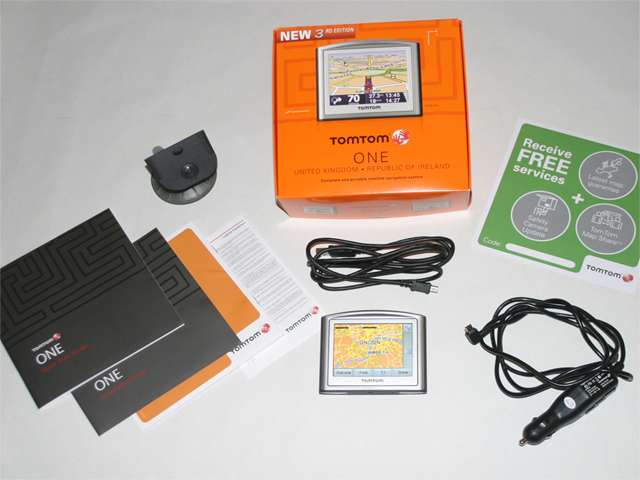
What’s in the box:


1/ USB Connect cable for the PC
2/ Car Charger Cable (1,5M in length)
3/ Windscreen suction mount
4/ The One Third Edition
5/ Quick start guides
6/ Free services card

What is not in the box is any form of removable software so a day one back up is essential with this unit – the non supply of software on disk is a long established tradition with the One devices, from when the original device was first seen some considerable time ago. I still think this omission is/ was a poor decision, the cost in wasted support calls must far outweigh the cost of mass produced CD’s these days.

With no memory card slot the One Third Edition relies upon internal Flash Memory, 512MB of it is supplied with this regional model. This cannot be upgraded or supplemented; it is all you have for the application, voices, POI files and maps. That said only 221MB is actually in use when new. You are left with 277MB to use, this amount can be increased by preening the memory of files and folders that are not required for day to day operation of the unit. Voice files can be deleted, lets face it if you are using a UK based device why carry voices that you will never use? This alone can save 50MB.

The usual TomTom POI files are included, however the file containing the inbuilt POI collection is less than 2MB – this is much smaller than seen on previous devices. POI accuracy and coverage will improve through the use of Map Share capability. One single ov2 file is pre-loaded this is for the TomTom Speed cameras and covers all fixed locations with speed limit data where known.

I experienced the accuracy of the pre-installed camera database on my drive home, the unit wrongly informed me of three camera locations that simply weren’t present. More worryingly it failed to notify of two fixed cameras that have been at the road side for over eighteen months. I appreciate a download to update this camera database is freely available with the supplied “free services” card, but I would expect a unit as new as this to contain fairly upto date data. Seven miles and five mistakes, let alone the lack of any mobile locations is not very good.

Free Services

1/ Latest map guarantee – this is a very nice touch, this would have alleviated so much trouble previously encountered with new devices, if it had been adopted with earlier units. A very good and worth while addition to the box.

2/ Map Share – Free to use for one year, it will be interesting to see how this develops over time, do you pay extra after the 12 months have expired, or are you expected to purchase a new map after 12 months, if so does it come with free map share – who knows?

3/ Safety Camera Update – will help some, but most users of this site will know where to obtain a better set-up to be honest. The lack of customisation for warning distance and sounds is still a major flaw with the supplied system.

Custom POI Files

As with all preceding TomTom products Custom POI files can be added to the map folder. The device uses the ov2 file format for custom POI’s and is capable of supporting spoken POI warnings if you decide to employ ogg files containing the audio. There is however a bug within the version 7 software used by this device (it also affects the x20 and One XL units). When setting up POI Warnings using ogg files you are presented with this screen:


If you answer No to the question the device will lock up displaying this screen:


The only way around this is to press the reset switch. If you answer Yes with respect to the warning sound (even though you heard nothing) the device will have picked up the sound file, and it will use it by default for any associated warnings.

The new One Third Edition can use the Pocket GPS World Speed Camera Database and utilise the spoken alerts with the correct associated ogg files which are found on THIS page.


Menu Structure

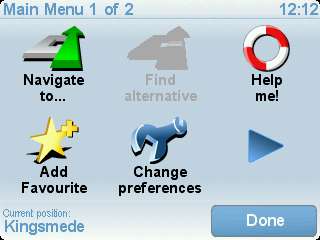
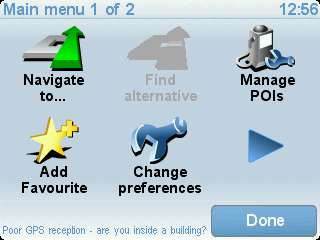
This has seen a significant reduction in the number of icons and pages when compared to previous devices. Firstly the Main Menu is only two pages so what’s present.


Of the above icons only the “Help Me” icon might appear new to users familiar with TomTom devices, all the others do “as they say on the tin” and have been in use for quite some time.

"Help Me" provides qute a wealth of useful information including short cuts to allow easy and quick navigation to emergency services and locations/ phone numbers of such places.
The "Where am I?" Icon is very handy if you find yourself involved in an accident or breakdown situation. Pressing it will reveal road information such as names and displays the current position in Lat/ Long - ideal as a summary for the emergency services.
This is a great idea, but it is seriously let down by the poor POI files contained on the device. As an example using the Phone/ Doctors option I am offered locations in Ireland, Map Share will help with this situation though.


As you can see from the above screen capture there are two pages to the "Phone for Help" the second page is just an expansion offering public transport, car repair, dentist, pharmacy and vet locations.

Another of the Help Me pages covers basic first aid, this could save lives so its inclusion is a welcome addition.


The last Help Me page is for information about road regulations in various counties and car maintenance, its not going to help you re-build an engine but does provide some basic information.


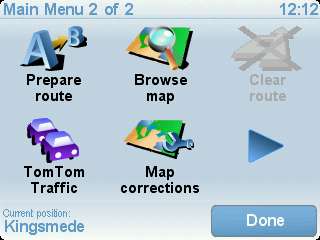
Page two of the main menu offers the slightly less often used options.


Again there is a newcomer for version 7 software – Map Corrections, Tim Buxton has already covered the use of map share functionality in This Article. If Map Share is used correctly it will add a wealth of local knowledge to the map data we all use with updates being made available via TomTom Home and the Internet connection your PC provides. These updates can include road updates, road direction changes and amended POI files – well worth trying, especially so on this device with the very poor inbuilt POI files it starts life with.

With only two pages available, what’s missing? Well with no Bluetooth capability, the Mobile Phone icon isn’t needed so no guesses, its not there. Neither are the Plus services as these are Bluetooth dependent. View Route has disappeared as an icon in its own right, however if you tap the Status bar followed by “Details” you will find the “missing menu” You are presented with the standard menu associated with “View Route” its just different in actually getting to it.


Itinerary Planning

This is not present within the menu structure, neither can it be found from any other approach with the One Third Edition, is this deliberate or a simple oversight when TomTom rationalised the menu structure?
Is this the menu page TomTom have forgotten about?


Fortunately (for now) this appears to be an omission by TomTom and the missing icon and associated functionality can be re-introduced to the One Third Edition, this necessitates the use of a custom menu, whilst this will return the missing functionality to the unit you will loose the Map corrections and Help Me icons from the main menu.
It would have been far preferable if TomTom had dropped the "Find Alternative" function from the main menu as this function is available from the status bar, in the same way you now have to find the "View Route" icon mentioned above.

Battery Life

It's too soon to say, I would typically charge/ discharge any cell at least eight times before quoting figures, others will have to comment on this as I only had access to the device for a short period.

On The Road

To power up the device needs a two second press of the power button. I like this feature as there is far less chance of an inadvertent switch on with the unit in your pocket or handbag.
GPS position fix is very fast, the One Third Edition employs the “Quick Fix” system to assist the initial position fix. Even with no updates (which are obtained via connection to the internet for free) the One Third Edition acquired its first fix in under 30 seconds. With the quick Fix data in place the device should perform even better, I found subsequent start ups took only seconds to acquire a position fix.

The screen is readable in sunlight – yes we do get sun in the UK from time to time, you can also select different colour schemes and brightness levels for day and night mode. The screen size is neither wide screen or large when compared to other devices in the TomTom family range, it is quite usable being larger than most modern PDA devices and phones. Measured diagonally the presented screen is 87MM and it uses the standard 4:3 aspect ratio.
You also have the option to move the status bar from the bottom of the screen to the right hand side, it would be nice to also shift it to the left side but this is not an option on the device.


Volume from the onboard speaker is good, with no noticeable distortion even at 100%, I found 80% was loud enough to clearly hear the instructions above the stereo playing rock music. In tradition with the minimalist TomTom approach to features on the One range there is no external sound output, so it’s a good job the volume and clarity are acceptable.

Route Planning

Efficient with full postcode support, although if you plan a long distance run this does appear to take longer than other TomTom products, I am only talking about a few seconds difference even when planning from one end of the country to the other. Where this does become noticeable is if you are stupid enough to compare multiple devices on the road. Ignore the navigation instructions and see how long they take to re-calculate, the 910 was quickest followed by the One XL using an SD card, then came the 720 followed by the One Third Edition – this happened on a number of occasions, the race result was the same each time.
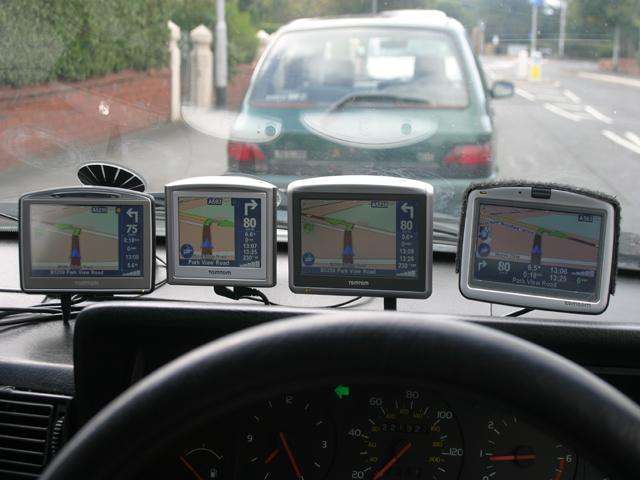
Map versions can often produce different routes so this will also partly explain the above – take the following as an example of such confusion different map versions can cause.


All the devices are correct in terms of a usable route,but they were loaded with different map versions, this picture also highlights the display size of the One Third Edition, viewed from left to right there is a 720, One Third Edition, One XL and a 910.

Traffic Information

With no Bluetooth connectivity all the TomTom eggs are in one basket with respect to the Traffic data – that being the RDS-TMC accessory which is an additional purchase if you want Traffic information.
In the UK we are plagued with poor reception, but the One Third Edition only offers RDS-TMC connectivity. To receive this data service you connect the optional receiver to the base mounted connector, once this is in place the Traffic menu becomes partially active. To be fully active (and usable) requires the receiver to lock on to a radio station providing the correct information. If/ when you receive some data the device will dynamically adjust your route to avoid traffic jams depending on your preferences.

All we need to see for the UK is a decent receiver and the much awaited iTIS network improvement to take place.

Conclusions

A no frills basic unit supplied with the very latest at the time of writing UK & IRE map available v705.1485 supplied by Tele Atlas (upgrade voucher in the box if this changes over time). If you want the capability a mobile phone offers in way of data consider the more costly One XL, or if data and hands free are needed look towards the x20 devices.

Should you ever want to use the more comprehensive seamless Europe or US maps look at another device as 512MB is not enough to store them, additional single European country maps will be OK on the device though.

It works and will suffice for most users if all they want is an out-of-the-box navigation device. What it does do very well is provide a navigable route with spoken instructions; combine the third party voices for spoken alerts and POI files and you won’t go far wrong, at £139 it’s a decent price if ordered over the net – with pick up in store an option as well dependent on where you purchase.

Please bear in mind the menu problems relating to Itinerary and the very limited custom POI functions supplied with the device, these omission are a very poor move on TomTom's part in my opinion, they really need to sort out the menu to release/ return the menu to its full capability, who cares if its two pages or three?

=======================================================================

HOW TO OVERCOME THESE OMISSIONS:

NOTE:
THE FOLLOWING ONLY APPLIES TO DEVICES USING NAVCORE 7 SOFTWARE, AS SOON AS YOU UPDATE TO VERSION 8 THIS WILL NOT WORK AS THE ITINERARY CODE HAS BEEN REMOVED FROM THE SOFTWARE FOR THESE DEVICES.


If you want to recover the full Itinerary and Custom POI capability that the software offers but TomTom have stupidly (in my opinion) removed from the device you need to run a custom menu on the unit.

Doing this will recover the missing POI menu and Itenerary functionality, but you loose the Help Me and Map Share icons (if I work out a way to get these back as well I will be happy, but all attemps at this have proven fruitless so far), this is a small price to pay as far as I am concerned as you can soon toggle between the two menu structures with a simple connection to the PC.

Before doing any of the following please make sure you have a full back up of the device, use the method detailed on the FAQ Page #1 for a reliable method.

Put the following text into a file named TomTom.mnu


MENUBLOCK|BLOCK_MAIN|BTM_GPS_POSITION|
MENUPAGE|TASK_PAGE1|Main menu 1 of 2|
MENUITEM|TASK_NAVIGATE_TO|
MENUITEM|TASK_MENU_FIND_ALTERNATIVES|
MENUITEM|TASK_MAINTAIN_POI|
MENUITEM|TASK_ADD_FAVORITE|
MENUITEM|TASK_MENU_PREFERENCES|
MENUITEM|TASK_PAGE2|
MENUPAGE|TASK_PAGE2|Main menu 2 of 2|
MENUITEM|TASK_MENU_PLAN_ATOB|
MENUITEM|TASK_SHOW_MAP|
MENUITEM|TASK_DELETE_ROUTE|
MENUITEM|TASK_MENU_TRAFFIC|
MENUITEM|TASK_ITINERARY|
MENUITEM|TASK_PAGE1|


Then put the file into a folder called "SdkRegistry" (do not use the quotation marks though) and pay attention to the Caps case of the letters.


This method will "unhide" the features people need and use on a day to day basis, unfortunatly it will remove the newer version 7 additions to the software.


You can still mark map changes to the map for future review using the navigation screen short cut as this does work even when using a custom menu (make sure you enable this BEFORE installing the custom menu though).


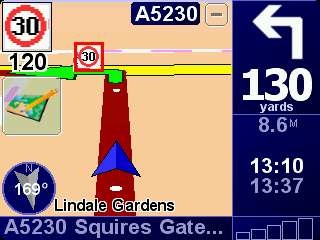
(note the short cut for marking a map change for future referral below the speed camera icon on the upper left side of the screen)

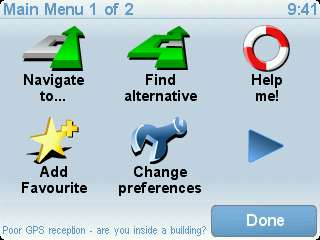
To revert to a normal menu simply rename the TomTom.mnu file to something else and the device will boot using the default menu structure, doing this will make the default menu screen return :

Main menu screen one:


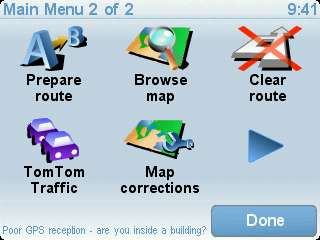
Main menu screen two:


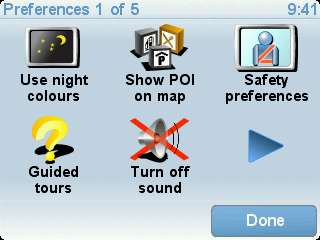
Change Preferences screen one:


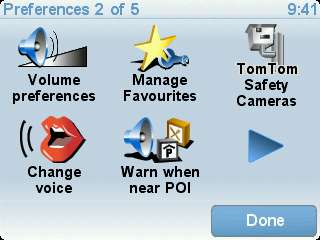
Change Preferences screen two:


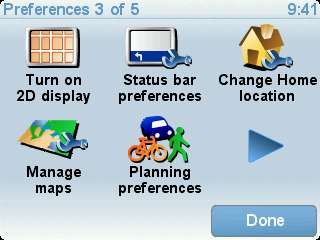
Change Preferences screen three:


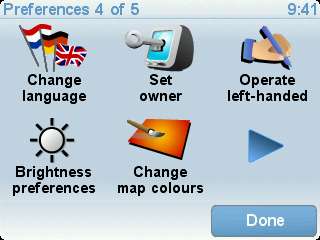
Change Preferences screen four:


Change Preferences screen five:


Edit Once to add the menu shift due to the stupid menu implementation on the device as supplied

Second edit to add the default menu screens to the end of the post - MikeAlder


Third edit to add the large red warning about navcore 8 implications for the work around - MikeAlder


Last edited by mikealder on Mon Jun 16, 2008 9:35 pm; edited 3 times in total
Back to top
View user's profile Send private message Send e-mail MSN Messenger
46jimbo
Regular Visitor


Joined: Apr 24, 2005
Posts: 185

PostPosted: Wed Sep 12, 2007 1:33 am    Post subject: Reply with quote

So, is this the end of the SD card slot on the One series? Does this mean that you will be forced to buy, say, a 720 if you want to install a large map?

Pity, I say, as my One does everything I want it to. And I do need the larger maps.
Back to top
View user's profile Send private message
rogalog
Occasional Visitor


Joined: Sep 14, 2007
Posts: 1

PostPosted: Sun Sep 16, 2007 3:10 pm    Post subject: Reply with quote

Hello
Am I going wrong somewhere?

I have just bought a TT1 Ver3 to replace my V2 because I liked the idea of Map Share; then I found they'd done the dirty by taking away the mange POI's menu and eventually found my way here....

I've done as suggested but the new items fail to appear, and the Menu remaind unchanged.

I copied your text into Notepad on my computer and made sure it was saved as a text file named TomTom.mnu

I made a folder in the root directory of my Tom Tom called SdkRegistry and put the file in it.

Rebooting the TomTom makes no difference to the menus... any ideas?

===============================================
Addendum 16/09/07

Realised what I did wrong!!

When I saved my file with Notepad as TomTom.mnu, all it did was to call it TomTom.mnu.txt Dorhhhh...

I can never remember how to actually change the file type in Windows, so I did it in a DOS window, made it TomTom.mnu and now it works fine.

Thanks Mike for your advice.


Last edited by rogalog on Sun Sep 16, 2007 10:07 pm; edited 1 time in total
Back to top
View user's profile Send private message
mikealder
Pocket GPS Moderator


Joined: Jan 14, 2005
Posts: 17983
Location: Blackpool , Lancs

PostPosted: Sun Sep 16, 2007 3:19 pm    Post subject: Reply with quote

You seem to have done everything correctly, I suspect your menu file name might be at fault though, it is quite possible it is named TomTom.mnu.txt

In Windows Explorer click Tools/ Folder Options, View Tab and make sure "Hide Extensions for known file types " is NOT selected, while you are in there set Hdden Files and and folders to Show.

Now have a look at your TomTom.mnu file in Windows Explorer, is it correctly named or not - if its wrong right click it and change it to what it should be - Mike
Back to top
View user's profile Send private message Send e-mail MSN Messenger
Robin2
Frequent Visitor


Joined: Nov 24, 2003
Posts: 1425
Location: Swansea

PostPosted: Sun Sep 16, 2007 7:20 pm    Post subject: Reply with quote

rogalog wrote:
Hello
I bought a TT1 Ver3 to replace my V2 because I liked the idea of Map Share; then I found they'd done the dirty by taking away the mange POI's menu and eventually found my way here....


I am still using a TomTom One v2 with Mapshare (see my thread here to see how to do it. I have MapShare and all the other functions of my One

Robin
_________________
TomTom One v3 Europe, Navcore 7.903, Western Europe 835.2420
TomTom Go 720 Europe, Navcore 8.351, Western Europe 850.2781
Plus a lot of other PDA GPS kit, seldom used
Back to top
View user's profile Send private message
SpanerInTheWorks
Occasional Visitor


Joined: Sep 20, 2007
Posts: 1

PostPosted: Thu Sep 20, 2007 11:08 pm    Post subject: Reply with quote

I to noticed this drop off on TomToms part. I'm also actively looking for the MENUITEMs for "Help Me!" and "Map Corrections".

I have spoken to TomTom about the "Manage POIs" and "Itinerary planning" menu items that are described and/or mentioned in their V3 users guide. The response was:

"In regards to your query, the information in the manual is indeed incorrect. A mistake was made by the production team. I apologies on there behalf for the error. The information will be updated in the very near future.
There will be no update to add these options in the future. The device can not use them at all."


Other differences I have noticed between the V2 and V3:

Similar to you mikealder I had a v2 and v3 side by side navigating the same route.

TomTom seemed to have cut out map detail overseas (WE model). I have only tested this in Finland but rivers, builtup arears (orange, default map colour) and Industrial areas (grey, default map colour) shown on the v2 map are missing on the v3!! This is I guess to fit it all in the 1GB memory. It seems a bit tight, I only have 19MB free space!!

I was lead to believe from somewhere that "Car symbols" would be available on the V3. but it is not.

Voice navigation seems to be improved on the v3 too.

Once I get those menu items I'm missing, I will be well happy.

Thanks for your post mikealder, great description!
Back to top
View user's profile Send private message
mikealder
Pocket GPS Moderator


Joined: Jan 14, 2005
Posts: 17983
Location: Blackpool , Lancs

PostPosted: Fri Sep 21, 2007 8:11 am    Post subject: Reply with quote

I appreciate the comment from TomTom:

"In regards to your query, the information in the manual is indeed incorrect. A mistake was made by the production team. I apologies on there behalf for the error. The information will be updated in the very near future.
There will be no update to add these options in the future. The device can not use them at all."


Whilst they admit the mistake in the manual they then state these menu options are not available because the device cannot use them - its time they WOKE UP as this device can use them, but doing so is at the cost of Map Share and Help Me - the ironic twist is TomTom are forcing users to update their POI by using Map Share.

In order to achieve this they remove certain menu functions from the device, we re-enable them and in the process disable what they want us to use.

I to would like to enable the full menu, but it would appear these new functions are not called up in the software when you look for them, they must be somewhere else - I will have another dig around for them this weekend - Mike
Back to top
View user's profile Send private message Send e-mail MSN Messenger
Gmonkey
Frequent Visitor


Joined: Oct 17, 2005
Posts: 390
Location: Washington DC

PostPosted: Fri Sep 21, 2007 8:16 pm    Post subject: Reply with quote

Thanks for your post Mike, this is the first I've heard of that problem. It's strange that you have to update POI's by using Mapshare. Hopefully they will update it soon. Like you said, at least they took responsibility and admitted their mistake.
Back to top
View user's profile Send private message
Andy_P
Pocket GPS Moderator


Joined: Jun 04, 2005
Posts: 14836
Location: West and Southwest London

PostPosted: Sat Sep 22, 2007 12:56 am    Post subject: Reply with quote

They only admitted a mistake in the manual...

It seems to be deliberate policy to cripple the functionality.

Call it paranoia, but we seem to have been lumbered with at least three or four "problems" all of which make it harder to use third-party POIs.

1. Can't add or manage them on the ONE Third Edition
2. Can't seem to install them using Home v2
3. Proximity warnings keep mysteriously disappearing, meaning extensive reprogramming.
4. Total number possible is being more than HALVED by Mapshare corrections using up the available ov2 "slots" (I now have 60 of these CAxxxx and PAxxxx.ov2 files - gonna have to start dumping some of the correction categories).

Is this deliberate????
Back to top
View user's profile Send private message
rossb55
Occasional Visitor


Joined: Oct 02, 2007
Posts: 2

PostPosted: Tue Oct 02, 2007 12:51 pm    Post subject: TomTom One V3 - Menus Reply with quote

mikealder - great information, very useful

i am new to sat navs and tomtoms. having just purchased a V3 i was struggling to plot routes.... now I know why.
can you give the menu text i would have to use if i only want to replace the map correction icon and leave the help me icon, i.e. have the choice of itinerary planning but not manage POI's - or is the need for POI's intrinsicaly linked to itinerary planning?
if you ever work out how to get all menu choices that would be a bonus!

many thanks
ross
Back to top
View user's profile Send private message
mikealder
Pocket GPS Moderator


Joined: Jan 14, 2005
Posts: 17983
Location: Blackpool , Lancs

PostPosted: Tue Oct 02, 2007 2:00 pm    Post subject: Reply with quote

Welcome to the forum, at present the menu text I put in the write up above will give you back the options you require at the cost of the Map Share and Help Me functions, these new version 7 menu items are not listed in the code in the normal way, as yet I still have not located what these functions can be called up by.
When/ If I manage this (or anyone else for that matter cracks this problem I am sure it will be made available via the forum though - Mike
Back to top
View user's profile Send private message Send e-mail MSN Messenger
spcdust
Occasional Visitor


Joined: Sep 18, 2007
Posts: 49

PostPosted: Thu Oct 04, 2007 10:20 pm    Post subject: Reply with quote

Does the Tom Tom One (3rd Edition) have any limit on the number of custom POI files it can handle?

Thanks in advance

spcdust
Back to top
View user's profile Send private message
mikealder
Pocket GPS Moderator


Joined: Jan 14, 2005
Posts: 17983
Location: Blackpool , Lancs

PostPosted: Thu Oct 04, 2007 10:26 pm    Post subject: Reply with quote

100 is the limit - BUT when map shere kicks in this can be reduced by a considerable amount - if you don't want map share and need to use Custom POI to the limit of the software don't enable the share options and you will be fine - Mike
Back to top
View user's profile Send private message Send e-mail MSN Messenger
spcdust
Occasional Visitor


Joined: Sep 18, 2007
Posts: 49

PostPosted: Thu Oct 04, 2007 11:18 pm    Post subject: Reply with quote

Thanks for that Mike

Just out of curiosity, you've obviously seen the issues that some of us are experiencing with the One (3rd Edition), have you used the one you reviewed much without any problems?

I see you removed the TT speed camera files which I have now done so I'll see this week end if that has any impact. Also, you're obviously far more technically informed on these things than myself but my instinct tells me it's some driver / memory management issue they need to resolve which I suspect a software patch/update should sort out - what are your thoughts?

Cheers again

spcdust
Back to top
View user's profile Send private message
Andy_P
Pocket GPS Moderator


Joined: Jun 04, 2005
Posts: 14836
Location: West and Southwest London

PostPosted: Fri Oct 12, 2007 1:06 pm    Post subject: Reply with quote

As this machine has some ongoing issues that are generating quite a lot of traffic in the forums, and Mike's excellent description here addresses most of them, could one of the moderators make this a "sticky" topic to stop it disappearing down the list?

I WOULD do it myself.... Wink
Back to top
View user's profile Send private message


Posted: Today    Post subject: Pocket GPS Advertising

Back to top
Display posts from previous:   
Post new topic   Reply to topic    Pocket GPS World Forum Index -> TomTom Portable Navigation Devices All times are GMT + 1 Hour
Goto page 1, 2, 3 ... 16, 17, 18  Next
Page 1 of 18

 
Jump to:  
You cannot post new topics in this forum
You cannot reply to topics in this forum
You cannot edit your posts in this forum
You cannot delete your posts in this forum
You cannot vote in polls in this forum

Powered by phpBB 2.0.11 © 2001 phpBB Group
phpBB port v2.1 based on Tom Nitzschner's phpbb2.0.6 upgraded to phpBB 2.0.4 standalone was developed and tested by:
ArtificialIntel, ChatServ, mikem,
sixonetonoffun and Paul Laudanski (aka Zhen-Xjell).

Version 2.1 by Nuke Cops © 2003 http://www.nukecops.com

Login

Nickname

Password

Don't have an account yet? You can create one. As a registered user you have some advantages like theme manager, comments configuration and post comments with your name.

Download Now!


PGPSW Speed Cameras on your iPhone.


Download POIs for your GPS


© Terms & Privacy

GPS Shopping


Follow Us Now!

Follow us on Twitter & Facebook. Keep up to date with breaking news round the clock...