Review by Alex Dixon and Lutz Bendlin
 iGO 2006 - let the Games begin... iGO 2006 - let the Games begin...
At this year's CeBIT most of the stuff we saw was not really new, rather some re-worked versions or marketing "improvements". However, there was one exception. Everybody talked about the game boys from Hungary.
Why game boys? Because the navigation solution for Pocket PCs that we present here, iGO 2006, has its roots in a PDA game development company called PDAmill (www.pdamill.com), and this shows quite a bit in the application. More on that later.
This review is the combined work of "alix776" and "lbendlin" and while we worked on it together we didn't always have the same opinion on it. We'll be marking throughout the text where we disagree or focus on different aspects.
iGO (www.i-Go.com) is not to be confused with iGo (www.igo.com), a mobility electronics/accessory reseller in the USA. Hopefully there won't be too much of a trademark fight between these two.
(alix776) I first came across iGO when Lutz mentioned it one night as I was giving him a headache yet again for something very simple and he mentioned iGO’s fast routing so I was interested. A few weeks later yet again Lutz asked if I fancied trying it out so of course I said yes.
Skip the setup blabla and jump directly to usage details
- Program installation -
This is where iGO is different to most of the competition because its locked to the 1 GB Mini SD card that it comes with (plus a SD adapter) - great if you have more than one PDA but not so good if you want to get yourself a bigger SD card, and install other stuff on it too.
 It remains to be seen if this licencing model can survive the realities of the consumer navigation market. iGO should at least be considering to release the application on Micro-SD which are becoming more common with newer devices like the much anticipated HTC Hermes. Oops, TyTN. It remains to be seen if this licencing model can survive the realities of the consumer navigation market. iGO should at least be considering to release the application on Micro-SD which are becoming more common with newer devices like the much anticipated HTC Hermes. Oops, TyTN.
Nevertheless, installation is very simple - insert the (Mini)SD card and iGO will autorun and install itself. Some portion of the program will install to main memory. The program can be moved back to the storage card and run from there if you prefer that (I do). Doing so will free up 1800 KB of main storage.
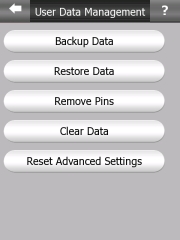
The user settings will be stored in main memory so make sure to do regular backups.
On each re-insert of the SD card iGO will start automatically. If you don't like that, rename or remove the 2577 folder on the SD card.
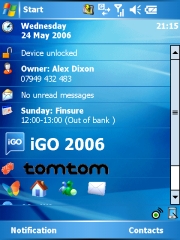
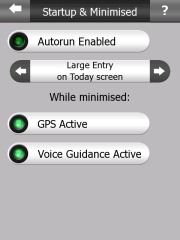
iGO also forces itself onto the Today screen - if you like that you can use the applet to quickly start iGO. If you don't like it you can disable the applet in the iGO settings.
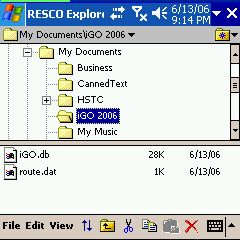 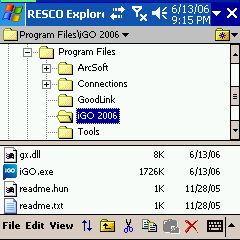
iGO will need at least 11 MB free RAM on your device to start up. It also has the tendency to occupy more RAM while it is running, and will "kick out" other programs that you may have started before. Let's hope iGO can fix that memory hogging.
 - Map Installation - - Map Installation -
Maps usually come on the SD card, and there is no need to install anything. Of course we recommend you do a backup of the SD card.
We are not sure how iGO will handle the addition of maps or map upgrades. Will they ask you to buy yet another SD card? Will it be possible to move everything to a bigger SD card? Time will tell.
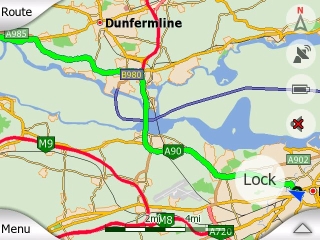
From tests it proved to be possible to do cross-map routing. You will have to specify the destination map (country/state) when you search for a destination though.
One of the interesting aspects of iGO is that a very large map range is available, either from TeleAtlas or from a local provider. iGO is the first vendor to offer decent maps of many Eastern Europe countries like Slovakia and Romania.
(lbendlin) I used the Scotland maps and found them to be pretty good except for the inevitable mix of newer roads and road changes which seem to be pretty frequent in Scottish cities judging by the abundance of red plates "changed road layout ahead".
- Configuration, saving/backup of user data -
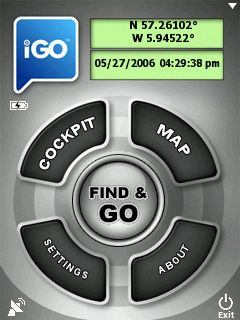 Let's look at the configuration options for iGO. On the main screen there is the "Settings" button which will take you to the settings menus. From there you can change the most common settings, or by tapping the "Advanced" button, configure some of the more esoteric items. Let's look at the configuration options for iGO. On the main screen there is the "Settings" button which will take you to the settings menus. From there you can change the most common settings, or by tapping the "Advanced" button, configure some of the more esoteric items.
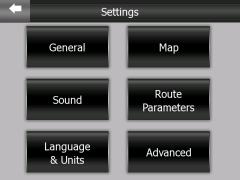
Intriguingly the GPS settings cannot be reached from the Settings button. Instead you have to tap the little icon in the bottom left of the main screen. This GPS icon also appears on the map, and you can also access the GPS settings from there.
Most of the menus do not have an "OK" and "Cancel" button. Changes in settings are applied immediately, and the "back" arrow only takes you back to the previous screen. This is very different from all other programs, and certainly not compliant to any usability guidelines. Be prepared for some intial confusion while you get to know that concept.
Most Settings menus do however come with a help button ("?") that explains the effect of the settings on that page. This is a very good feature because some of the settings are not self explanatory.
  - GPS setup - - GPS setup -
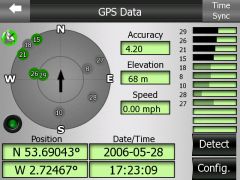
You can select to have iGO try and detect your receiver, or - if you know the parameters - to configure the GPS yourself.
The symbol in the upper right will tell you if you were successful (white/green) or not (black/red).
On the right side you will see the satellites in view as well as the ones that are currently used.
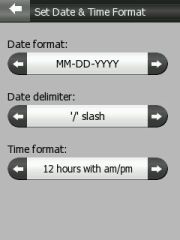
Both the position and the date/time formats can be changed in the settings menu.
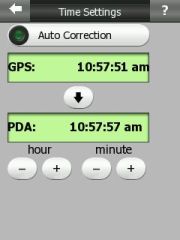
Optionally you can synchronise the PDA time with the GPS time once a fix is obtained - a nice add-on.
- The General Settings menu -
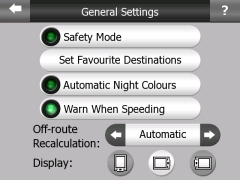 Safety mode disables the touch screen while the vehicle is in motion. Sounds a bit like the Rider, ah? Safety mode disables the touch screen while the vehicle is in motion. Sounds a bit like the Rider, ah?
Set Favourite Destinations allows you to specify Home and Work locations. Later you can navigate to these with less button clicks.
Automatic Night Colours will switch between the two color schemes you have selected, based on the time of day and location. This worked reasonably well for me, but I also do not find it too difficult to switch that through the Quck Menu.
"Warn when speeding" can be configured to warn at exactly the speed limit of the road your traveling at, or at a (configurable) lower speed. Of course the accuracy of this depends on the available map data which is still less than stellar for speed limits.
(lbendlin) The recalculation when going off route should always be automatic. No idea why iGO decided to make that optional.
As you can see there is no auto-rotate function in iGO. You will have to select Portrait or Landscape mode yourself. This is not too much of a problem since you tend to use the device mostly in just one orientation. The advantage is that you can use a landscape display even on on PDAs that are running older versions of Windows Mobile (below WM 2003 Second Edition).
iGO supports all known resolutions - QVGA, VGA, and square screens.
- Map settings -
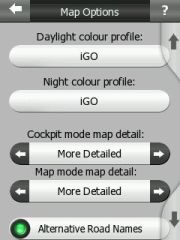 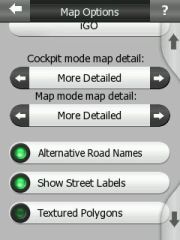
Here you can set the color schemes for the day and night modes. There are some predefined schemes that come with the application but with enough of energy you can actually create your own, too.
If you drive a lot in areas where streets tend to have multiple names then you will appreciate the "Alternative Road Names" setting.
(lbendlin) Textured Polygons is a gimmick and should stay switched off for the sake of keeping the UI at least a little bit clean.
(alix776) I like it, it doesn’t slow the program down and I really like eye candy like this.
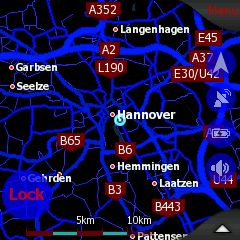
Street names can be shown in all map modes, no matter if 2D or 3D. In fact, the difference between 2D and 3D is pretty blurry because you can tilt the map completely up (2D) or completely down (max 3D) and find the tilt angle that is optimal for you.
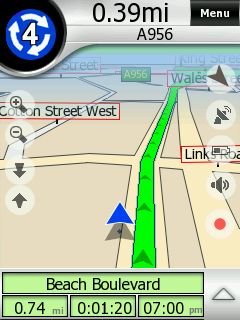 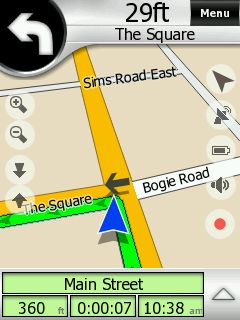
For some unknown reason the street labels are sometimes shown directly on the streets, and sometimes they are encased in these ugly red rectangles. It would be less confusing if only one style would be used, preferable the one on the right.
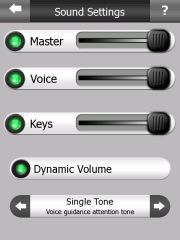 Sound Sound
Coming from a game development company, there is a lot of noise being produced by iGO. Every little tap or key press makes you feel like you are playing an arcade game. Thankfully these sounds can be adjusted, and even muted (highly recommended for the "Keys" slider).
The Dynamic Volume works reasonably well, tuning the volume down at slower speeds, and cranking it up fully at higher speeds. The sound quality is reasonable, and the voice instructions are easy to understand.
If you want you can also precede each announcement with an "attention tone". This may actually be beneficial if you are using a Bluetooth headset, and are normally suffering from the "where is the first part of the announcement" issue when the Bluetooth headset is woken up by the announcement but fails to respond quick enough.
The master sound can be switched on and off directly from the map display. This is very nice especially when you hav reached your destination and are circling to find a parking spot. The last thing you need at that moment is a navigation voice telling you to turn around when possible...
Route Parameters
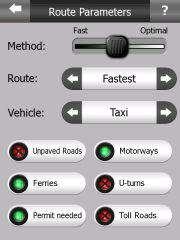
(alix776) There’s a multitude of settings which are very similar to the Garmin system ie: lorry, taxi, car, emergency, bus and pedestrian with routing in fastest, shortest and economical. As with the new Tomtom GO x10 series there’s road speed data, which can be displayed and a verbal warning given when you exceed the speed limit.
All good stuff really, unfortunately for me as an HGV driver in the UK, under truck routing the application gives a fast e.t.a. and seems to route motorways at 65 mph. (99% of hgv’s throughout Europe travel on motorways between 52 and 56 mph due to road speed limiters).
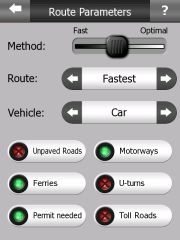 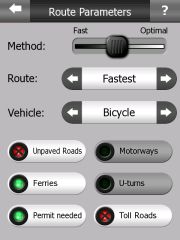 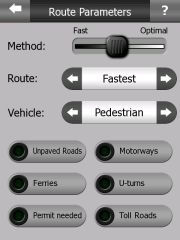
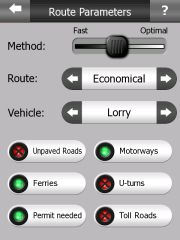
(lbendlin) For my holiday I chose economical and had a fantastic variety of narrow roads (called motorways here) and very narrow roads (B roads that will not permit cars to pass each other except in passing places) with lovely landscape passing by, and motorways only used where it really made sense. As a result I never got stuck in a traffic jam, except for an episode in Dundee where the economical route was to drive straight through the city in the middle of rush hour (instead of using the motorway bypass).
(alix776) There are no settings for RVs, so I chose the settings for Truck (Lorry) and Economical, with the method towards the optimal side. This gave me a good route and kept me to main roads. (Unfortunately for Lutz our main roads aren’t as big as in the States ).
The colour scheme is good and I like the route marking the bright green colour is easy to pick out at a glance. As are the night colours. The only thing I would change is the speed colour to something more vibrant from the grey on green as in the night mode display. It would be nice to have the over speed flash or some other continual warning.
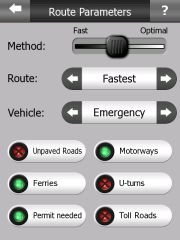 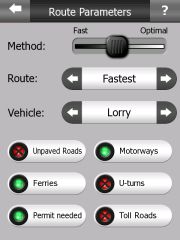 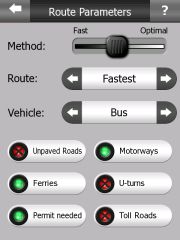
(lbendlin) Note how you can allow or avoid certain types of roads and connections. This is a permanent setting (unlike in TomTom where you can decide for each route if you want to avoid Toll roads). "Permit needed" seems to mean private roads. You can still navigate there if this setting is switched off, but you get a warning that your destination is in an unreachable area.
  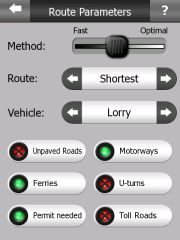
Language and Units
The iGO user interface can be configured in a large variety of languages, including such exotic languages as Romanian or Russian. With a bit of poking around in the configuration files you can even provide your very own translation.
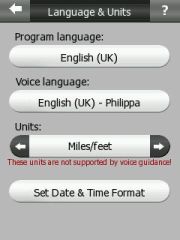 
The voice language is independent of the user interface language, you can mix them at will. Some of the voices do not cover the complete range of units yet. As you see from the picture above our dear lady Philippa doesn't know miles and feet (instead she will talk in kilometres and metres). I am pretty sure that over time this coverage will improve. Other voice files do already cover the complete range of commands. And again, with a bit of tinkering you can create your own voice files.
iGO does not support Text-to-Speech. This means it will not tell you street names as part of the voice instructions.
Advanced Menu
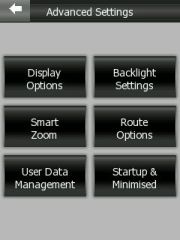
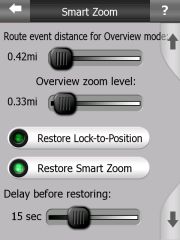
Well, just a bunch of advanced settings really. We'll let the pictures speak for themselves. Get a towel for the drool.
 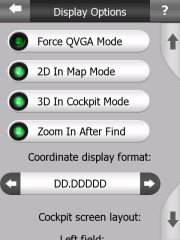 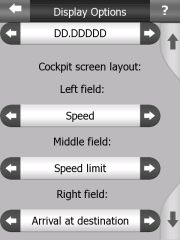
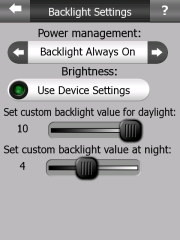 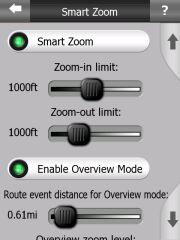 
- Using the application -
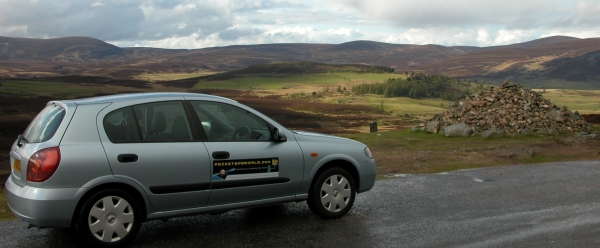
Enough of all this configuration. What we really want to see is how the application performs on the road. We both used the time after the Edinburgh GPS Expo to test iGO in the rough Scottish Highlands.
 - Find and Go - - Find and Go -
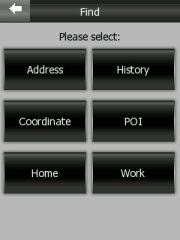
(lbendlin) Finding a destination was relatively easy. From the main page press the Find and GO button. You can navigate to the (previously specified) Home and Work addresses, to a POI or coordinate, to a previous destination, or you can just resort to entering an address.
There is an awkward step of discarding the previously selected country or city to be able to select another one - this does still throw me out every time. There must be a better way to do that...
(alix776) This takes a little getting used to if you are only used to Tomtom. iGO requires a few more screen presses to select a new city or postcode, but this becomes second nature once you’ve got used to it. It takes 4 screen presses to be able to put a different city or postal code in. This seems to be a little more accurate than tomtom but the menu pages change at lightning speed.
(lbendlin) Unfortunately iGO does not permit address search by street name rather than by city name. This may not be an issue in most of Europe except for the more densely populated areas. But it certainly is a problem in the US where the suburbia boundaries are not well defined, and you never really know what city you are in at the moment. Streets can easily go through four cities within only a few miles, and there are no signs as to where one city stops and the other begins. Even worse, the same house number may be re-used throughout the road...
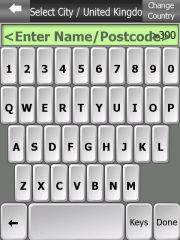 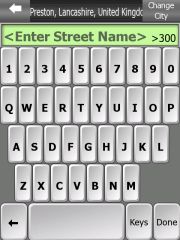 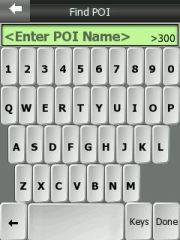
Full 7 digit postcode search is available for the UK, I found it to be convenient and accurate enough for touristic endeavors - most of the castles and hotels list the post code on their websites. The space must be entered - for example "EH6 AA8". From user feedback we have learned that some UK maps have been delivered without postcode data - hopefully this will be fixed soon.
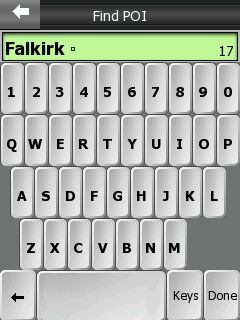
The on-screen keyboard feels awkward in Portrait mode. The vertical orientation of the keys doesn't seem to compute with my fingernails - those seem to be arranged horizontally. The keyboard is much easier to use in landscape mode where the keys are more square. You can also try the ABCD keyboard style - there the keys have square buttons.
A good element is that the number of possible matches is shown. This number will decrease with each letter that you select, and finally, when the selction is small enough, the list will show directly.
 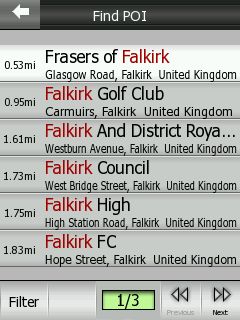
Unfortunately only the distance to the possible location is shown, not the direction. It would be nice if iGO could add that crucial piece of information in a future release.
- Routing and voice announcements -
(alix776) The routing seemed good when I used it going to Edinburgh for the Pocketgpsworld Expo towing a caravan. I was staying in Scotland for the following week on holiday and then used iGO to get me to Glencoe, then Ullapool to see some friends, again towing the caravan both ways. I came home without the caravan again using iGO and got a shorter route than with Tomtom, which I ran along side it as a known bench mark (and the software I use as my main navigation tool).
The voice prompts are very clear and accurate and usually come in good time to make a maneuvre. One thing worthy of mention is the” bear slighty” right this does sometimes necessitate a glance at the screen and can lead to a little confusion at times. I was using the US English voice ("Amy") because it seems to have a higher pitch, and is easier to hear through the engine noise.
(lbendlin) Vocal guidance is excellent, and it will most of the time remove the need to look at the screen. The UK english female voice ("Philippa") is by far the best and easiest to comprehend, and she also has such an adorable accent - ever so slightly annoyed, and only very rarely losing her cool (go in the opposite direction of what she is telling you, and devour her "Turn BACK!" - that is priceless). Let's hope she will soon also support imperial measures (as mentioned right now she only speaks metric).
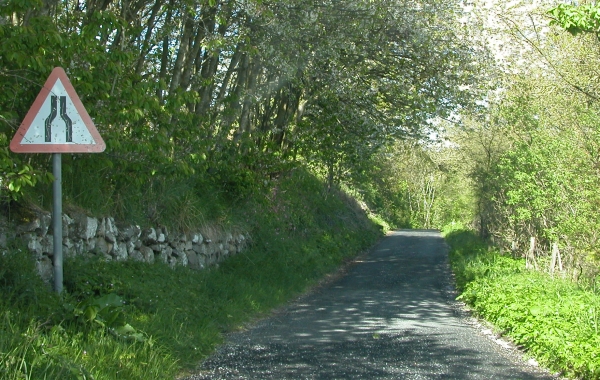
I found two exceptions that necessitate looking at the screen - one is when you can't believe the program is sending you down one of these single lane death traps that they call "B" roads in Scotland. If you ever wondered why there are a few good scottish car racing pilots - this is your answer. I am very sure the ones that survived live on a road such as the B87 above.
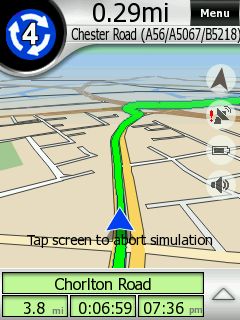 The second exception is the guidance upon approaching a roundabout (rotary/traffic circle). The second exception is the guidance upon approaching a roundabout (rotary/traffic circle).
Voice instructions are given 800, 300 and 100 metres prior, but only the very last one tells you which exit to take.
By that time it is always too late and you invariably end up in the wrong lane, and have to endure the rather not amused reactions of the other drivers when you are cutting them off.
(lbendlin) It would be much better if the 300 metre announcement would contain the complete instructions, including the number of the exit to take.
(alix776)Giving the full instruction 300meters before the turn or roundabout and then 50 meters before would be more useful.
The alternative is to lookup the information on the screen, but that will not always be possible or desired, especially in hectic traffic.
- Map Modes (North Up, Track Up, Plane) and views (2D, tilt, zoom, rotate) -
Maps are rendered very nicely in iGO. In addition to the 2D/3D option you can also use varying levels of 3D tilt to display the map more or less angled. It is even possible to rotate and even drag the map around in 3D mode - I am not aware of any other program that can do this.
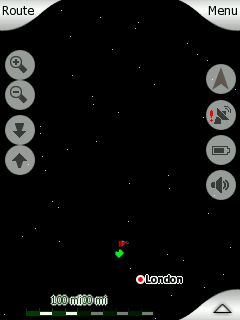 The other pair of controls allows you to zoom in and out. Zooming is done smoothly (again as if to showcase the rendering engine performance) but a tad too finely stepped for my taste. You have to tap quite a few times to get it to zoom out to a useful level. Don't overdo it though, otherwise you end up in outer space... The other pair of controls allows you to zoom in and out. Zooming is done smoothly (again as if to showcase the rendering engine performance) but a tad too finely stepped for my taste. You have to tap quite a few times to get it to zoom out to a useful level. Don't overdo it though, otherwise you end up in outer space...
(lbendlin) iGO employs a number of interesting color combinations. The PDAmill heritage shines through heavily here, with lots of atmospheric greys, and textures all over the place. I believe this type of graphical design - while looking very nice - has no value in a navigation application where it is very important to grab a maximum of information (not just data) in a very short time while diverting the eye from the street, so to speak.
For example, a green route on green-ish map background is not helpful to me, and it is taking me much too long to understand the data on the screen. There's a reason why other programs use red colors for the route - the eye can identify those quicker.
I also found some of the pictograms to be slightly confusing - for example a left turn is shown as a left curve. The voice instruction is much more accurate, and clearly specifies the turn. It would be better if the pictogram would show the real intersection geometry - like Mapopolis or TomTom are doing.
And why oh why do we need a shadow below the current position arrow? Anyhow, iGO also allows you to switch the "snap to road" off, and then your true position is shown with a little black dot. Map errors like the one on the right may then also lead to rather suicidal assumptions as to on what lane we currently are driving...
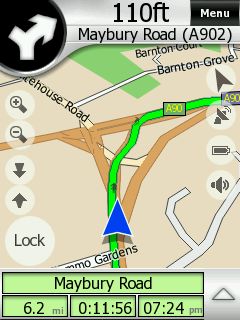 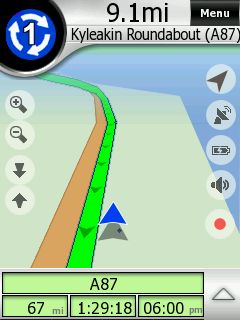
(alix776) Unlike Lutz I actually like the map display and find the next turn display to be good. The roundabout display I found easy to use, too.
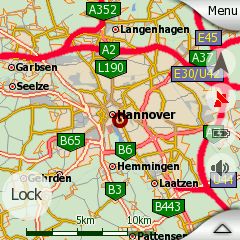
Tapping on the map or on the little "up" arrow will bring up a information window about the place you tapped. There will also be a small selection menu that allows you to set a pin, add a POI, or select the location as destination or via point.
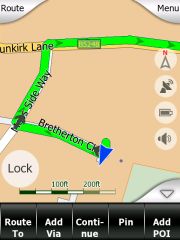 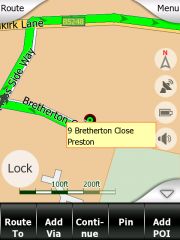
The "Lock" button will be visible whenever you moved the map. Tapping it will bring the position back into view. You can also use the automatic re-locking feature which I found to be very convenient.
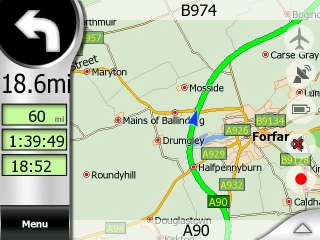 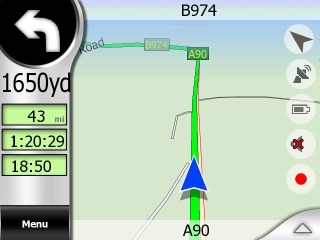
In "plane" mode your position will be centered on the map while in "track up" mode you will see more of the map ahead.
- Cockpit Mode -
Cockpit mode is what we normally call navigation mode - in reality it is map mode plus some special fields. The next turn pictogram is shown together with the remaining distance. The target street is on top, the current street on the bottom.
Below that are three fields that you can configure yourself - here showing overall remaining distance, remaining time, and arrival time.
When you come closer to a maneuvre a black horizontal bar will fill part of the top of the screen. It is another example for a less than optimal user interface - it is not noticeable enough to be of any use.
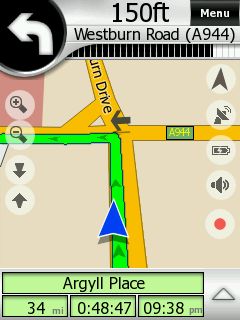 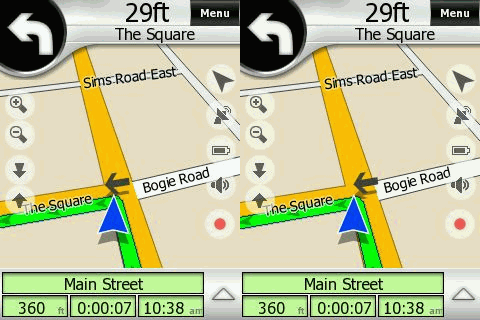
Yes, the arrow on the street is actually animated. What a waste of computing resource...
When you are navigating the view will change depending on the situation. At higher speeds you will see a 3D mode, at lower speeds or during standstills the map will tilt up to a more and more 2D mode. If there are long stretches without active navigation the map can switch to overview or plane mode. This is all happening automatically (if you want it). I found that to be very impressive and helpful.
- The Mini Menu -
Not sure how to call this menu - it sits in between the map or cockpit display and the "main" page and will appear whenever you hit the "Menu" button on the map.
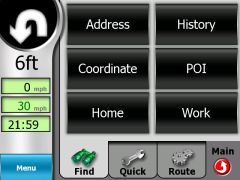 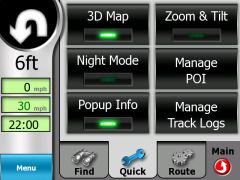
while navigation is in progress you can quickly find other destinations, change the map mode from 2D to 3D, access your track logs, or switch to night mode.
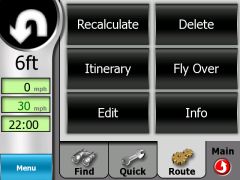
Of particular interest is the "Route" submenu. You can force a route recalculation (specifying the blockage distance), delete the route completely, or start a route simulation (Fly Over). The route simulation does only run once (unlike in TomTom where it loops). You stop the simulation by tapping the screen.
Additionally here you can access the Itinerary planner which allows you to specify a number of destinations and waypoints.
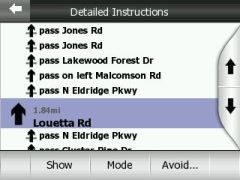
Erm. Wrong button... The Itinerary planner is reached via the Edit button. Itinerary in iGO speak is just the list of route maneuvres. Here you can also place some avoids (as you can do in the Recalculate menu). Note the inconsistency in the User Interface - all of a sudden we have a Cancel button...
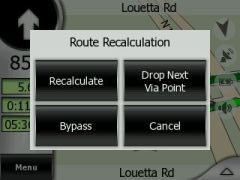 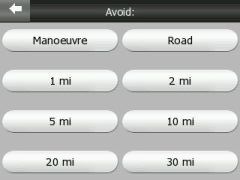
Back to the Itinerary planning - you can add via points and destinations (there is no real distinction, the first waypoint will be the start, and the last will be the destination). This editing can be done either directly from the map or through the aforementioned menu.
Once finished you can select to optimise the route yourself by moving items up and down, or have iGO do it for you. Note that on the images below the two waypoints have swapped places after I tapped Optimise.
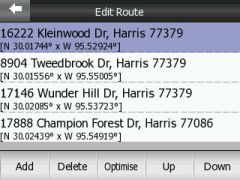 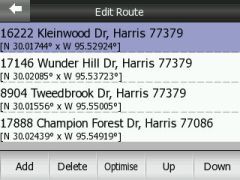
I have not, however, found a way to save and restore itineraries - a grave omission and a feature that cleary needs to be added to a future release. The only consolation is that routes are remembered through program restarts and device crashes.
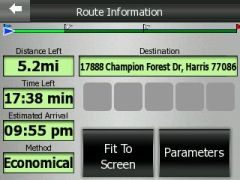 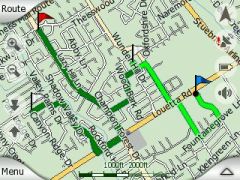
Lastly, Route Info will show an overview of the route as well as any special conditions like the usage of toll roads along the way. The little flags are actually waving frantically - another waste of processing power.
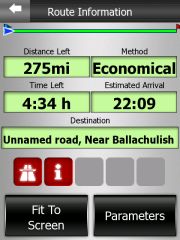 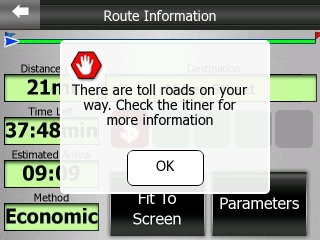
(lbendlin) By the way, the message on the right is an example how a successful user interface could look like (even though iGO had to throw in some transparency tricks).
- Track Logs -
(alix776) I tried this out but it crashed my pda after about 30mins though a soft reset did bring it back.
(lbendlin) I tried to use the Track log feature but it does not seem to be working properly yet. Track log of a current recording is not saved upon program exit, so you lose your track log when you switch the PDA off while the program is running.
- POIs -
The included POI collection is useless. The closest restaurant was invariably some 130 miles away, and other vital categories (post office, ATM, super market, tourist information) are not even listed. And I was quite astonished to learn that not even the Falkirk Wheel is included in the POI collection (see further up).
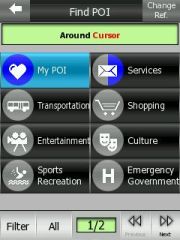 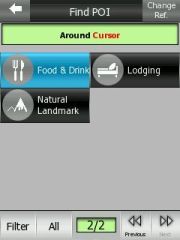
Hopefully the custom POI feature can help out here. As far as our Safety Cameras are concerned - iGO doesn't currently have any POI alerting functionality yet. But I understand this is in the works.
- Custom POIs (database format) -
iGO uses the SQLite database format to store custom POIs. For people that are not as familiar with SQL databases there is also a small program (POIconvert) available that allows to convert KML (Keyhole Markup Language, the storage format for the Google Earth POIs) files into the iGO.db format, as well as to read data from the iGO.db Track Log into KML.
We have listed the download link for POIConvert.exe below. Beware, it is a DOS based application, and documentation is scarce.
We also haven't seen any obvious way of database optimization, so we would expect quite a bit of performance loss when - for example - converting all the UK speed camera POIs to the iGO.db format. TomTom have a technological advantage here with their makeov2 program.
- Tuning (colors, sounds, strings) -
We already mentioned that you can craft your own user interface language and voice instructions. Equally, you can create your own day and night color schemes. Most of the settings of iGO are easily accessible in the data.ZIP file in the program folder on the SD card. If you are adventurous you will have plenty of things to tweak and tune (don't forget the backup !!!). But don't worry - the default settings work just fine, you don't really need to tweak the program. The only real annoyance is the "Route recalculation" announcement that basically just adds insult to injury when you missed a turn. I have replaced it (recalc.ogg) with an empty sound.
- Issues -
iGO is using the GAPI (Gaming API) extensively. One of the side effects is that iGO "owns" the screen AND the hardware keys when it is running. (Even worse, iGO registers as a service, and will not appear in the list of running programs on your Pocket PC). (We had to use a special screen capture program that can take interval captures to work around that ).
The only way to do anything else while iGO is running is to return to the main menu, and press the small "down" arrow in the top right. This will send iGO to the status bar, and you can then re-activate it by tapping the icon there.
Another issue - as already mentioned - is the fixation to a SD card. We very much doubt that this will help to sell iGO. In our understanding users will already own a SD card, and will be unwilling to swap cards back and forth. Maybe you can tell us your opinion?
 Which brings me to yet another issue - at least on the iPaq 6315 the program will not survive a standby/wakeup cycle (this may be different on other devices). This is very inconvenient when you have lots of stops in your journey (Petrol station, museum, castle etc) when you remove the PDA from the car for a while before restarting the navigation. Which brings me to yet another issue - at least on the iPaq 6315 the program will not survive a standby/wakeup cycle (this may be different on other devices). This is very inconvenient when you have lots of stops in your journey (Petrol station, museum, castle etc) when you remove the PDA from the car for a while before restarting the navigation.
At this point I normally switch off the PDA, and let the BT receiver go to standby. I would expect to be able to switch the PDA and the receiver back on when returning to the car to continue the journey. Unfortunately this didn't work with iGO - it simply froze the PDA.
At least the program remembers the route through program restarts which is really helping over the anger with the freeze after wakeup, and the need for a soft reset.
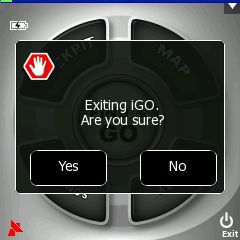
It takes four taps to exit the program (including answering affirmative to the stupid "Are you sure?" question) - this is way too long.
Not being able to search addresses by street name is painful for US users.
- Outlook, functionality for future versions -
A performant custom POI management system is an absolute necessity nowadays. An included POI warning mechanism seems to be required too.
If the program wants to compete in the US market then the search by street name needs to be implemented.
Saving and Restoring of routes would be nice.
(lbendlin) Some of the graphical elements are not very in line with the current school of thought in the area of ergonomics. I would hope that iGO can distance themselves a bit from the gaming mentality, and clean up the user interface to make it more usable for road warriors.
For a sneak preview of the features to come have a look at the OEM version of iGO. (Flash plugin required). Let's hope many of the features make it into the PDA version.
- Conclusion -
iGO is fast. Very fast. Compared to most other navigation applications iGO is the clear speed winner. Only Mapopolis can hold onto the rails, but then Mapopolis has much less graphical detail to render.
(alix776) If iGO gets POI warning and traffic then I’m seriously considering changing to this software. An alternative would be to use a second application for POI warning as I use a Windows Mobile 5 machine.
(lbendlin) iGO is an impressive newcomer. It certainly has the potential to take away market share from the big players, TomTom, Navigon and CoPilot. iGO offers a number of unique features together with amazing performance even on older devices.
There are a number of questions that need to be answered before iGO can storm the market, though. The licencing model is highly questionable, and the price is also pretty steep (even if you count the cost of the provided storage card).
|
































