|
|
 |
 |
 |
 |
|
Garmin Geko GPS Receivers Review |
09th May 2003
|
|
|
Reviewed by
Mike Barrett
|
 |
| What
are they and What do you get?
This
spring Garmin announced the introduction of a new range of GPS receivers:
the Gekos. They have created two new models the Geko 101 and the
Geko 201. These are small, trendy and snuggle in the palm of your
hand.
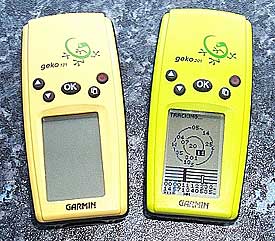
The
Geko 101 is canary yellow and the 201 is lime green. They are about
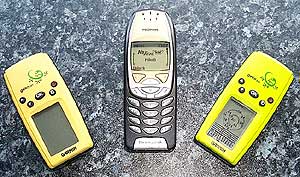
the size of the Nokia 8210 mobile phone. The main differences between
the two is that the 201 has a Computer interface and WAAS, routes
and enhanced features. Unfortunately the Gekos do not have quite
the same protocol interface, which means that you cannot use
G7toWin to download the display images.
The
Garmin Geko 101 receiver is priced, in stores, between £83
and £130, the Geko 201 between £109 and £160 including
VAT and both come complete with a quick reference guide, and a full
manual.
You will need a pair of AAA sized batteries to run the GPS receiver which are not included in the package. It is possible to use rechargeable batteries, but I did not try these as I only have AA sized NiCad batteries.
In this review if a specific model is not mentioned then the comments refer to both models. Otherwise the function or feature will refer to a specific receiver.
To
connect the Geko 201 to a PC you will need a PC Interface cable.
The Garmin cable costs about £30. The Geko 101 cannot be
connected to a PC or PDA. | 
 |
 The
cable set used connecting the Geko 201 to the Pocket PC was provided
by PC-Mobile
and comes in a number of modular cables which can be set into a
number of configurations so you can by a new adapter for another
Pocket PC without having to by a complete lead set. The
cable set used connecting the Geko 201 to the Pocket PC was provided
by PC-Mobile
and comes in a number of modular cables which can be set into a
number of configurations so you can by a new adapter for another
Pocket PC without having to by a complete lead set.
The
review unit was kindly lent to us by Garmin.
This was used in conjunction with Anquet
Maps on the PC and PDA applications Autoroute, Fugawi,
Memory-Map, OziExplorer,
Tom Tom Navigator.
The photo to the left shows the size of the Gekos compared to the Nokia 6310i phone. As you can see the GPS receivers are somewhat smaller, closer to the size of the 8210.
|
|
Garmin
eTrex Specification
The
manufacturer's specifications are quoted here.
| Geko
101 |
Geko
201 |
Navigation
features
Waypoints: 250 with name and graphic symbol
Tracks: 3,000 trackpoints;
automatic track log; TracBack® lets you retrace your path
Trip computer: Current speed,
average speed, resetable maximum speed, trip timer, and trip
distance
Tables: World Time Zones
Map datums: 18
Position format: Lat/Lon, UTM/UPS,
Maidenhead, MGRS, and other grids |
Navigation
features
Waypoints/icons: 500 with name and graphic symbol
Routes: 20 reversible x 125 legs/route
Tracks: 10,000 trackpoints
and 20 saved tracks; automatic track log; TracBack® lets
you retrace your path
Trip odometer: Current speed,
average speed, time of sunrise/sunset, resetable maximum speed,
trip timer, and trip distance; has separate, configurable
trip computer screen
Tables: World time zones
Map datums: 100, 1 user
Position format: Lat/Lon, UTM/UPS,
Maidenhead, MGRS, and other grids
|
GPS performance
Receiver: 12 parallel channel GPS receiver continuously tracks
and uses up to 12 satellites to compute and update your position
|
GPS performance
Receiver: WAAS-enabled, differential-ready, 12 parallel channel
GPS receiver continuously tracks and uses up to 12 satellites
to compute and update your position
|
Acquisition
times:
Warm: Approximately 15 seconds
Cold: Approximately 45
seconds
AutoLocate™: Approximately
5 minutes
Update rate: 1/second, continuous
|
Acquisition
times:
Warm: Approximately 15 seconds
Cold: Approximately 45
seconds
AutoLocate™: Approximately
5 minutes
Update rate: 1/second, continuous
|
GPS
accuracy:
Position: < 15 meters, 95%
typical*
Velocity: 0.05 meter/sec
steady state
Dynamics: 6g’s
|
GPS
accuracy:
Position: < 15 meters, 95%
typical*
Velocity: 0.05 meter/sec
steady state
DGPS (USCG) accuracy:
Position: < 3 meters,
95% typical
Velocity: 0.05 meter/sec
steady state
DGPS (WAAS) accuracy:
Position: < 3 meters,
95% typical
Velocity: 0.05 meter/sec
steady state
Dynamics: 6g’s
|
| |
Interfaces:
RS232 with NMEA 0183, RTCM 104 DGPS data format and proprietary
Garmin
|
| Antenna: Built-in
patch |
Antenna: Built-in
patch
|
Power
Source: 2 “AAA” batteries (not included)
Battery life: Up to 12
hours
|
Power
Source: 2 “AAA” batteries (not included)
Battery life: Up to 12
hours
|
Physical
Size: 1.9" W x 3.9" H x .96" D (48.3 x 99.1 x
24.4 mm)
Weight: 3.1oz with batteries
(88 g), 2.3oz without batteries
Display: .92" W x
1.44" H (23.35 x 36.49 mm), 64 x 100 pixel, high-contrast,
bright LED backlighting
Case: Waterproof to IEC
529 IPX7 standards
Temperature range: 5ºF
to 158ºF (-15ºC to 70ºC) |
Physical
Size: 1.9" W x 3.9" H x .96" D (48.3 x 99.1
x 24.4 mm)
Weight: 3.1oz with batteries
(88 g), 2.3oz without batteries
Display: .92" W
x 1.44" H (23.35 x 36.49 mm), 64 x 100 pixel, high-contrast,
bright LED backlighting
Case: Waterproof to IEC
529 IPX7 standards |
|
|
User data storage: Indefinite, no memory battery required |
|
| The
Garmin Geko Receiver |
|
|
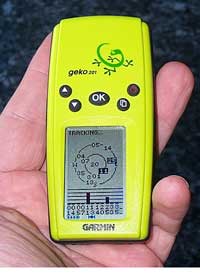
I
was instantly taken with the looks of the Geko a little bit smaller
than the eTrex, but with all the functionality. I was interested
in seeing if the new Garmin GPS entry range was capable of replacing a
GPS sleeve for the PDA and still provide a versatile multifunction
capability. Well the Geko 101 was a let down with no data interface.
This was instantly revoked by the Geko 201 which not only has a
data interface but also features WAAS.
Both the Geko models
are the same size and the cases are exactly the same, varying only
in the colour. I thought that the eTrex was small, but these are
even smaller, about the size of your palm.
There are a few strips
of cleverly located rubber strips around the edge of the receiver
and on the battery cover. These combine to give the GPS device a
rugged and quality feel, and also provide grip when on the dashboard of the car.
Despite its size the
Geko is not a toy. They are packed with tons of features living
up to the well earned reputation of the Garmin stable.
The display is a four level gray LCD screen with backlight. It has a resolution screen of 110 by 64 pixels which is 18 pixels less than the eTrex. However as neither Geko models support the display of maps it is not an issue.
|
|
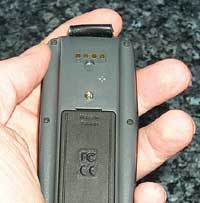 The Geko 201 has a black
tongue at the top on the back which protects the electrical communications
connectors. This is where the interface cable is plugged in. The
four connectors are for data in, data out, ground and power. Both
the Garmin PC Interface and the PC-Mobile modular PDA cables fit
in this socket. This uses the same type of connector as the eTrex series. The Geko 201 has a black
tongue at the top on the back which protects the electrical communications
connectors. This is where the interface cable is plugged in. The
four connectors are for data in, data out, ground and power. Both
the Garmin PC Interface and the PC-Mobile modular PDA cables fit
in this socket. This uses the same type of connector as the eTrex series.
The Geko 201 specifications
above state that the receiver is differential-ready. DGPS can only
be achieved with the addition of an external beacon receiver. DGPS
(in the form of WAAS or EGNOS) is also built into this device, though
you may have to enable it in the setup menu. I was pleasantly surprised
to find I had a differential fix on about 8 satellites whilst onboard
a tourist bus in Barcelona harbour.
The battery compartment is situated on the back and requires 2xAAA
batteries. Although you could put rechargeable NiCad or NiMh
batteries in there, the Gekos seem to prefer alkaline batteries.
The alkaline batteries will always last longer than rechargables.
I thought that the battery cover was not as easy to open and close
as you would expect from a Garmin unit. To get into the compartment
you need a coin or a knife. I tried using my thumb nail which promptly
and painfully broke, so take heed.
All the controls for
the Gekos are located on the face of the receiver. There are 5 rubberised
buttons: Power; Up; Down; Page and OK. These work in the same manner
as most other Garmin units I have used, allowing you to navigate
through it's functionality. My main concern is the position and
action of the power button. On more than three occasions the unit
had managed to turn itself on either in my pocket, or in my gadget
bag. This resulted in exhausted batteries, with no spares.
Overall the GPS receiver
felt well constructed. The device is marginally shorter than the
palm of my hand and about half the width. The weight felt about
right to, about the same as a Nokia 8210 phone. Not light weight
and plastic, but solid and not too heavy. |
|
GPS
Satellite Fixing
I
felt that the Gekos managed to obtain a fix faster than the eTrex,
but there is no scientific evidence to support this. I was impressed
with the factory TTFF results, though ironically the 201 took significantly longer to fix under the same conditions. The table below shows the fixing times achieved under similar conditions in Minutes and Seconds.
| Fix Type |
Geko 101 |
Geko 201 |
| Factory |
2:00
|
2:30
|
| Cold 1 |
1:37
|
0:34
|
| Cold 2 |
0:45
|
0:45
|
| Cold 3 |
0:38
|
0:38
|
| Warm |
0:15
|
0:19
|
| Hot |
0:13
|
0:10
|
There are two different displays available for the tracking display: a graphical image and a traditional sky view (Geko 201 only). Shown below are the two screens associated with the GPS satellite fixing. The first one is the "normal skyview" this shows graphically four satellites in the sky, when a satellite is being tracked but has not been fixed yet a dashed line flickers between the person and the satellite. When it is fixed a solid line is displayed as shown below. When 3 satellites have been fixed positional data will be available with a 2D fix, when all 4 are connected then you will have a 3D fix.
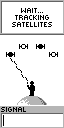 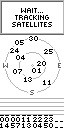
These graphics are from the eTrex but are similar to the Gekos displays
The
screen can be changed on the 201 by pressing the centre OK button. This displays a menu which allows you to select from the various options by using the two left hand arrow buttons to highlight your selection, then pressing OK again to confirm the selection.
The traditional satellite screen (201 only) shows up to 12 satellites that it knows are in the sky,
and identifies which ones have complete ephemeris data for and which
one's its currently getting this from. If you have WAAS enabled and are receiving differentially corrected data a 'D' will appear in the strength bar for the satellite. The Geko's ability to hold a fix once obtained was quite reasonable. This was at least on par with the eTrex series.
|
Map Displays
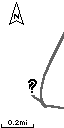 Map display is not really the correct term for this display but this is the one that shows your track and route in a graphical screen. What you actually see on this display is your current position and where you have been. If there are any waypoints or the route encompassed in the current display area then these will be shown as well. Map display is not really the correct term for this display but this is the one that shows your track and route in a graphical screen. What you actually see on this display is your current position and where you have been. If there are any waypoints or the route encompassed in the current display area then these will be shown as well.
The picture on the right shows the track and a "?" again this is from the eTrex but is similar on the Geko. The question mark is displayed flashing when there is no GPS fix. Otherwise a small man is shown. When you are moving the man will walk leaving the tracked marked behind. The scale of the display can be modified by pressing the upper left buttons. This scale goes from 200 feet all the way to 800 miles. I was able to have the full flight path from London Heathrow to Barcelona displayed on the screen.
The map display has two levels of menu pressing the OK button accesses these features. You can do some of the functions from this menu that are contextually associated with the map display such as: Stopping Navigation; Paning the Track Log (showing the start and end of the log); clearing the track log; measuring distances; and entering the map configuration.
The map display can be configured in a number of ways:
- be North up or course up,
- you can have auto zoom enabled to show your entire route automatically,
- you can show or hide the waypoints on the display,
- you can show the bearing line or course line of travel,
|
|
The Pointer Page
 The
various displays on the Gekos are referred to as pages. The pointer
page has three functional areas: Navigation section; Compass and
direction data; and Information area. The
various displays on the Gekos are referred to as pages. The pointer
page has three functional areas: Navigation section; Compass and
direction data; and Information area.
When navigating to a waypoint the waypoint name and distance are displayed in the top section.
At the bottom of the display is the
information panel. This can display 10 types of data including your
position in a number of different formats, your speed, average speed,
trip time etc. The different data types can be changed by using
the scrolling arrow buttons.
Pressing the enter button will show
the pointer options display. From here you can stop navigating and reset trip information.
|
| Geko
Menu Page
The menu page is where you control the features of the Geko receiver. It has the following functions available:
|
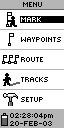
This is the eTrex display, the Geko display is similar.
|
| Geko 101 |
Geko 201 |
- Mark - Create a new waypoint
- Manage the list of waypoints
- Time
- Select the units to display
- Set the operational parameters of the receiver.
|
- Mark - Create a new waypoint
- Manage the list of waypoints
- Manage the route
- Manage tracks
- Select the Games (not shown)
- Set the operational parameters of the receiver.
|
|
Mark Waypoint
 Selecting
the mark waypoint option will display the screen to the left.
You can change the icon associated with the waypoint and also edit
the name by scrolling the highlight and pressing the enter button. Selecting
the mark waypoint option will display the screen to the left.
You can change the icon associated with the waypoint and also edit
the name by scrolling the highlight and pressing the enter button.
Changing the icon is not a problem,
just a matter of scrolling down the list of options and pressing
enter. Editing the name is a different matter altogether. For each
letter you need to scroll through the list pressing enter when you
find the right one.
To save the waypoint press OK
when OK is highlighted. |
Manage Waypoints
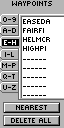
 The
Geko 101 can store up to 250 waypoints and the 201 can store 500. This can be a nightmare to
manage if you are not careful how they are named. The management
is achieved through selection of the waypoint via the screen shown
on the far left. You can also find the nearest waypoint, or delete
all of the stored waypoints. The
Geko 101 can store up to 250 waypoints and the 201 can store 500. This can be a nightmare to
manage if you are not careful how they are named. The management
is achieved through selection of the waypoint via the screen shown
on the far left. You can also find the nearest waypoint, or delete
all of the stored waypoints.
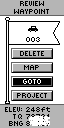
Having selected your waypoint the
review waypoint display is shown. This allows you to navigate to
the waypoint, using GOTO; display the waypoint on the Map Page,
delete the waypoint, or create a new waypoint a specific distance
and bearing from the current position.
|
Manage Routes Geko 201 only
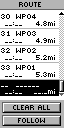 The
Geko 201 supports up to 20 routes with up to 125 waypoints in each route. This can be created or edited
by selecting the location where you want to add a waypoint and then
pressing the enter button. This will then show the waypoint selection
screen as shown above left (eTrex display). The
Geko 201 supports up to 20 routes with up to 125 waypoints in each route. This can be created or edited
by selecting the location where you want to add a waypoint and then
pressing the enter button. This will then show the waypoint selection
screen as shown above left (eTrex display).
When the route is complete you can
navigate along it using the FOLLOW option. This will activate the
route and you will see it highlighted in the other pages already
described. |
Manage Tracks Geko 201 only
The track log screen allows you to manage the tracks in you GPS
receiver. You can have up to 20 tracks stored in the Geko with 10,000 trackpoints.
When you select to save the
tracklog you will be prompted to select the start and end points. This is don by displaying the track in a map type view and using the scroll buttons to find the start and end points in your track to save. Saving the track will not remove it
from the activelog. You will also need to clear the track log.
When saving the track a default name
is selected. You will also have the option to rename the tracklog.
The Geko has a feature known as
TracBack which allows you to retrace your steps by navigating in
reverse along the recorded track. This is activated by selecting
a track, pressing the enter button and then selecting navigate and either start or end of the track. |
Games
Yes you did read that correctly like all other small electronic devices the Geko 201 comes with four games. These games are played in real time and require a large(ish) open area as the movement is controlled by you walking or running to keep up with the action. It could get very interesting if you played these in a city, or in a forest.
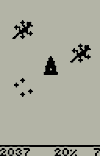
Game 1: Geko Smak
Move toward the Geko symbol on the screen until you're directly above it. Then press a key to "smak" it! You've got to hurry as the pace picks up throughout the game. Three levels of difficulty will challenge everyone in the family! |
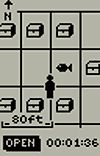
Game 2: Memory Race
Under every treasure chest, you’ll find a tile. Each tile has an exact match hidden elsewhere on the game board. Be the fastest to match all the tiles on the board! Gather a group of friends together and see which Geko will win the race! |
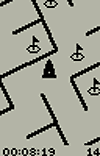
Game 3: Virtua Maze
You're centered in a virtual maze world with virtual flags hidden throughout. Navigate your physical world to explore the virtual maze and gather all the flags. A special "cheat" mode can help you when you're frustrated, but it comes with a hefty time penalty! |
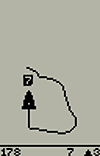
Game 4: Nibbons
Your mission is to gather numbers as they appear on the screen. As you collect larger and larger numbers, your tail will grow. Be careful—you don’t want to step on it! |
|
Setup: Geko 101
The setup menu of the Geko 101 is very basic, allowing you to change the GPS mode from Normal to Battery Save or Demo, and to adjust the backlight timeout and the contrast setting of the screen.
|
Setup: Geko 201
The final section
of the Geko 201 menu is the setup. This section allows the setting of date
and time options, along with the display settings. The most important
options though are the those shown below: The display and selection
of the units, here you can select a number of options I have selected
British Grid which gives me the position in Ordnance Survey co-ordinates.
The last display is the interface options which define how the eTrex
will communicate with connected equipment.
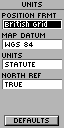 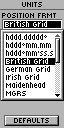 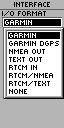
Screen shots from the Garmin eTrex.
There is also a SYSTEM option on this menu which takes you to a further screen where you can select the WAAS from the GPS mode. You can also select if you are using Alkaline or Rechargeable batteries.
|
|
Connecting
the Geko to a Pocket PC (Geko 201)
 This can be done very easily with a cable set supplied from PC-Mobile.
All you need to do is set the Garmin Geko interface to NMEA In/NMEA
Out, and connect it up to your Pocket PC and use any GPS package
set to COM1 and NMEA 4800 and you should start receiving the NMEA
data stream. This can be done very easily with a cable set supplied from PC-Mobile.
All you need to do is set the Garmin Geko interface to NMEA In/NMEA
Out, and connect it up to your Pocket PC and use any GPS package
set to COM1 and NMEA 4800 and you should start receiving the NMEA
data stream.
However with applications like OziExplorerCE and Memory-Map if the interface is set to GARMIN then the receiver can upload and download information for management within the PDA.
I
have used this configuration successfully with Tom Tom Navigator,
OziExplorer, Memory-Map and Fugawi
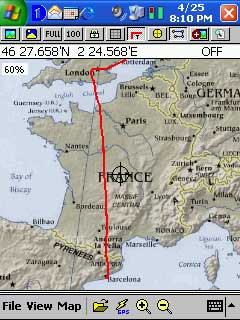
An example of this is the image to the left. It shows the track of a flight from London Heathrow to Barcelona, Spain. This is a screen shot of OziExplorer with a map of Europe. Although I had my
iPAQ displaying the flight I was not recording it. When we got to Barcelona I downloaded the track file from the Garmin Geko 201. You can also see my journey to Heathrow displayed from the eastern area of the UK.
I also used the
Garmin in standalone mode to record waypoints at some of the tourist locations in Barcelona and then transferred then to the PDA back in my Hotel.
|
|
Connecting
the Geko to a PC (Geko 201)
Once
again the Garmin Geko 201 can be connected to a PC. Why would you want
to connect your GPS to a static PC? Well this is really for 2 reasons:
Firstly the PC does not have to be static, you could be running
on a laptop; secondly using various software packages you can manage
the waypoints, routes, and tracks.
Connecting to a static
PC I was able to integrate the Geko 201 with Anquet Maps, Fugawi, Memory-Map, and
OziExplorer to manage tracks, routes and waypoints. I currently
reviewing Garmin's eTrail software. This connects to the Geko 201,
and I can then load the data back into one of my management applications.
This will be described in more detail later.
|
| Strengths
and Weaknesses
The unit tested is a new breed of GPS from one of the world's popular GPS manufacturers and
priced at just over £100 compares very favourably in price
to sleeve and Compact Flash GPS Receivers.
Where
the receiver really scores is in the fact that it is a stand-alone
unit which can last up to 12 hours on a set of batteries, far longer
than a PDA. This means that you can use the GPS for extended periods
recording track data, and use a PDA only occasionally when you need to
look at a moving map. You could even take the receiver on an plane
and once electronic gadgets are useable you can record your
flight track, downloading to your PC or PDA when you touch down.
A
big advantage over GPS sleeves and CF receivers is the TTFF and
the receivers ability to retain the fix even in adverse conditions.
It is not as good as the Emtac BTGPS or Garmin GPSMap76 but is about
1/3 the price of those units.
Downside to these units well there were a couple. I suppose that when you engineer things to be small and light you have to make some compromises on the way. One of these was the battery life. Although 12 hours is considerably more than the PDA when using it over a couple of days the batteries were drained at unexpected times.
The construction of the unit although solid did not seem to have the robustness of the eTrex series. The battery compartment cannot be opened with a fingernail, I lost 2 proving that, you need to use a small coin. The biggest weakness of these units though is the power button it just needs a little knock on the button to switch the unit on. On a number of occasions this has happened when in my pocket or in my equipment bag, resulting in drained batteries.
The final problem (if you can call it that) is that G7TOWIN does not support the Geko 201 screen download. This is not a big problem for users but caused me a lot of trouble trying to capture displays for you to see.
Garmin Geko 101
The Garmin Geko 101 is a very basic GPS receiver. It is of no use to PDA users as there is no external interface. The functionality was also severely restricted. No support for routes, limited track recording etc. This receiver would be ideal for entry level into GPS where all that is required is very basic functionality and positioning for paper based maps.
Garmin Geko 201
The Garmin Geko 201 is an altogether different proposition. It is small, the smallest receiver that Garmin makes. It has a PDA/PC interface. It supports WAAS.
Given a choice of basic entry level GPS receivers I would certainly choose the Geko 201 over the eTrex, it is smaller, and has lots more features, especially routes. It doesn't seem quite as well constructed or durable as the eTrex, but all in all you get much more for your money.
|
|
|
 |
 |
 |
 |
|
|


























