|
|
 |
 |
 |
 |
| CoPilot Live | Pocket PC 4 North America |
07th October 2003 |
Review by Lutz Bendlin

Don't mess with CoPilot!
This review is looking at version 4.0.4.89 North America of the well-known CoPilot suite of applications from ALK (the parent company of Travroute). The full name of this program is "CoPilot Live | Pocket PC 4 (NA)" Phew…
Whenever I use CoPilot I have to think of my old math teacher back in school. He was a very strict person, precise and exactly to the point, and you did it his way or no way. This is what CoPilot is about - to teach us what a serious route planner should look like, and to take route planning and navigation serious. And this is also what I would like to focus the review on - the do's and don'ts of using CoPilot. If you are looking for the much more exhaustive basic review, please check http://www.pocketgpsworld.com/copilot4.asp first and then continue reading here.
I am using the term "route planner" on purpose here, mostly to distinguish this type of applications from the other ones that you may know as "navigation programs". I would like to think of a navigation program as "I am here, now take me there, and make it a fun thing to do". A route planner on the other hand is more "I have business to do; fifteen clients to visit today, so help me to do that most effectively and don't bother me with gimmicks"
Travroute/ALK (http://www.alk.com) have a long history in the route planning business, and it certainly shows with the CoPilot suite of applications. Those guys know what a route planner needs, and they also take care of the necessary travel safety. Because - and this cannot be repeated often enough - when you drive your eyes should be on the road and your hands on the wheel, and not any other way! Just to make sure we will be repeating this statement further down again.
For a geek who loves 3D views and different map zoom levels and customized color settings and and and - all this fancy stuff - well, getting used to CoPilot will take some time. Don't try to enter a destination on the map (it is not impossible, but certainly not made easy either - it's hidden in the planning mode). You are supposed to know the address and enter it, and you must enter the state, then the city name and then the street address. Period! Just to state it again - CoPilot is not just a navigation program - it is a serious route planner.
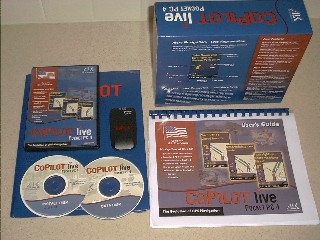
What's in the package?
CoPilot comes in a professional packaging, in a high gloss, colorful nice box, with introductory leaflets, extensive user guide, and yes, with two CDs containing the installation routine and Point Of Interest database (on disk one) and the US/Canada/Mexico maps (on disc two). On top of this users can chose from the combined software/hardware packages - one with the iPAQ GPS jacket, the other with the CoPilot Bluetooth GPS (shown in the picture here). The Bluetooth receiver comes with a bright yellow leaflet explaining in great detail how to connect the receiver to Pocket PC 2002 or Windows Mobile 2003. The CoPilot documentation gives exhaustive answers to all your installation question, and the user guide is one of the best I have seen yet for this kind of application. As mentioned in the other review CoPilot 4 does not have any hardware locking - you can use any GPS receiver.
 Installation
Installation is quick and easy. As mentioned there are two CDs, one has the installation routine and the Pocket PC and Windows clients, the other CD holds the maps. CoPilot is one of the few programs that actually support installation from a network drive (my standard notebook is too small for a CD drive, so this was a very welcome feature that once again shows the maturity of the application). When your data CD location changes you can easily adjust the data.cfg file to reflect the new path - excellent for people with multiple CD drives etc. You could for example leave your data disk in the drive all the time (or even copy it to a directory on your hard drive) and can always create your maps and routes with ease while keeping your local CD drive free.
The same flexibility is also true for the Pocket PC - you can adjust your map locations accordingly if you decide to place the maps somewhere else. As far as I can see CoPilot does not write to the Pocket PC registry but rather stores all settings in said data.cfg file.
Oddly enough the application places a very big welcome.wav file into the \windows directory (no matter what you specify as the target location) and each time you start the application it plays this welcome file (even if you have switched off all other sounds!). Needless to say that I deleted the file quickly…This saved me some space, and now CoPilot starts quietly.
The application itself gracefully installs into any available location on the Pocket PC, helping you to preserve precious RAM.
Voice support
The same is true for the TTS based voice files. CoPilot offers two types of voice instructions - Text-to-Speech (based on the Fonix engine) as well as a pretty limited set of wav files (By the way, if you select the WAV based voice prompts then again those are forced into the \Windows directory. ALK are aware of this bug and promised to change it in a future version).
My personal opinion is that the Fonix TTS sound is pretty much useless. OK, let me rephrase that: My wife has told me repeatedly that she doesn't understand a single one of the voice instructions, and I would have to concur - most of the time you catch yourself looking at the screen to understand what that strange voice was trying to tell you.
This is a pity since the idea of the Text-to-Speech approach is quite intriguing - it is capable to speak to you in whole sentences, it names the streets and the exits, and it even tries to pronounce the road numbers and house numbers. Since most of the house numbers in the US extend well into the five digit range this sometimes results in funny sounding announcements. 12340 will be spoken as "twelve thousand three hundred forty" where as most people would say "twelve three forty" or "twelve three hundred forty". Not a big deal after all, and it is also worth noting that four digit numbers are spoken properly. For example 1960 is spoken as "nineteen sixty" - the only way people on the street would recognize it.
So the idea of the Text-To-Speech engine is good, the final result isn't. Of course the clarity and volume greatly depends on the speakers contained in your Pocket PC. Some are better, some are worse. You can get a wide variety of mounts that will send the sound through your car speakers. Give that a try, because ultimately TTS has the better safety feature - "Turn left" may not give you enough information to make an accurate turn without looking at a map. "Just ahead turn left on Regent Street" does because you can relate it to the world outside your car window.
If you switch to the wav files you will lose some functionality (like the announcement of the street names and numbers) but as you can understand the instructions on your Pocket PC's speaker, and if you don't like them, then you can replace the wav files with your own creations - similar to the way you can do this in other navigation programs that use wav files. Good candidates for replacement/deletions are instructions like "just ahead". This really is one piece of redundant data that can be dropped without any loss in functionality because "just ahead - turn left" is the same as saying "turn left", but takes twice as long to play, and that gets annoying after a while. I still chuckle at the fact that it even says "Just ahead". Imagine it would say "Just behind"...
Overall, the voice instructions come just in time (there is even a customization option for that timing!), and they are not overwhelming the driver with too much information. In doing so they do contribute to the overall concept of assisting in a safe and successful drive.
 Maps
Maps
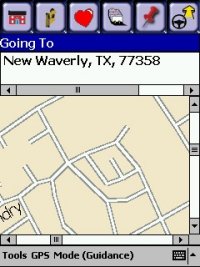
ALK have their own database in North America (so they are not using Navtech or TeleAtlas data), and most of the time the ALK maps are more recent than the other ones. ALK say: "The North American map database has been built over the last 20 years and is differentiated from competitors by having consistent accuracy in rural as well as urban areas. Most map providers focus on urban areas to the exclusion of rural areas, which is why ALK maps are favored by people who travel the width and breadth of North America. ALK has a team of digital cartographers that constantly updates the map database--the map data for CoPilot Live | Pocket PC 4 (NA) was frozen in mid-March of 2003". When you compare the maps with reality you will notice some data reduction that makes a round street corner appear as rectangular, but this is irrelevant for the routing experience. An example for this effect is shown in the to the right.
Data download
CoPilot is one of these applications that have a mandatory desktop component and expect the user to select/define the map data on the PC and then download them to the Pocket PC. At the same time the PC part of the application (the map loader) does not have sufficient functionality to be used for PC based navigation (this is what CoPilot 2003 for the PC is for). A bit of a disappointment, since it means that there will be no way to change your map selection on the Pocket PC once you disconnected from the PC and found yourself in lets say, the desert just outside of your loaded map data, and your water bottle is empty and the sun is burning and - oh, I got carried away. Anyhow, there is a neat fix to that issue - see below.
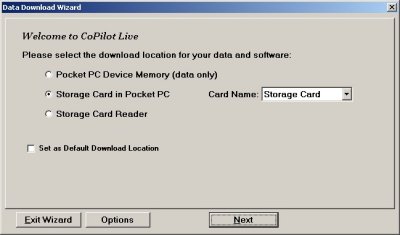
So how does the map download work? First you have to decide where to store the maps.
I was somehow expecting this step to be later in the process. At least you can specify a default location, which saves some time when you repeat the download.
Second step is to make up your mind what kind of map area you want to define for later download. CoPilot gives you plenty of options here - if you tend to use the application in a well-defined area around where you live then take "City Radius", if you plan a holiday take "Map Area", and then, for the serious folks, there is the "Trip" option.
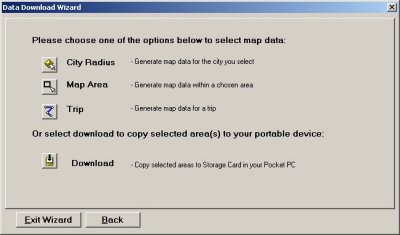
Now, finally you can press that "Download" button that you were wandering around for so long.
It will list all the map definitions that you have created previously, and you can select the ones that you want to download to the storage place defined a long time ago (in step one, that is).
Additionally you can download the basic US Highway Network (at a hefty 36 MB), your Favourites from the desktop application, and even the cool Quickstart (at 10 MB).
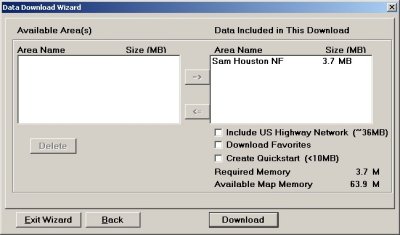
What is the Quickstart? It creates a special folder on your storage card with the Pocket PC installer CAB on it. And if your Pocket PC's battery died and all data in RAM is lost, then all you need to do to get you back up and navigating again is to give your battery a nice big charge and then pop in the storage card (you may have to remove it first - the magic works only upon inserting the card). CoPilot Live | Pocket PC 4 (NA) will be installed back onto your Pocket PC and ready to be used (just like an AutoRun CD on the PC).
Obviously this particular download needs to be carried out only once, and it doesn't need to be done at all when you were brave enough to install the application onto the storage card in the first place! Contrary to popular belief it is possible to run most of the programs off a storage card - you may lose some performance, but you gain a lot of free operating memory. CoPilot is no exception here. Just make sure your storage card gets defragmented from time to time.
Where were we? Ah yes, downloading maps. There's a little twist in the current version of CoPilot - existing maps on the Pocket PC do not get preserved during the download. So if you want to load more than one map area onto your Pocket PC you will have to reload all of them in one go. If you follow this advice then you can have any number of map areas on your Pocket PC, happily coexisting and loading according to your GPS position.
Now if you want to preserve the map data that was already on your Pocket PC then you can achieve this by keeping multiple directories with the map data for multiple regions/trips and eventually renaming those directories to the default directory name mentioned in the data.cfg file (alternatively you could keep multiple data.cfg files, but then you would have to rename these as well, and this would be about the same effort, so you may as well ignore this advice). This isn't for the faint hearted or for the general user, only for the more advanced user who knows his way around the Pocket PC!
Start moving, and please keep it safe
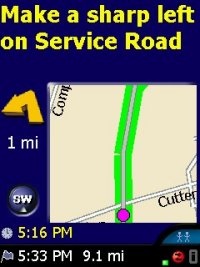 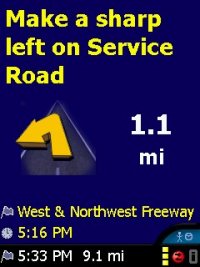 The first thing you read in the online help and in the printed user guide is "Always keep your hands on the steering wheel and eyes on the road when driving." Sounds obvious but it is still nice to be reminded of that fact from time to time. The first thing you read in the online help and in the printed user guide is "Always keep your hands on the steering wheel and eyes on the road when driving." Sounds obvious but it is still nice to be reminded of that fact from time to time.
CoPilot features a driver mode and a copilot mode - the latter assumes there is a passenger that handles the screen data while the driver, well, drives. Now there's nothing stopping a driver from selecting the copilot mode, apart from your conscience and good education.
Most of the time the driver will see a safety screen with turn instructions but without map detail, and only when you are approaching your next action area (below 0.6 miles) CoPilot will automatically zoom the maps of this area. As soon as you made the turn and increase speed again you are back at the safety screen.
The passenger/copilot will see maps or parts of maps at all times, also with automatic zoom. As you can see these maps are pretty basic - just enough to negotiate your way through the turns. If you compare this to other applications that focus on navigation then you see that this way of hiding the map from the user's eyes is one of the main differences of CoPilot. ALK have not spent any effort on maximizing the real estate for map display - simply because that's not what was intended with CoPilot.
Rather the screen real estate is used for turn pictograms, written instructions, and other valuable information concerning the current journey. This includes current location, next intersection, ETA (estimated time of arrival), time of day, name of destination etc. - even the altitude (or elevation as it is called in the program)!
Operating modes
 CoPilot Live has a Navigating Mode that tracks your position without snapping your signal to a road. In this mode you do not receive Guidance instructions, but it is useful if you only want to see where you are on a map. Receiving Guidance requires that your signal be snapped to a road (there is no place in the application where you could switch that off), otherwise there's no way for the application to know where you are on the digital map. (All programs that give route guidance do this to some extent based on proximity to a road--CoPilot is one of the few that uses other factors - like current speed matched to road class - to intelligently snap you when the roads are extremely close together.) Walking and Planning modes are used far less frequently - you just don't walk with CoPilot (biking is a different story as you will see below) and you should do the planning on the desktop PC… CoPilot Live has a Navigating Mode that tracks your position without snapping your signal to a road. In this mode you do not receive Guidance instructions, but it is useful if you only want to see where you are on a map. Receiving Guidance requires that your signal be snapped to a road (there is no place in the application where you could switch that off), otherwise there's no way for the application to know where you are on the digital map. (All programs that give route guidance do this to some extent based on proximity to a road--CoPilot is one of the few that uses other factors - like current speed matched to road class - to intelligently snap you when the roads are extremely close together.) Walking and Planning modes are used far less frequently - you just don't walk with CoPilot (biking is a different story as you will see below) and you should do the planning on the desktop PC…
While in guidance mode the basic functions can be performed with a finger - no need to fumble with the stylus.
CoPilot uses the whole Pocket PC screen, but doesn't offer any mapping of hardware keys to functions. So to get back to your other programs while CoPilot is running I recommend mapping one of the hardware keys to the "Today" function of your Pocket PC.
Solid Performance on the road
You select your destination from a list of favorites ("Home" and "Work" very conveniently have got their own icons), via an address search, from a list of downloaded trips, from a list of POIs, from your Pocket Outlook contacts, or by accepting a proposal from the "Live" connection (see below).
This destination stays active until you have reached it or until you cancel the current trip and select a different location to go to. Multiple locations will be navigated to in the order of selection.
The PC part has an "Optimize waypoints" feature that can check if the waypoint order needs some reshuffling. On the Pocket PC you can move individual waypoints up or down in the list.
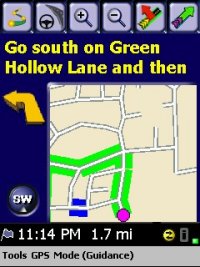 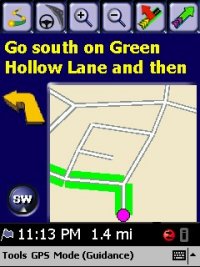 If there's a sudden obstacle on your path - like a completely unexpected traffic jam in the middle of rush hour - then you can ask CoPilot to calculate a detour (second button from right). Don't expect any magic here - it will only block the piece of road after the next possible turn or exit, and until the following on-ramp or re-turn. So you may well end up on the congested street again. There is a workaround for this - in guidance mode you can also set avoids on particular roads. And, if conditions should have improved and obstacles have been cleared you can always cancel the detour or the avoid and continue on the original route (right most button). If there's a sudden obstacle on your path - like a completely unexpected traffic jam in the middle of rush hour - then you can ask CoPilot to calculate a detour (second button from right). Don't expect any magic here - it will only block the piece of road after the next possible turn or exit, and until the following on-ramp or re-turn. So you may well end up on the congested street again. There is a workaround for this - in guidance mode you can also set avoids on particular roads. And, if conditions should have improved and obstacles have been cleared you can always cancel the detour or the avoid and continue on the original route (right most button).
Bike tours with CoPilot
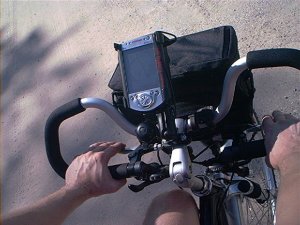 Cycling or motorbike riding with CoPilot is actually worth considering. Why? Because the route planning also allows round trips (when you return to your starting point after reaching your last destination) - an exclusive feature of CoPilot. As you can imagine this functionality is ideal for bike trips - those tend to be planned well ahead on your PC anyhow. Cycling or motorbike riding with CoPilot is actually worth considering. Why? Because the route planning also allows round trips (when you return to your starting point after reaching your last destination) - an exclusive feature of CoPilot. As you can imagine this functionality is ideal for bike trips - those tend to be planned well ahead on your PC anyhow.
The ALK map data is adequate for the kind of roads you may want to ride on a bike, avoiding the highways and preferring the back roads if required. I have been using CoPilot on a number of bicycle trips now and I was very pleased with the results. Both the CoPilot GPS jacket for the iPAQ (shown in the picture, sitting in a RAM U-Bolt mount) as well as the CoPilot Bluetooth GPS receiver are excellent choices for use on a bicycle - the Bluetooth version will probably yield better reception in tightly covered areas such as dense forest.
Customization
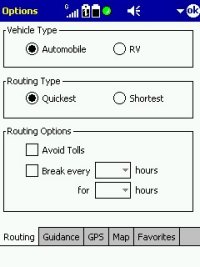 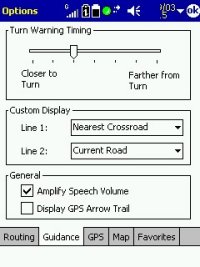 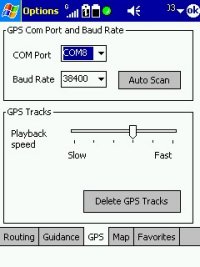 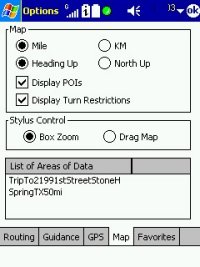
There are a few options that you can select to influence the display of items on the Pocket PC screen and the overall application behaviour. These options are pretty self explanatory. Worth mentioning are the "RV" mode to avoid narrow turns and small streets, the option to avoid toll roads, and the ability to delete the GPS track that CoPilot records (without asking you if it may do so, clogging up your main memory as time passes by).
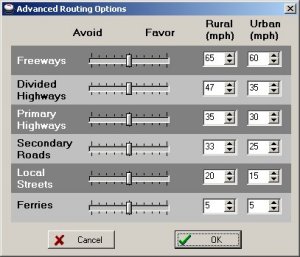 In addition there is one important feature of the PC part that must be mentioned here - the ability to set speed ranges for road types. This selection will then have an impact on the route that is planned on the PC. In addition there is one important feature of the PC part that must be mentioned here - the ability to set speed ranges for road types. This selection will then have an impact on the route that is planned on the PC.
I am not sure how much this stays true when you are on the road and you divert from the original route - will it continue to use the user defined settings or will it fall back to the default road type speeds?
I was not able to find an answer to that question - I would be interested in hearing from others using this! It's a bit sad that this road speed selection cannot be performed on the Pocket PC. Equally annoying is the fact that you wouldn't even know what road type one or the other street is - this level of detail is not exposed in either application.
"Live"
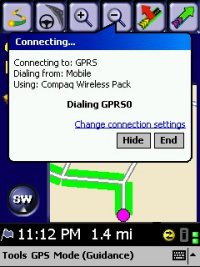 CoPilot carries the term "Live" in its name. So what is this about? The PC part of the application (that also serves as a map selector) has the ability to communicate with the Pocket PC part of CoPilot. This is done via the Internet, and it requires that the Pocket PC is permanently connected to the network. CoPilot carries the term "Live" in its name. So what is this about? The PC part of the application (that also serves as a map selector) has the ability to communicate with the Pocket PC part of CoPilot. This is done via the Internet, and it requires that the Pocket PC is permanently connected to the network.
The easiest (and least costly) way to accomplish this is to establish a GPRS connection, either manually or from within the CoPilot application. Both PC and Pocket PC are then connecting to the Travroute Live server. Travroute/ALK put out a disclaimer that this server is just relaying messages back and forth and not logging any data - you will have to decide for yourself if you are comfortable with this.
The connection allows the PC client to trace the location, the destination, and the ETA (estimated time of arrival) of the Pocket PC. The PC can also send messages with prefabricated or customized answer options (like "Yes/No") to the Pocket PC, where the message appears together with the buttons on the screen, and the Pocket PC user can then select one of the offered replies. The same way the PC can send route change proposals to the Pocket PC, and the mobile user can then accept or reject these route changes. When the change is accepted the route will be recalculated accordingly.
The connection only works with the one Pocket PC that has the same license as the PC part, and it can only be initiated by the PC. While this may seem to be a limiting factor it shows where this is taking us - in later versions CoPilot will actually support multiple Pocket PCs connecting to multiple PCs, and will also introduce messaging initiated by the Pocket PCs.
This feature extension will certainly be appreciated by the businesses that want to track the whereabouts of their vehicles for a fraction of the price of other, built-in car tracking systems.
Routing
Routing is once again professional. It is one more facet/aspect/element of the overall picture - you do not argue with CoPilot, you accept it. Re-routing is instantaneous, and always thoughtful. I could not test the influence of different road speed assignments as this wasn't possible to change on the Pocket PC. But the standard settings are certainly satisfactory, even for the drivers of bigger cars - those can utilize the RV mode."
Summary
CoPilot is a strong performer and a very professional program. You will have to be serious about route planning and navigation to appreciate its design, but once you have laid aside your original geeky attitude you will value its solid performance and well thought of safety features. The maps are reasonably up to date and contribute to the overall impression of a solid performance. CoPilot helps you accomplish your job, and it teaches you not to mess around with it.
|
| Conclusion |
|
| Manufacturers Website |
http://www.alk.com |
| Pocket GPS Reviewer |
Lutz Bendlin |
| Pocket GPS Reviewer Website |
n/a |
| |
|
| Rating |
|
| Tracking |
  |
| Re-Routing Quality |
|
| Acquisition Times |
|
| Voice Navigation Quality |
|
| Ability to Plot Route and Follow |
|
| |
|
| Overall Rating 90% |
|
|
|
|
 |
 |
 |
 |
|
|


























