Article by Lutz Bendlin
Where's my free memory gone?
This article describes how to install TomTom Navigator 2.24 to just about any place on your Pocket PC, with the obvious emphasis on the storage card. The same approach should work for TomTom Navigator 3, but I could not test it because here in the US we're still stuck with version 2.
Why are we doing this? Because all these navigation applications are memory hogs, and TomTom Navigator is no exception.
Let's do some inventory
- TomTom Navigator program and DLL's: well over 2.5 MB
- Voice files: varies by language, but generally over 2.8 MB
- GPS engine and User interface: 465 KB
- TomTom GPS Control panel applet: 16 KB
See what I mean? A good 6 MB taken away from the Pocket PC's RAM! Memory that is precious, and should rather be used to run applications, not to store them.
I am mentioning the control panel applet specifically because it's the only file that really must stay in the \windows directory - that's where all the .cpl files need to be.
The toolset To achieve our goal (move the application to the storage card) we need two tools
- registry editor
- a file explorer that doesn't hide any files
You have a number of options here, for example use the free PHM registry editor and the ActiveSync File Explorer, or use the All-in-one Resco File Explorer which also includes its own registry editor.
Yes, we are going to edit the registry, so if you feel uncomfortably at this point, please stop reading.
Still here? OK, let's tackle them one by one. We will mark the items that require the file editor with "File:" and the ones where we need the registry editor with "Registry:"
The Navigator program By default, the program installs into \Program Files\Navigator and also creates a shortcut on the Windows start menu. So what we need to do is to move the folder to the storage card and adjust the shortcut.
- File: Cut & Paste the Navigator folder from \Program Files to \Storage Card
- File: Navigate to \Windows\Start Menu and delete the TomTom Navigator shortcut
- File: Navigate to \Storage Card\Navigator, tap and hold the TomTom Navigator.exe and tap Copy
- File: Navigate to \Windows\Start Menu and tap Edit > Paste Shortcut
Of course you can rename the shortcut and also place it somewhere else, for example to \Windows\Start Menu\Programs
The Voices Voice files are by default installed under the \Program Files\Navigator branch, in their own folder. The folder name represents the voice, mine is called "USAC" (USA Computer voice). The pointer to the location of the voice files is stored in the registry and can be changed there.
- File: Move the voice files folder from \Program Files\Navigator to \Storage Card\Navigator.
- Registry: Navigate to HKEY_CURRENT_USER\Software\TomTom\TomTom Navigator\Voice and edit the LastInstalled string value to reflect the new location of the voice folder.
 
Note the "American" (or whatever your voice file name is) string value - this one is not actually used by TomTom. Looks like a programming glitch to me. Probably this was an attempt at an easier way to switch voices, similar to the way TomTom have organized the map switching.
The GPS engine
The GPS engine files are by default stored in the \Windows directory which is obviously not a good location for application specific files. Fortunately they can be moved as well, as I found out just recently.
- File: Move the file TomTom GPS.exe from \Windows to \Storage Card\Navigator
- File: Move the file ttgpseng.exe from \Windows to \Storage Card\Navigator
- Registry: Navigate to HKEY_LOCAL_MACHINE\SOFTWARE\TomTom\GPS Engine and edit the FilePathApplet string value to point to the new location of TomTom GPS.exe
- Registry: in the same place, edit the FilePathEngine string value to reflect the new location of the ttgpseng.exe
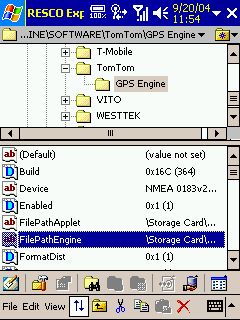 
Note that the GPS engine registry information is in the HKLM section of the registry, not in HKCU.
If you do not find the described values (FilePathApplet and FilePathEngine) you can either create them yourself or simply start the GPS control panel applet once from it's original position.
Caveat
There's a caveat (isn't there always?) - the ttgpseng.exe creates a hook into the WAKEUP events database. Now if you switched the Pocket PC off with TTN running, and then wake the Pocket PC up again, it first runs through the events, and only then initializes the storage card. Not very smart when the program linked to the event is on the storage card. Basically you will get a message at wakeup stating that \Storage Card\Navigator\ttgpseng.exe could not be found. Two options - leave ttgpseng.exe untouched in \windows (it's only 86 KB), or move it to the iPAQ file store if your device has one.
Conclusion
It takes a bit of tinkering, but you can actually install TomTom Navigator completely to the storage card and preserve a good 6 MB of precious RAM to run programs (and especially TomTom Navigator) more stable. There may be a small performance drop upon startup due to the speed difference between RAM and storage card, but once the application is running this difference is negligible.
Resources used:
PHM registry editor (freeware): http://www.phm.lu/Products/PocketPC/RegEdit/
Resco File explorer (USD25, 14 day trial) http://www.resco-net.com/explorer.asp
|































