|
 |
 |
 |
[+] Apple
• : Jul08
[+] Article
• : Jul08
• : Jul08
• : Dec07
• : Nov07
• : Nov07
• : Nov07
• : Nov07
• : Oct07
• : Mar07
[+] Binatone
• : Jul08
[+] Blaupunkt
• : Nov07
[+] Brodit
• : Dec07
• : Oct07
• : Jun07
• : Mar06
• : Mar06
• : Mar06
[+] Carcomm
• : Dec07
• : Jan07
[+] CoPilot
• : Feb08
• : Jan08
• : Nov06
• : Jan06
[+] Destinator
• : Jan08
[+] Directions Ltd
• : Sep07
[+] Event
• : Nov08
• : Mar08
• : Jan08
• : Oct07
• : Oct07
• : Oct07
• : Oct07
• : Aug07
• : Jun07
• : May07
• : Apr07
[+] Evermore
• : Aug07
[+] Fugawi
• : Jul08
[+] Garmin
• : Sep08
• : Aug08
• : Aug08
• : Jul08
• : Feb08
• : Jan08
• : Jan08
• : Dec06
• : Jul06
• : Apr06
• : Mar06
[+] Globalsat
• : Jul06
• : Jul06
• : Apr06
• : Jan06
• : Jan06
• : Jan06
• : Jan06
• : Dec05
• : Dec05
[+] Holux
• : Aug06
[+] Intellinav
• : Dec05
• : Dec05
• : Dec05
• : Dec05
[+] Krusell
• : Mar06
[+] Magellan
• : Dec07
• : Dec05
• : Dec05
[+] Mapopolis
• : Jun06
[+] Memory-Map
• : Apr06
[+] Mio
• : Jan08
• : May06
[+] Nav N GO
• : Jun08
• : Jun06
[+] Navigon
• : Aug08
• : Jun08
• : Apr07
[+] Navman
• : Oct08
• : Jan08
• : Jan08
• : Jan08
• : Jan08
• : May07
• : Mar06
• : Jan06
[+] Navteq
• : Sep08
• : Jun08
[+] Other
• : Oct08
• : Sep08
• : Sep08
• : Sep08
• : Aug08
• : Aug08
• : Jun08
• : May08
• : Mar08
• : Feb08
• : Jan08
• : Jan08
• : Jan08
• : Dec07
• : Dec07
• : Oct07
• : Oct07
• : Oct07
• : Aug07
• : Aug07
• : Aug07
• : Mar07
• : Feb07
• : Nov06
• : Oct06
• : Sep06
• : Jul06
• : Jan06
• : Jan06
• : Dec05
• : Dec05
[+] Otterbox
• : Nov08
• : Oct07
• : Sep07
[+] Qstarz
• : Nov08
• : Jun08
• : Sep07
• : Feb07
[+] Route66
• : Jun06
[+] Royaltek
• : Jun08
[+] Satmap
• : Apr08
• : Apr08
[+] TomTom
• : Nov08
• : Sep08
• : Aug08
• : Aug08
• : Jul08
• : Jun08
• : May08
• : Apr08
• : Feb08
• : Feb08
• : Feb08
• : Jan08
• : Jan08
• : Jan08
• : Jan08
• : Oct07
• : Jun07
• : Jun07
• : Jun07
• : Jun07
• : Oct06
• : Oct06
• : Sep06
• : Aug06
• : Jul06
• : Jan06
• : Jan06
• : Jan06
• : Jan06
[+] Trimble
• : Jun08
[+] ViaMichelin
• : Jan08
• : Oct07
• : Apr07
[+] Wonde Proud
• : Mar08
|
 |
 |
 |
 |
|
 |
 |
 |
 |
|
Navman iCN630 |
02nd June 2003 |
|
|
Review by
Dave Burrows
Introduction
The Navman iCN630 is a new kid
on the block in terms of a complete integrated Street Routing system without the
need for any type of PDA. The iCN630 uses a modified version of Navman's
newest software (SmartST Professional) and this on the iCN630 this is called SmartMap.

Navman iCN630
With the release of the Navman iCN630, Navman are
trying to compete with the likes of Garmin who have had an enormous share of the
market with the Street Pilot III because excluding PDA systems and fully
installable in-car systems, there has been no real competition for them until
now. Although both systems use the same maps
provided by NavTech, the interfaces and maps look completely different.
When you power on the iCN630 and start looking at the maps, the first thing
you'll notice if you've already seen SmartST Pro is
how very similar the system looks. In-fact any changes made by Navman for
SmartST Pro can be ported to the
iCN630 and vice versa as the systems are very similar both from a program point
of view and also from a hardware/processor point of view. The routing
screens are about the only thing that is different, on the iCN630 you don't get
the nicely coloured borders around the map that you would see on an iPAQ.
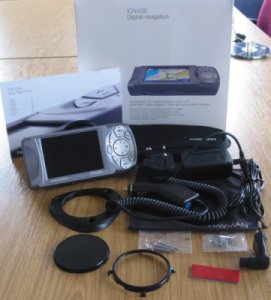
What's in the box ?
Storage Space
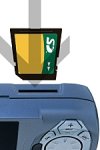
One of the first things I noticed that disappointed me with the
iCN630 is not only the price which is more expensive than the Street Pilot III,
but you also don't get any storage cards supplied with the Navman where as
Garmin supply you with a 128mb storage card. What does this mean ?
If you're looking to put a large amount of maps onto the iCN630
like complete UK maps, then this will not be possible with the supplied
equipment as the iCN630 only has 64mb of storage space which will probably get
you a couple of maps installed depending on the size of the segments. I
managed two myself. So in additional to purchasing the iCN630, you will
need to look at purchasing at minimum a 128mb MMC or SD Card. If you are
looking to also house the complete European maps, then I would strongly suggest
purchasing a 256mb or even a 512mb SD card, because you know you're going to
need to use it at some point! SD card prices are constantly coming down in
price and you can pick up a 128mb SD card for around £35, so I would have
thought that Navman could have chucked this in for free.
Antenna

The iCN630 comes with a built in antenna which is multi directional and
will increase the availability of the signal and comes supported with an
external MCX connector allowing you to plug in an external active antenna if you
feel you require it.
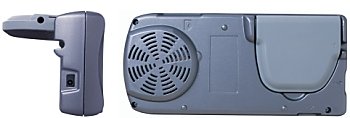
One thing I have found under testing, at no point did I have to
extend the multi-directional antenna or use an external antenna, I always had
the internal antenna folded flat and it
always used to receive an adequate amount of satellites to give me a 3D fix even when
in the worst of conditions.
Speaker
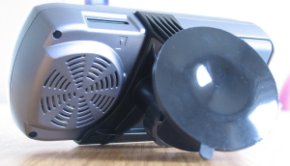
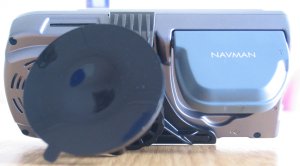
The integrated speaker on the iCN630 is very clear even though it
is facing the wrong direction. Unlike the Garmin Street Pilot III, the
speaker is available within the unit where the SPIII you had to use the supplied
car charger/speaker plug. Navman have done well including the speaker into
the unit. Voice Navigation is also very loud and can be adjustable within
the iCN630 using the keypad supplied (no jog dial). Running the iCN630
side by side with an iPAQ 3630 the speech was much louder and clearer in the
iCN630 which is something we were originally concerned about with SmartST Pro,
so it's good to see this has been addressed. The Voice Navigational
quality is also much better, where SmartST Pro sounds like someone has spoken
each word in turn and glued them together, the iCN630 has fluent voice
navigation which makes it a lot easier to listen to when driving at speed.
Screen Quality
The screen quality on the iCN630 is outstanding. The
colours are rich and the contrast strong. The screen sports a 3.8" TFT
QVGA screen for use in-car with anti-reflective coating. The screen
dimensions are 320x240 pixels with more than 230,000 colours. Not quite as
much as a Pocket PC, but 64 million colours really aren't needed for mapping and
230,000 colours should be more than enough to contend with various shades of
colours.
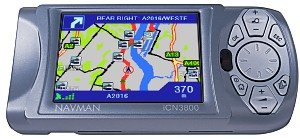
Something the more advanced GPS user may recognise is that many
in-car navigation systems includeing the iCN630 are always designed in a landscape mode screen layout
(eg longer screen and shorter height), this is the norm for TV's and monitor's, but most PDA based
GPS systems are the
opposite using a portrait mode system. There's no rhyme nor reason for this
really, landscape systems look more aesthetical but in theory will provide less
information on screen (height wise). I pitted the iCN630 together side by
side with an iPAQ running SmartST Pro in my tests and you did find sometimes you
lost a little bit of map data on the height of the screen on the iCN630, but in
most cases it was nearly identical. The way Navman have managed to get
around this is to reduce the overall size of the maps on screen that you would
see, which in a sense is like zooming out. Now because with most PDA GPS
Systems you are always facing/travelling up the screen, it does mean that there
is a lot of wasted real estate on screen on the left and right hand sides of the
screen. It's not entirely wasted as it's always good to see where you are
on a map and the more information you have the better, but I would have thought
it better to have a portrait system, or even better a system that can switch
easily between portrait and landscape modes. I'm sure this will come in
later products.
Suction Cup Strength
One thing that Navman customers have constantly complained about
with the Navman 3000 and Navman 3400/3420 is the strength of the suction cup.
If left in direct sunlight most people would find after a few days their suction
cup has fallen to the floor. This can and did happen sometimes whilst
travelling as driving over bumps would loosen the suction on the windscreen.
One thing I can categorically say, is the windscreen mount supplied with the
iCN630 will not have this problem! It's so strong, you can even hang onto
the iCN630 whilst it's suctioned to the windscreen and pull it in all directions
and adjust the direction it's facing. This newly designed suction cup is
much better than previously supplied in the Navman 3000 and 3400/3420 packages
so having your prized possession drop from the windscreen is a thing of the past
for Navman users!
Time To First Fix and Satellite Information
With the extensive testing I have carried out in this review, I have witnessed
no extended TTFF's, in-fact most are sub one minute. The iCN630 didn't
ever lose a 3D fix at anytime. With Pocket PC systems I religiously used to check that I had a 4+ sat fix
before planning a route, but found myself not having to do this, which makes the
iCN630 very desirable, in effect just plug in, switch on and go!
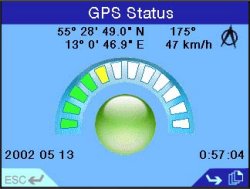
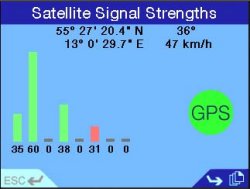
The first GPS Status screen is similar to what SmartST Pro owners
would be used to and this shows your co-ordinates, speed and direction, date and time and
also a visual large circle indication if you have a fix (green) or no fix (red) and how many
green/yellow/red bars you have which suggest the amount of sat fix you have.
The second satellite screen you'll see this same information but with signal
strength for each satellite which most people will be used to seeing in GPS
products.
|
|
Navman
iCN630 Menu Screens
Lets take a
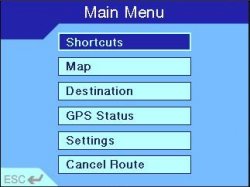
look at the iCN630 Menus. The menu system is very simple to
navigate through. The Main Menu gives you shortcuts to select, a
map view option, choose your destination, GPS Status (as seen in the
above screenshots), a more detailed Settings screen and an option to
easily cancel the route.

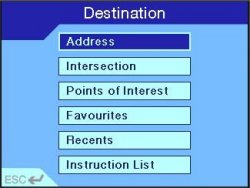
When going into the Destination screen you'll be given
the option to choose an address to navigate to, an intersection, a
Point of Interest, a saved favourite location, and recent locations
that you have already visited. You will also have the
Instruction List which will give you turn by turn instructions rather
than a map view.

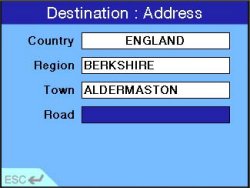
When selecting a destination you specify the country,
region which usually is classified as the county, the town and then
the road name. Note you cannot navigate by means of postcode!
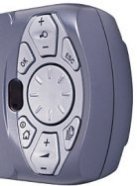
When typing in place names, the on-screen keyboard will pop up
allowing you to quickly enter the desired letters on the keyboard
using the supplied hard cursor keypad on the right of the iCN630.
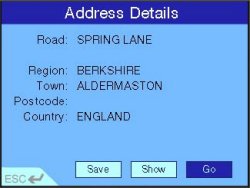
Once you've entered the address you want to navigate
to, the final details will be displayed on screen. You can then
save this for future use, show it on the map, or select GO which will
start plotting the route for you.
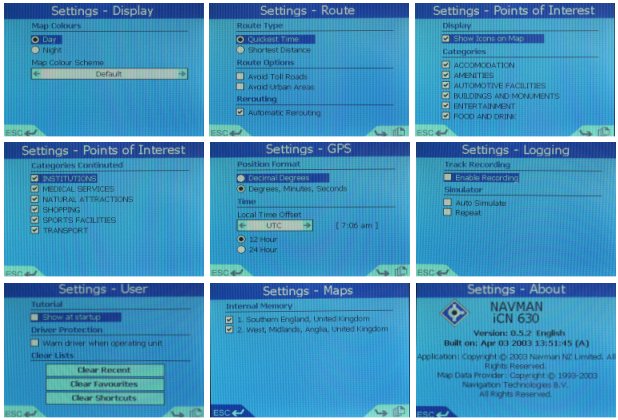
Navman iCN630 Setup Screens

|
|
Navman
iCN630 Maps
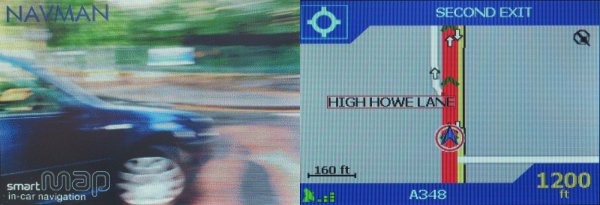
Taking
screenshots of the Navman iCN630 in action was very difficult due to
not having a feature to take screenshots of maps, so unfortunately a
digital camera had to be used in quite a lot of screenshots to take
photos of maps and some of the menus (and this is reflected in the
degraded quality of the screenshots) because the iCN630 has a
flickering screen similar to a TV which creates horizontal scrolling
lines when taking photos.

Routing Quality
The Routing Quality is an important issue, and one we
always try to address. SmartST Pro for the Pocket PC when it was
released did have minor routing issues. Driving the same routes
where SmartST Pro would hiccup, the iCN630 seemed to be quite happy
and not route you down side roads which was good to see. I did
experience a few strange routes where the iCN630 tried to route me
through a very large and busy town rather than continuing on a
motorway which was both the quickest and shortest route, so be
prepared for a few strange directions, but all in all the iCN630
always got me to the destination on time.
|
|

Navman
iCN630 Specification
| Cold TTFF |


120 secs |

| Warm TTFF |
48 secs |
| Hot TTFF |
18 sec |
| Accuracy |
5 meters |
| Interface |
RS232 (9 pin serial) NMEA 0183
Out |
| Physical Size |
3.2"H x 6.8"W x 2.6"D |
| Weight |
1.4 pounds (635g) |
| Display |
320x240 pixel resolution
supporting 230,000 colours |
| Memory |
128mb Ram (64mb Application, 64mb
Storage for Maps) |
| Data Storage |
64mb internal, up to 512mb with
external SD card (not supplied) |
| Map Storage |
SD Data Storage Cards |
| Power Source |
12v car charger / mains charger
(no battery) |
| Battery Life |
No battery Support |
| Processor |
Intel PXA250 (200Mhz) |
| Map Data |
Navtech giving support for 14
European Countries |
|
|
Route
Re-Calculation
Route
Re-Calculation is very fast and much faster than the Street Pilot III
which the iCN630 is in direct competition with. This is probably
down to the processor being uses as the iCN630 sports an Intel PXA250
XScale Processor.
Comparing
the iCN630 Size
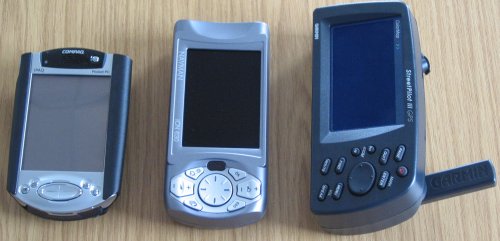
We've
compared the size of the iCN630 to a regular Compaq iPAQ and also the
Garmin Street Pilot III. You can see that the iCN630 is quite a
bit larger than a regular iPAQ, mainly the extra length is due to the
cursor pad that's been added, but it is smaller both in length and
depth compared to the Garmin Street Pilot III.

Problems
Encountered
The iCN630
has been pretty flawless throughout it's use, however I did receive
one runtime error which required a complete power off and back on
again. This was when I was fiddling around with routes and
cancelling them. When you go to cancel a route by plotting a new
route you get an option to ask if you want to cancel the route or not.
It always looks like the cancel route option is selected when it's
not, so after 3 or 4 entries into this screen the runtime error
appeared. This is something I haven't been able to duplicate in
recent tests.
The other
problem I'm sad to report is the initial blue bug that has still not
been fixed in SmartST Pro is also present on the iCN630. I would
have hoped that this bug which was originally explained as a simple fix
would have been implemented by now in SmartST Pro and also in the
iCN630, so unfortunately we'll have to wait for a fix to resolve this
issue. For those that don't know what the blue bug is, the
terrain (background) where it would be normally green or other shades,
turns a bright blue which looks like you're travelling over the sea.
|
|
Navman
iCN630 Compared to a Pocket PC or Palm Colour Solution
So how does
the iCN630 compare to a Pocket PC or Palm Colour GPS Street Routing
solution ? The iCN630 is an integrated product, which means less
cables which is a big advantage of a system like this. The size
is much smaller than the Garmin Street Pilot III and a little bit
larger than a Pocket PC. The on-screen keyboard is much better
than the SPIII but it would have been nice to have had touch screen capability
which isn't present in the iCN630.
Navman
iCN630 Advantage
-
Integrated
System (less cables)
-
Screen
brightness is the brightest I have seen in a portable screen
-
Maps
supplied by NavTech
-
Routing
quality is fast and pretty good
-
No Pocket
PC slow downs or crashes
Navman
iCN630 Disadvantage
-
Weight and
overall size (more weightier and larger than a Pocket PC)
-
No
dashboard mount that can just sit there on the dashboard like the
Garmin Street Pilot III beanbag mount
-
No touch
sensitive screen where you can tap out using an onscreen keyboard
for route entering.
-
You still
have to have cables draping off the dashboard
-
experienced
one crash whilst routing which required a complete power down by
unplugging the power socket
-
No battery
support!
-
Price!
|
|
Summary
There are
quite a few disadvantages for the iCN630 over advantages, one of the
larger disadvantages is the price. Comparing it with the current
front runner the Garmin Street Pilot III, the Garmin weighs in at
£850, where as the Navman iCN630 weighs in at £999. What extra's
are you getting for the extra £150 ? Well, not a lot, you get
less mount choices, no 128mb storage card, but you do get a smaller
lighter setup which has much nicer and richer maps. You need to
weigh up if the extra storage and mounts are a requirement, if they
are then you will be very pleased with the Garmin Street Pilot III, if
ascetics and nicer maps are more important then the Navman iCN630 is
much better!
The first
thing I know I'm going to receive is a flood of emails on whether this
is better or worse than a PDA GPS system. It really depends on
what you want out of a system. If you have absolutely no
experience in GPS Street Routing, or PDA's like Pocket PC's or Palm
devices, and all you want is Street Routing, then the Navman iCN630
I believe you will be pleased with. It caters nicely for the
novice, someone who doesn't want to get bogged down into having to
tweak memory, install drivers, constantly check the GPS Status screen
to see if you have a 2D or 3D fix. In short, great for people
who need to rely on a system in anger like taxi drivers or couriers.
However, if
you have used PDA's like Pocket PC's or Palm's and you might want to
look at Topographical maps for hiking or walking, perhaps even for
marine use, or you're not shy in wanting to right the steep learning
curve of GPS products and you would like to gain a huge knowledge of
behind the GPS scenes, then a Pocket PC or Palm GPS system would be
better for you.
One of the
better points about the iCN630 is it has an anti-reflective
coating on the screen. Coupled with it's superb brightness and
contrast, this really is one of the better screens I have seen in a
PDA type system. Even in the brightest of sunlight where a
Pocket PC (even a Compaq!) starts to white out, the iCN630 seemed to
be unaffected, and I was really amazed at the quality of the screen!

|
|
|
 |
 |
 |
 |
|
|