|
|
 |
 |
 |
 |
| Fujitsu Pocket LOOX N100 with Navigon SatNav review |
Date 9th April 2007
|
Review by Maft (Intro by Mike Barrett)
There have been a very large number of SatNavs introduced over the last couple of years. The technology has evolved to a point where it is not the hardware function that differentiates the PNDs, but the features and design of the device.
Last year we got a peek at the Fujitsu Loox N100, a small, stylish SatNav. After visiting Navigon a few weeks ago we walked away with a review sample. The Loox N100 with Northern Europe maps retails at £230.
Read on to see what we thought about it...
|
 |
Fujitsu Pocket LOOX product specifications
The following are the official Pocket LOOX N100 specifications which have been reproduced from information provided by Navigon/Fujitsu:
Pocket LOOX N100 specifications:
– NAVIGON MobileNavigator Premium software
– Rechargeable 1150 mAH lithium ion battery
– AC adapter and car charger
– USB cable
– Headphones
– Windshield and dashboard mount
– Changeable cover
– 2GB Mini SD card
– Manuals and Quick Start Guide
– Microsoft® Windows® CE 5.0
– Music player (MP3, AAC, WMA) – Photo Viewer
– Video player
– Samsung 300 MHz processor
– 64 MB RAM
– 2.8” QVGA display, color transmissive TFT touch screen
– Fully integrated SiRFstarIII GPS chip
– Mini SD card slot
– Integral microphone, loudspeaker and headphone jack
– Retro games, world clock, calculator
– Dimensions: 2.4 x 3.5 x 0.6 in
– Weight: 3.9 oz |
|
Getting Started
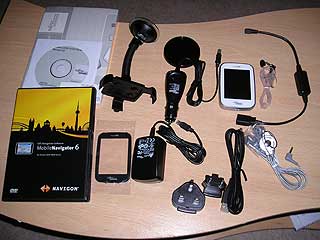
The first thing that struck me when I opened the box for this pocket-sized SatNav was the sheer amount of ‘stuff’ that is included:
• Fujitsu Pocket LOOX N100
• Mini SD card (1 GB - Preinstalled with British Isles, Germany & Nordics maps)
• Mini USB cable
• AC adapter with cable (country specific EU/UK)
• Car Holder
• Car Charger
• Earphones
• Exchangeable front covers (White or Black)
• TMC Module & Aerial
• NAVIGON MobileNavigator 6 DVD (manual on DVD)
• Navigation SW and Map preinstalled
• Getting Started poster
• Safety instructions and warranty flyer
• Easy Guide on CD
• Warranty manual on CD
• Main battery
• Stylus
|
|
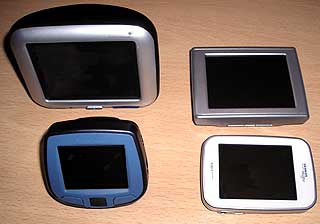
Measuring only a mere 89 x 62 x 16 mm (H x W x D) and weighing around 110g the LOOX N100 is easily pocketable and won’t cause any unsightly bulges when being carried around. I was a bit concerned that the carry case is an optional accessory as due to the size of the device it is likely to be kept in a pocket alongside keys and other potentially damaging items.
After a bit of a play around with the extra features I got quite frustrated with the seemingly unusable MP3 player… So, after a bit of hunting I found a firmware upgrade (76mb download) that solved the problems and added some extra features too. This is a bit of a shame considering that the LOOX N100 is advertised as being ‘ready to go’.
|
 |
The device is based on Windows CE 5.0 but you cannot access any of the Windows settings – it is literally a SatNav and MP3 player. It uses a Samsung 300MHz processor along with 64MB Ram and sports a decent sized 2.8 inch QVGA screen (240x320, colour transflective TFT Touchscreen, 64k colours).
At first I found the included stylus to be quite fiddly until I realized it was telescopic and extends to a useable length; it also stores away nicely in the bottom corner of the device. You can unscrew the end of the stylus which has been designed as a ‘reset tool’ – no more having to carry around a small pin in your wallet.
I’ll mention more about the extras later but for now I’ll discuss the reason for the review: Satellite Navigation!
The LOOX N100 uses an integrated SiRFstarIII GPS receiver, one of the top receivers available at the moment. Upon selecting ‘Navigate’ there is a wait of about a minute while the Navigon 6 software loads. Once loaded you are asked which of the installed maps you wish to use – this gets a bit annoying each time and there is no option to disable it. Another minor annoyance is having to wait a good 10 seconds once the software has loaded until a ‘Warning do not use this device while driving’ style notice comes up which you have to click to accept – again, no option to disable this.
The main menu gives you the following options: New Destination, My Destinations (favourites and most recent selections), Take Me Home, Voice Command (the SatNav equivalent to voice dialing on a mobile phone) and Options. The Options should really be named ‘Other’ as it contains Route Planning, Settings, Show Map, MP3 Player, Traffic and GPS Status.
The settings are quite numerous and cover which POIs to show on screen, your route profile (type of vehicle, route preference, avoidances etc) and settings for what to display on either the 2D or 3D maps (street names, current speed, next turn, remaining distance, arrival times etc).
|
Chances are the first thing you will do is choose a New Destination and after clicking it you are presented with the option of selecting an address, a POI or one of the ‘Direct Access’ links – three user-definable links which I have set as Fuel, Parking and ATM and these simply show the nearest of each POI to your current location. For entering an address you select either the city or postcode. Entering the postcode, however, does not give you the option to enter a building number. If entering the city you then enter the street or destination – for example entering ‘MC’ will pull up any POIs containing that phrase eg ‘McDonalds’ and ‘Broomcroft’. Once a street is entered you can then either input a house number or a ‘cross street’ and then hit ‘Start Navigation’.
|
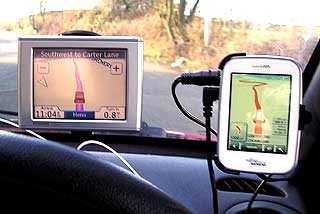 |
When searching for a POI you can choose the city / postcode and enter the category and subcategory of the required destination. It is very simple to use but requires you to have a knowledge of what POI categories and sub-categories are actually available – also ‘Fuel’ is known as ‘Gas’… While the sheer number and accuracy of the included POIs is very good there is no way to add your own except by saving an awful lot of favourites! You can, however, designate which POI icons get shown on the map.
If you save a destination as a favourite then you can add a voice tag. The Voice Command option on the main menu then allows you to say your destination and it will take you to the specified favourite. While this works well indoors, it requires a considerably raised voice in the car – the microphone is hidden away nicely on the back corner of the device making it difficult for it to pick up your commands. I’m guessing it was placed away from the front of the unit to keep it looking ‘nice’, however, along with the small, rear speaker, it’s just not practical.
Route planning in advance (via the ‘Options’ menu) takes a bit of getting used to. Whereas you would normally start with your destination you need to first select your starting point (you can select ‘Current Position’) and then you add each point in turn. You can re-arrange the points easily enough if you make a mistake in your order. It doesn’t pick the best order for your route so you will still need to think in terms of the order of your points for example if you were picking a few people up before heading off to your final destination. As with selecting a standard destination you have the option of selecting from favourites and POIs as well as adding an address.
|
A slight downside to the Navigon software is that you cannot view the route without having a GPS signal so if you are planning indoors before you set off you will need to either stand outside with the LOOX or attach the windscreen mount
to your window!
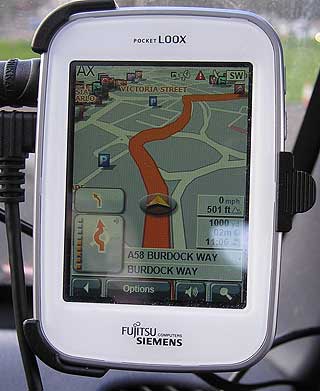
You can set the LOOX to use the screen in either portrait or landscape but this must be changed before loading up Navigon. My opinion is that the layout is better suited to portrait orientation, particularly when you have the extras showing on the screen such as current speed and altitude, distance remaining, next turns etc. The mapping is nice and clear using an orange and grey colour scheme but you must manually change between day and night modes.
Whilst looking at the map you can drag it around, zoom in and out and select a POI or new road. You then have the option of adding it to the route, navigating directly to it, saving it as a favourite or searching nearby. While dragging about the map can be a bit sluggish at times it is not so bad that it causes frustration – maybe I’ve been spoiled by having access to the Google Maps!
|
|
Route calculation is relatively speedy and once done you can review the list of turns and remove certain roads if you want to avoid any known problems. You can also simulate the route in almost real-time (with no way to speed it up). Once navigating, the instructions are very clear and well timed however the internal speaker is no where near adequate; I recommend either an FM Transmitter or some lead or other to connect it to your car stereo. The built in MP3 player has a separate volume to the navigation voice so you can have that loud enough to hear and still adjust the voice level accordingly. Yet another minor irritation is that the device ‘forgets’ volume settings – you put it on full so you can hear it but then next time you load up Navigon you need to adjust the volume, and this can’t be done until you actually start navigating…
At seemingly random times you get told to watch your speed, even with no speed cameras around. I can only presume that the mapping has data for the road speeds on certain roads and warns you if you exceed it.
|
 |
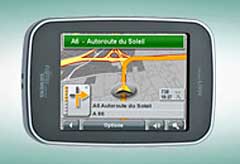
Approaching turns you get a diagram of the junction in the bottom left corner as well as a count-down display for that turn. Straying off route causes a nice, fast recalculation. Navigon 6 features the Lane Advisor which during my travels with the LOOX I never encountered it in action but I have been informed that it works well on Motorways.
|
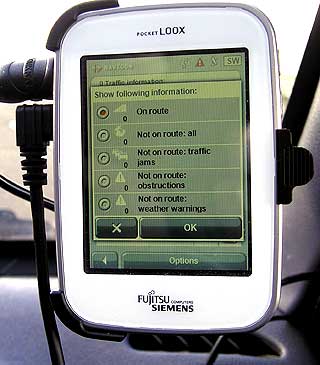
Tapping the screen during navigation gives some extra options to view POIs on your route, switch between 2D and 3D views, skip the next route-point, choose a new route point or set a ‘block’ distance. The ‘block’ works quickly and adequately – you can set the distance to preset lengths from 0.5miles up to 30miles and you will be rerouted bringing you back on your original route after the set distance. Handy for getting past the traffic jams that the TMC fails to pick up the signals for! In the times I’ve used it I’ve been unable to get a signal with the supplied TMC unit so I can’t really comment other than saying it exists and the LOOX shows the various options for displaying where any problems would be.
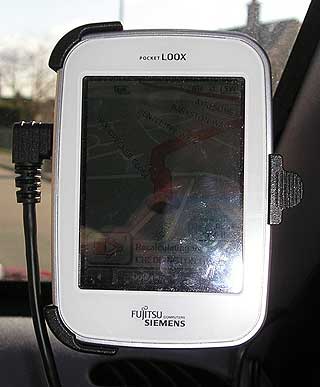
The screen, although nice and clear, is also nice and reflective. With even a small amount of sun it makes it difficult to see what’s on the screen. You can make out the general direction and map detail but it’s very hard to see the details such as current speed and arrival time.
Another comment on the touch screen is that while sensitivity, in general, is very good I found that the times when you need to select around something around the edge I often had to try twice; the second attempt involving using quite a bit more pressure.
|
|
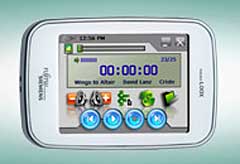
On to the extras, with the firmware upgraded to 1.57 (bundled version was 1.16) we have a photo viewer, mp3 player, video player, clock, alarm, world clock and games. The photo viewer and video player were added in the firmware upgrade and so there is no mention of these in the manual.
The MP3 player is very good – quality is good, it’s easy to use and makes use of the ID3 tags. You can search by album, artist, track and can even save up to five favourite playlists. There are separate controls for earphone level, bass and treble too.
|
|
The photo viewer is fairly basic but will open most picture files (jpg, gif, bmp, png etc) and has a few different settings for running a slide show.
Unfortunately I found the video player to be unusable; playing a 320x240 WMV file was very poor. The sound was fine but the video would play for a second and then freeze for 3 or 4 making it impossible to watch.
|
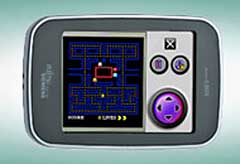
Fans of classic arcade games will like the two bundled games – a copy of PacMan and a copy of Breakout. There’s nothing really to say about them other than they work, they’re fun and relieve a bit of boredom!
|
 |
Conclusion
In conclusion I’ll summarise what I believe are the pro’s and cons of the LOOX N100.
Pro’s:
- Small size and clear screen
- SIRFstarIII GPS receiver (in use it usually locked onto 9 satellites)
- Navigon software seems good and is easy to get to grips with
- Clear mapping and voice directions
- Clear diagrams for junctions
- Voice Commands are a nice touch for saved favourites
- Maps of Europe provided on DVD and easy to transfer
- Extensive, built in POIs
- Lots of bundled accessories
- Windscreen mount is both very very strong and easy to remove quickly
- Storage card is accessible for loading maps, music, photo’s etc via USB and displays as removable drive (no drivers required)
- MP3 player is very good – both in features ad in sound quality
- Separate volumes for MP3 player and voice directions
- Very good battery life (even with playing MP3’s while navigating)
Con’s
- Display for current speed etc is hard to read
- Required firmware upgrade to get the MP3 player to function correctly
- Screen is too reflective at times
- No way to add custom POIs (including speed cameras)
- Fairly slow transfer speed (3m30s to transfer ~80mb)
- Manual for the device is separate to that for the Navigon software – I would have expected it to be together seeing as it is sold as an MP3 player and navigator
- Speaker is far too quiet and hidden around the back
- Microphone for picking up voice commands is badly placed round the back
- No route planning without a GPS signal
- Little annoyances such as always having to click to agree to use the device safely, not remembering the volume when software reloads etc.
Overall this is a nice little unit and is only really let down by the totally inadequate speaker and its inability to load custom POIs. It would be a good introduction to GPS or useful for someone who just needed a basic navigator but I wouldn’t class it as a serious contender in the top ens SatNav market; more like a useful gadget to have around! |
|
|
|
 |
 |
 |
 |
|
|