|
|
 |
 |
 |
 |
|
PowerLOC Destinator Software Review for the Pocket PC |
18th August 2002
|
|
Reviewed by
Darren Griffin |
|
|
Destinator, a product
from PowerLOC Technologies Inc has been around for some time now in
various revisions. Although the latest release is v1.8.0, the
version I have reviewed here is v1.7.2.0b.
Destinator is a fully
featured in-car navigation system. It can be purchased as a bundle
with supplied GPS hardware or as maps only. Some of its many
features are Route Calculation, Voice Navigation, Automatic re-routing
should you wander or be directed off the intended route and Points of
Interest (POIs).
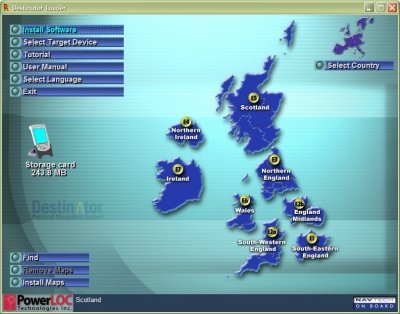
The first thing that
impressed me was the installation program, it launches on the PC with
a simple system that allows you to install the PocketPC application
and choose which maps you wish to upload.
(Right).
This made the installation of the software and maps
very straight forward.
|
 |
|
Maps can be selected
for download to the PocketPC’s main memory, to an installed storage card or to a card
reader on the PC. The UK is divided into 8 segments ranging in size
from 14Mb (Southern Ireland) to 58Mb (South-East England) Depending on
the amount of memory you have available and where you will be
traveling you can choose which segments you need.
Once installed, it is
a simple matter of launching the application and accepting the
standard warning that drivers should not operate the software whilst
the vehicle is in motion etc. (See Fig 1).
On first use you select the GPS Info screen, choose the correct
GPS settings and off you go. If you do not know which COM port your
GPS runs on you can ask Destinator to search all available ports and
Baud rates for you. (See
Fig2)
|
|
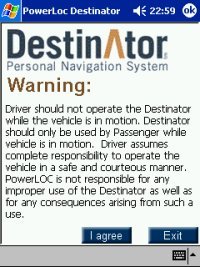
Fig 1 |
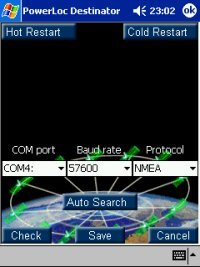
Fig 2 |
|
The signal status
screen will then spring into life and this provides Lat/Lon, speed,
altitude and the number of satellites in view information
(Fig 3).
TTFF (Time to
first fix) is a revelation compared with SmartPath software. I
acquired a satellite lock within 30 seconds of its first cold start
whereas this would normally be between 5-10 minutes with SmartPath.
It also held lock under moderate tree cover where others would lose
signal and if signal was lost because of transit through tunnels etc,
it would rapidly re-acquire lock on exiting the tunnel.
This benefit of this cannot be over emphasized;
there is nothing more frustrating than losing signal just when you
need guidance most.
The next step is to switch to the
navigation screen. This displays your current location and from here
you can enter a destination, find POI’s (Places of interest) change
system settings etc.
|
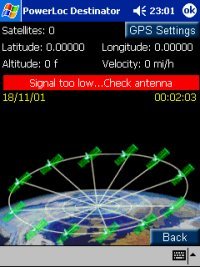
Fig 3 |
|
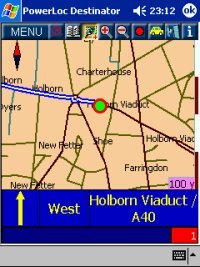
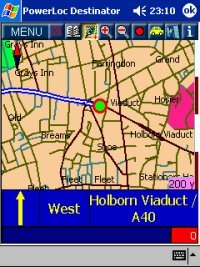
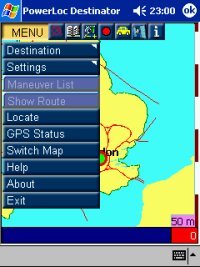
A button bar at the top of the main map
screen allows you to access the menu, zoom in/out of the map and
access GPS Status and information option. (See Fig 3a)
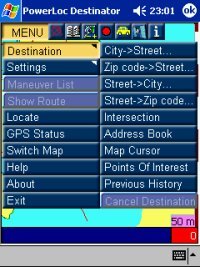
Selecting a new route is simple and quick.
Destinations are input by selecting City – Street – House. (See
Fig 4)
As you begin typing a list appears allowing you to either type the
full name or choose from the list. Once you have done this select the
Navigate button and the route is calculated and you’re ready to go.
The initial route calculation can be quite ponderous but once done it
is clearly indicated by a bold blue line. An information area at the
bottom of the screen shows the direction of travel, next junction and
road name. |
|
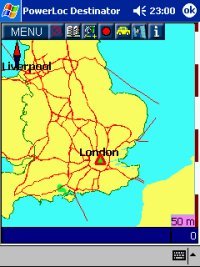
Fig 3a |
Fig
4 |
|
The voice navigation is in a clear
female American accent but has a number of quirks, eg. Roundabouts are
called ‘circles’, on a number of occasions it directed me off the
motorway only to reach the top of the ramp and be directed to rejoin
the same motorway! And screen updates are very slow, happening about
once every 3 seconds. Another issue was that as you approached a
junction the screen would often not update in time leaving you to rely
on the voice navigation for guidance, this is OK but often happens a
little late for you to prepare and position your vehicle safely.
If you deviate from the chosen route Destinator will re-calculate the
route, this can be very slow in practice. |
|
A recent road test I undertook for a 40
minute journey where there is a clear route via major roads had
Destinator take me on the most fascinating mystery journey through
hill and dale, I followed it’s instructions to the letter and arrived
at the correct destination but it had taken 1 hour 20 minutes and
involved travelling along single track roads through places I had
never heard of and probably will never see again!
Another issue is navigating across map
segments. When you travel across a maps segment the map does not
load automatically, instead detail defaults to major A Roads and
motorways. You must switch map segment manually. To
navigate to a minor street on another segment you have to load the
destination segment, choose your route and then begin the journey
using basic map information only or load your start segment and create
a route to the segment boundary and then repeat this process once you
reach the map segment boundary.
This is to put it mildly a real pain.
(See Fig 4a)
|
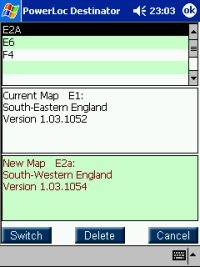
Fig 4a
|
|
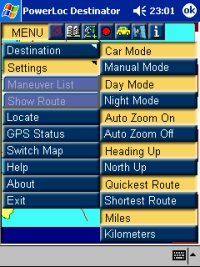
Fig 5 |
Settings that can be configured include
day/night screen colours to avoid glare, auto zoom which zooms in as
you approach a junction the zooms back out again after it has been
passed. North Up or Route Up, Miles/Kilometres and Quickest/Shortest
route (although changing this made little difference to routes
planned). (See Fig 5)
You can save
commonly visited locations to a favourites list for quick recall, you
can also switch to a pedestrian mode for use when on foot.
Finally
Destinator comes with a huge POI database with information on bus
stations, casino’s, cinemas, restaurants, hospitals, car parks, petrol
stations and much more.
I haven’t been able to verify the
accuracy of all the information (even I can only eat 3 time a day!)
but petrol stations built within the last 3 years are on the map for
my area.
|
|
Highs and Low’s
I can’t fault the
software’s ability to acquire and hang on to a satellite signal, it’s
been very stable in use and I’ve only once had to soft reset the
system to get things back up and running. The map detail is too basic
for my liking, all the necessary information is there but the roads
are thin and not as clear as TomTom maps. Also the map cursor would
be much better if it used an arrow to indicate direction of travel. I
liked the Info button which when selected gave useful data on street
numbering, which side was odd numbered/even numbered and what the
number range was, this was a real boon when attempting to locate an
address in London.
Conclusion
A good effort let
down by slow screen updates, and poor handling of map segments. If
Destinator can improve the screen re-draw speed, route calculation and
re-route speed and resolve the requirement to switch map segments
manually then this will be a much better product, for me with the
competition in this area demanding near perfection, Destinator has too
many compromises to make it my choice.
|
|
|
 |
 |
 |
 |
|
|